# Directory Structure
```
├── .gitignore
├── .python-version
├── LICENSE
├── Makefile
├── mcp_alchemy
│ ├── __init__.py
│ └── server.py
├── pyproject.toml
├── README.md
├── screenshot.png
├── tests
│ ├── Chinook_Sqlite.sqlite
│ ├── claude_desktop_config.json
│ ├── docker-compose.yml
│ ├── test_report.md
│ └── test.py
├── TESTS.md
└── uv.lock
```
# Files
--------------------------------------------------------------------------------
/.python-version:
--------------------------------------------------------------------------------
```
3.12
```
--------------------------------------------------------------------------------
/.gitignore:
--------------------------------------------------------------------------------
```
# Byte-compiled / optimized / DLL files
__pycache__/
*.py[cod]
*$py.class
# C extensions
*.so
# Distribution / packaging
.Python
build/
develop-eggs/
dist/
downloads/
eggs/
.eggs/
lib/
lib64/
parts/
sdist/
var/
wheels/
share/python-wheels/
*.egg-info/
.installed.cfg
*.egg
MANIFEST
# PyInstaller
# Usually these files are written by a python script from a template
# before PyInstaller builds the exe, so as to inject date/other infos into it.
*.manifest
*.spec
# Installer logs
pip-log.txt
pip-delete-this-directory.txt
# Unit test / coverage reports
htmlcov/
.tox/
.nox/
.coverage
.coverage.*
.cache
nosetests.xml
coverage.xml
*.cover
*.py,cover
.hypothesis/
.pytest_cache/
cover/
# Translations
*.mo
*.pot
# Django stuff:
*.log
local_settings.py
db.sqlite3
db.sqlite3-journal
# Flask stuff:
instance/
.webassets-cache
# Scrapy stuff:
.scrapy
# Sphinx documentation
docs/_build/
# PyBuilder
.pybuilder/
target/
# Jupyter Notebook
.ipynb_checkpoints
# IPython
profile_default/
ipython_config.py
# pyenv
# For a library or package, you might want to ignore these files since the code is
# intended to run in multiple environments; otherwise, check them in:
# .python-version
# pipenv
# According to pypa/pipenv#598, it is recommended to include Pipfile.lock in version control.
# However, in case of collaboration, if having platform-specific dependencies or dependencies
# having no cross-platform support, pipenv may install dependencies that don't work, or not
# install all needed dependencies.
#Pipfile.lock
# UV
# Similar to Pipfile.lock, it is generally recommended to include uv.lock in version control.
# This is especially recommended for binary packages to ensure reproducibility, and is more
# commonly ignored for libraries.
#uv.lock
# poetry
# Similar to Pipfile.lock, it is generally recommended to include poetry.lock in version control.
# This is especially recommended for binary packages to ensure reproducibility, and is more
# commonly ignored for libraries.
# https://python-poetry.org/docs/basic-usage/#commit-your-poetrylock-file-to-version-control
#poetry.lock
# pdm
# Similar to Pipfile.lock, it is generally recommended to include pdm.lock in version control.
#pdm.lock
# pdm stores project-wide configurations in .pdm.toml, but it is recommended to not include it
# in version control.
# https://pdm.fming.dev/latest/usage/project/#working-with-version-control
.pdm.toml
.pdm-python
.pdm-build/
# PEP 582; used by e.g. github.com/David-OConnor/pyflow and github.com/pdm-project/pdm
__pypackages__/
# Celery stuff
celerybeat-schedule
celerybeat.pid
# SageMath parsed files
*.sage.py
# Environments
.env
.venv
env/
venv/
ENV/
env.bak/
venv.bak/
# Spyder project settings
.spyderproject
.spyproject
# Rope project settings
.ropeproject
# mkdocs documentation
/site
# mypy
.mypy_cache/
.dmypy.json
dmypy.json
# Pyre type checker
.pyre/
# pytype static type analyzer
.pytype/
# Cython debug symbols
cython_debug/
# PyCharm
# JetBrains specific template is maintained in a separate JetBrains.gitignore that can
# be found at https://github.com/github/gitignore/blob/main/Global/JetBrains.gitignore
# and can be added to the global gitignore or merged into this file. For a more nuclear
# option (not recommended) you can uncomment the following to ignore the entire idea folder.
.idea/
# PyPI configuration file
.pypirc
.aider*
```
--------------------------------------------------------------------------------
/README.md:
--------------------------------------------------------------------------------
```markdown
# MCP Alchemy
<a href="https://www.pulsemcp.com/servers/runekaagaard-alchemy"><img src="https://www.pulsemcp.com/badge/top-pick/runekaagaard-alchemy" width="400" alt="PulseMCP Badge"></a>
**Status: Works great and is in daily use without any known bugs.**
**Status2: I just added the package to PyPI and updated the usage instructions. Please report any issues :)**
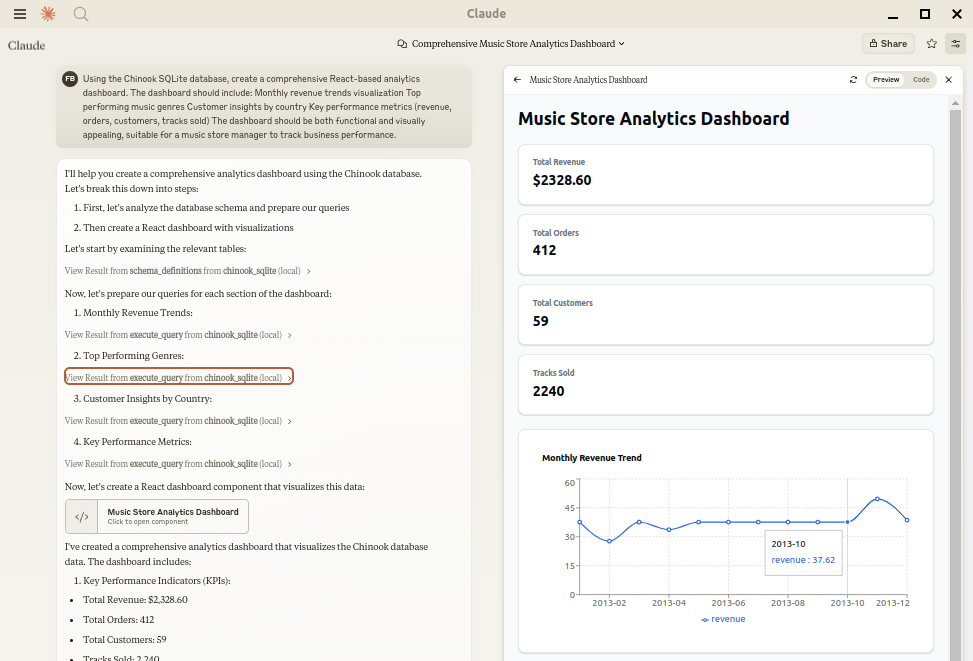
Let Claude be your database expert! MCP Alchemy connects Claude Desktop directly to your databases, allowing it to:
- Help you explore and understand your database structure
- Assist in writing and validating SQL queries
- Displays relationships between tables
- Analyze large datasets and create reports
- Claude Desktop Can analyse and create artifacts for very large datasets using [claude-local-files](https://github.com/runekaagaard/claude-local-files).
Works with PostgreSQL, MySQL, MariaDB, SQLite, Oracle, MS SQL Server, CrateDB, Vertica,
and a host of other [SQLAlchemy-compatible](https://docs.sqlalchemy.org/en/20/dialects/) databases.
## Installation
Ensure you have uv installed:
```bash
# Install uv if you haven't already
curl -LsSf https://astral.sh/uv/install.sh | sh
```
## Usage with Claude Desktop
Add to your `claude_desktop_config.json`. You need to add the appropriate database driver in the ``--with`` parameter.
_Note: After a new version release there might be a period of up to 600 seconds while the cache clears locally
cached causing uv to raise a versioning error. Restarting the MCP client once again solves the error._
### SQLite (built into Python)
```json
{
"mcpServers": {
"my_sqlite_db": {
"command": "uvx",
"args": ["--from", "mcp-alchemy==2025.8.15.91819",
"--refresh-package", "mcp-alchemy", "mcp-alchemy"],
"env": {
"DB_URL": "sqlite:////absolute/path/to/database.db"
}
}
}
}
```
### PostgreSQL
```json
{
"mcpServers": {
"my_postgres_db": {
"command": "uvx",
"args": ["--from", "mcp-alchemy==2025.8.15.91819", "--with", "psycopg2-binary",
"--refresh-package", "mcp-alchemy", "mcp-alchemy"],
"env": {
"DB_URL": "postgresql://user:password@localhost/dbname"
}
}
}
}
```
### MySQL/MariaDB
```json
{
"mcpServers": {
"my_mysql_db": {
"command": "uvx",
"args": ["--from", "mcp-alchemy==2025.8.15.91819", "--with", "pymysql",
"--refresh-package", "mcp-alchemy", "mcp-alchemy"],
"env": {
"DB_URL": "mysql+pymysql://user:password@localhost/dbname"
}
}
}
}
```
### Microsoft SQL Server
```json
{
"mcpServers": {
"my_mssql_db": {
"command": "uvx",
"args": ["--from", "mcp-alchemy==2025.8.15.91819", "--with", "pymssql",
"--refresh-package", "mcp-alchemy", "mcp-alchemy"],
"env": {
"DB_URL": "mssql+pymssql://user:password@localhost/dbname"
}
}
}
}
```
### Oracle
```json
{
"mcpServers": {
"my_oracle_db": {
"command": "uvx",
"args": ["--from", "mcp-alchemy==2025.8.15.91819", "--with", "oracledb",
"--refresh-package", "mcp-alchemy", "mcp-alchemy"],
"env": {
"DB_URL": "oracle+oracledb://user:password@localhost/dbname"
}
}
}
}
```
### CrateDB
```json
{
"mcpServers": {
"my_cratedb": {
"command": "uvx",
"args": ["--from", "mcp-alchemy==2025.8.15.91819", "--with", "sqlalchemy-cratedb>=0.42.0.dev1",
"--refresh-package", "mcp-alchemy", "mcp-alchemy"],
"env": {
"DB_URL": "crate://user:password@localhost:4200/?schema=testdrive"
}
}
}
}
```
For connecting to CrateDB Cloud, use a URL like
`crate://user:[email protected]:4200?ssl=true`.
### Vertica
```json
{
"mcpServers": {
"my_vertica_db": {
"command": "uvx",
"args": ["--from", "mcp-alchemy==2025.8.15.91819", "--with", "vertica-python",
"--refresh-package", "mcp-alchemy", "mcp-alchemy"],
"env": {
"DB_URL": "vertica+vertica_python://user:password@localhost:5433/dbname",
"DB_ENGINE_OPTIONS": "{\"connect_args\": {\"ssl\": false}}"
}
}
}
}
```
## Environment Variables
- `DB_URL`: SQLAlchemy [database URL](https://docs.sqlalchemy.org/en/20/core/engines.html#database-urls) (required)
- `CLAUDE_LOCAL_FILES_PATH`: Directory for full result sets (optional)
- `EXECUTE_QUERY_MAX_CHARS`: Maximum output length (optional, default 4000)
- `DB_ENGINE_OPTIONS`: JSON string containing additional SQLAlchemy engine options (optional)
## Connection Pooling
MCP Alchemy uses connection pooling optimized for long-running MCP servers. The default settings are:
- `pool_pre_ping=True`: Tests connections before use to handle database timeouts and network issues
- `pool_size=1`: Maintains 1 persistent connection (MCP servers typically handle one request at a time)
- `max_overflow=2`: Allows up to 2 additional connections for burst capacity
- `pool_recycle=3600`: Refreshes connections older than 1 hour (prevents timeout issues)
- `isolation_level='AUTOCOMMIT'`: Ensures each query commits automatically
These defaults work well for most databases, but you can override them via `DB_ENGINE_OPTIONS`:
```json
{
"DB_ENGINE_OPTIONS": "{\"pool_size\": 5, \"max_overflow\": 10, \"pool_recycle\": 1800}"
}
```
For databases with aggressive timeout settings (like MySQL's 8-hour default), the combination of `pool_pre_ping` and `pool_recycle` ensures reliable connections.
## API
### Tools
- **all_table_names**
- Return all table names in the database
- No input required
- Returns comma-separated list of tables
```
users, orders, products, categories
```
- **filter_table_names**
- Find tables matching a substring
- Input: `q` (string)
- Returns matching table names
```
Input: "user"
Returns: "users, user_roles, user_permissions"
```
- **schema_definitions**
- Get detailed schema for specified tables
- Input: `table_names` (string[])
- Returns table definitions including:
- Column names and types
- Primary keys
- Foreign key relationships
- Nullable flags
```
users:
id: INTEGER, primary key, autoincrement
email: VARCHAR(255), nullable
created_at: DATETIME
Relationships:
id -> orders.user_id
```
- **execute_query**
- Execute SQL query with vertical output format
- Inputs:
- `query` (string): SQL query
- `params` (object, optional): Query parameters
- Returns results in clean vertical format:
```
1. row
id: 123
name: John Doe
created_at: 2024-03-15T14:30:00
email: NULL
Result: 1 rows
```
- Features:
- Smart truncation of large results
- Full result set access via [claude-local-files](https://github.com/runekaagaard/claude-local-files) integration
- Clean NULL value display
- ISO formatted dates
- Clear row separation
## Claude Local Files
When [claude-local-files](https://github.com/runekaagaard/claude-local-files) is configured:
- Access complete result sets beyond Claude's context window
- Generate detailed reports and visualizations
- Perform deep analysis on large datasets
- Export results for further processing
The integration automatically activates when `CLAUDE_LOCAL_FILES_PATH` is set.
## Developing
First clone the github repository, install the dependencies and your database driver(s) of choice:
```
git clone [email protected]:runekaagaard/mcp-alchemy.git
cd mcp-alchemy
uv sync
uv pip install psycopg2-binary
```
Then set this in claude_desktop_config.json:
```
...
"command": "uv",
"args": ["run", "--directory", "/path/to/mcp-alchemy", "-m", "mcp_alchemy.server", "main"],
...
```
## My Other LLM Projects
- **[MCP Redmine](https://github.com/runekaagaard/mcp-redmine)** - Let Claude Desktop manage your Redmine projects and issues.
- **[MCP Notmuch Sendmail](https://github.com/runekaagaard/mcp-notmuch-sendmail)** - Email assistant for Claude Desktop using notmuch.
- **[Diffpilot](https://github.com/runekaagaard/diffpilot)** - Multi-column git diff viewer with file grouping and tagging.
- **[Claude Local Files](https://github.com/runekaagaard/claude-local-files)** - Access local files in Claude Desktop artifacts.
## MCP Directory Listings
MCP Alchemy is listed in the following MCP directory sites and repositories:
- [PulseMCP](https://www.pulsemcp.com/servers/runekaagaard-alchemy)
- [Glama](https://glama.ai/mcp/servers/@runekaagaard/mcp-alchemy)
- [MCP.so](https://mcp.so/server/mcp-alchemy)
- [MCP Archive](https://mcp-archive.com/server/mcp-alchemy)
- [Playbooks MCP](https://playbooks.com/mcp/runekaagaard-alchemy)
- [Awesome MCP Servers](https://github.com/punkpeye/awesome-mcp-servers)
## Contributing
Contributions are warmly welcomed! Whether it's bug reports, feature requests, documentation improvements, or code contributions - all input is valuable. Feel free to:
- Open an issue to report bugs or suggest features
- Submit pull requests with improvements
- Enhance documentation or share your usage examples
- Ask questions and share your experiences
The goal is to make database interaction with Claude even better, and your insights and contributions help achieve that.
## License
Mozilla Public License Version 2.0
```
--------------------------------------------------------------------------------
/mcp_alchemy/__init__.py:
--------------------------------------------------------------------------------
```python
```
--------------------------------------------------------------------------------
/tests/claude_desktop_config.json:
--------------------------------------------------------------------------------
```json
{
"mcpServers": {
"chinook_sqlite": {
"command": "uv",
"args": [
"--directory",
"/home/r/ws/mcp-alchemy",
"run",
"server.py"
],
"env": {
"DB_URL": "sqlite:////home/r/ws/mcp-alchemy/tests/Chinook_Sqlite.sqlite"
}
},
"chinook_mysql": {
"command": "uv",
"args": [
"--directory",
"/home/r/ws/mcp-alchemy",
"run",
"server.py"
],
"env": {
"DB_URL": "mysql+pymysql://chinook:chinook@localhost:3307/Chinook"
}
},
"chinook_postgres": {
"command": "uv",
"args": [
"--directory",
"/home/r/ws/mcp-alchemy",
"run",
"server.py"
],
"env": {
"DB_URL": "postgresql://chinook:chinook@localhost:5434/chinook_db"
}
}
}
}
```
--------------------------------------------------------------------------------
/pyproject.toml:
--------------------------------------------------------------------------------
```toml
[project]
name = "mcp-alchemy"
version = "2025.8.15.91819"
description = "A MCP server that connects to your database"
readme = "README.md"
requires-python = ">=3.10"
dependencies = [
"mcp[cli]>=1.2.0rc1",
"sqlalchemy>=2.0.36",
]
authors = [
{ name="Rune Kaagaard" },
]
classifiers = [
"Programming Language :: Python :: 3",
"Operating System :: OS Independent",
]
license-files = ["LICENSE"]
packages = [
{include = "mcp_alchemy"}
]
[project.scripts]
mcp-alchemy = "mcp_alchemy.server:main"
[project.urls]
Homepage = "https://github.com/runekaagaard/mcp-alchemy"
Issues = "https://github.com/runekaagaard/mcp-alchemy/issues"
Disussions = "https://github.com/runekaagaard/mcp-alchemy/discussions"
[build-system]
requires = ["hatchling>=1.27"]
build-backend = "hatchling.build"
[tool.uv]
package = true
[dependency-groups]
dev = [
"build>=1.2.2.post1",
"hatchling>=1.27.0",
]
```
--------------------------------------------------------------------------------
/tests/docker-compose.yml:
--------------------------------------------------------------------------------
```yaml
version: '3.8'
name: chinook
services:
#----------------------------------------------------------------------------
# MySQL Container
# https://hub.docker.com/_/mysql
# Commands:
# mysql -u chinook -p Chinook
#----------------------------------------------------------------------------
mysql:
image: mysql:latest
environment:
MYSQL_USER: chinook
MYSQL_PASSWORD: chinook
MYSQL_ROOT_PASSWORD: chinook
MYSQL_DATABASE: Chinook
network_mode: "host"
command: --port=3307
volumes:
- ./ChinookDatabase/DataSources/Chinook_MySql.sql:/docker-entrypoint-initdb.d/Chinook_MySql.sql
- ./ChinookDatabase/DataSources/Chinook_MySql_AutoIncrementPKs.sql:/docker-entrypoint-initdb.d/Chinook_MySql_AutoIncrementPKs.sql
#----------------------------------------------------------------------------
# PostgreSQL Container
# https://hub.docker.com/_/postgres
# Commands:
# psql -U chinook chinook
#----------------------------------------------------------------------------
postgres:
image: postgres:15.3-alpine
environment:
POSTGRES_USER: chinook
POSTGRES_PASSWORD: chinook
POSTGRES_DB: chinook_db
network_mode: "host"
command: -p 5434
volumes:
- ./ChinookDatabase/DataSources/Chinook_PostgreSql.sql:/docker-entrypoint-initdb.d/Chinook_PostgreSql.sql
- ./ChinookDatabase/DataSources/Chinook_PostgreSql_AutoIncrementPKs.sql:/docker-entrypoint-initdb.d/Chinook_PostgreSql_AutoIncrementPKs.sql
- ./ChinookDatabase/DataSources/Chinook_PostgreSql_SerialPKs.sql:/docker-entrypoint-initdb.d/Chinook_PostgreSql_SerialPKs.sql
```
--------------------------------------------------------------------------------
/TESTS.md:
--------------------------------------------------------------------------------
```markdown
# Testing MCP Alchemy
This guide explains how to test MCP Alchemy with multiple databases using Docker and Claude Desktop.
## Setup Test Databases
1. Start the test databases using docker-compose:
```bash
cd tests
docker-compose up -d
```
This will create:
- MySQL database on port 3307
- PostgreSQL database on port 5433
- The Chinook sample database will be loaded into both
2. Verify the databases are running:
```bash
# Check MySQL
mysql -h 127.0.0.1 -P 3307 -u chinook -pchinook Chinook -e "SELECT COUNT(*) FROM Album;"
# Check PostgreSQL
PGPASSWORD=chinook psql -h localhost -p 5433 -U chinook chinook_db -c "SELECT COUNT(*) FROM \"Album\";"
```
## Configure Claude Desktop
The provided `tests/claude_desktop_config.json` contains configurations for:
- SQLite Chinook database
- MySQL Chinook database
- PostgreSQL Chinook database
Copy it to your Claude Desktop config location:
```bash
cp tests/claude_desktop_config.json ~/.config/claude-desktop/config.json
```
## Sample Test Prompt
Here's a comprehensive prompt to test all three databases:
```
I'd like to explore the Chinook database across different database engines. Let's:
1. First, list all tables in each database (SQLite, MySQL, and PostgreSQL) to verify they're identical
2. Get the schema for the Album and Artist tables from each database
3. Run this query on each database:
SELECT ar.Name as ArtistName, COUNT(al.AlbumId) as AlbumCount
FROM Artist ar
LEFT JOIN Album al ON ar.ArtistId = al.ArtistId
GROUP BY ar.ArtistId, ar.Name
HAVING COUNT(al.AlbumId) > 5
ORDER BY AlbumCount DESC;
4. Compare the results - they should be identical across all three databases
Can you help me with this analysis?
```
This will test:
- Database connectivity to all three databases
- Table listing functionality
- Schema inspection
- Complex query execution
- Result formatting
- Cross-database consistency
## Expected Results
The results should show:
- 11 tables in each database
- Identical schema definitions
- Same query results across all databases
- Proper handling of NULL values and formatting
If any discrepancies are found, check:
1. Docker container status
2. Database connection strings
3. Database initialization scripts
```
--------------------------------------------------------------------------------
/tests/test_report.md:
--------------------------------------------------------------------------------
```markdown
# MCP Alchemy Test Report
## Overview
This report documents the testing of MCP Alchemy, a tool that connects Claude Desktop directly to databases, allowing Claude to explore database structures, write and validate SQL queries, display relationships between tables, and analyze large datasets.
**Test Date:** July 9, 2025
**MCP Alchemy Version:** 2025.6.19.201831 (with connection pooling improvements)
**Database Engine:** MySQL 5.7.36
## Test Environment
Testing was performed on a MySQL database with the following characteristics:
- Over 350 tables
- Complex schema with extensive relationships
- Real-world data structure with various data types
## Features Tested
### 1. Database Information Retrieval
- **Get Database Info**: Successfully verified connection information
- **List All Tables**: Retrieved complete list of all 367 database tables
- **Filter Tables**: Successfully filtered tables by substring pattern
### 2. Schema Analysis
- **Table Schema Definition**: Successfully retrieved detailed schema including:
- Column names and types
- Primary keys
- Foreign key relationships
- Nullable flags
- Default values
- **Complex Table Relationships**: Successfully mapped and displayed relationships between tables
### 3. Query Execution
- **Basic Queries**: Executed simple SELECT queries to retrieve data
- **Parameterized Queries**: Successfully used parameterized queries with the params argument
- **Complex Joins**: Successfully performed queries with multiple joins across related tables
- **Error Handling**: Properly handled and reported errors for invalid queries
- **SQL Injection Protection**: Verified that SQL injection attempts are properly neutralized
### 4. Output Formatting
- **Vertical Display Format**: Confirmed that query results are displayed in clear vertical format
- **NULL Value Display**: Properly formats NULL values as "NULL"
- **Row Counting**: Correctly displays the number of rows returned
- **Output Truncation**: Properly truncates large result sets with appropriate notifications
- **Full Result Access**: Successfully generated URLs for complete result sets via claude-local-files
## Test Results
### Functionality Tests
| Feature | Status | Notes |
|---------|--------|-------|
| Database Connection | ✅ Pass | Successfully connected to MySQL 5.7.36 |
| Table Listing | ✅ Pass | Successfully retrieved all 367 tables |
| Table Filtering | ✅ Pass | Correctly filtered tables by substring |
| Schema Definition | ✅ Pass | Retrieved detailed schema with relationships |
| Basic Queries | ✅ Pass | Successfully executed simple SELECT queries |
| Parameterized Queries | ✅ Pass | Parameterized queries worked correctly |
| Complex Joins | ✅ Pass | Successfully joined multiple tables |
| Error Handling | ✅ Pass | Properly handled and reported query errors |
| SQL Injection Protection | ✅ Pass | Parameters sanitized correctly |
| Result Formatting | ✅ Pass | Clean vertical format with row numbers |
| Truncation | ✅ Pass | Large results properly truncated |
| Full Result Access | ✅ Pass | Generated valid URLs for complete result access |
### Edge Cases Tested
| Test Case | Result | Notes |
|-----------|--------|-------|
| Query with no results | ✅ Pass | Returns "No rows returned" |
| Invalid table query | ✅ Pass | Returns appropriate error message |
| SQL syntax error | ✅ Pass | Returns detailed error with location |
| SQL injection attempt | ✅ Pass | Parameters properly sanitized |
| Very large result set | ✅ Pass | Truncates and provides full result URL |
| Unicode/special characters | ✅ Pass | Properly handles non-ASCII data |
## Performance Observations
- Query execution is fast for simple to moderately complex queries
- Schema retrieval performs well even on large tables
- Result truncation works properly for large result sets
- Full result access via URLs provides efficient access to large datasets
## Connection Pooling Tests (July 9, 2025) - UPDATED
### Initial Test (Before Fix Applied)
| Test | Result | Notes |
|------|--------|-------|
| Initial Connection Count | ✅ Pass | Started with 3 threads connected |
| Connection Reuse | ❌ Fail | Connections incrementing (3→7) suggesting new engines being created |
| Connection ID Tracking | ✅ Pass | Different connection IDs showing connection creation |
| Pool Behavior | ❌ Fail | Connections kept growing instead of stabilizing |
### Final Test (After Fix Applied)
| Test | Result | Notes |
|------|--------|-------|
| Version Tracking | ✅ Pass | @mcp_alchemy_version = '2025.6.19.201831' correctly set |
| Engine Reuse | ✅ Pass | Single engine instance reused across all requests |
| Connection Pool Size | ✅ Pass | Stabilized at expected count (pool_size + overflow) |
| Connection Rotation | ✅ Pass | Pool properly rotates connections (different IDs but stable count) |
| All Core Features | ✅ Pass | all_table_names, filter_table_names, schema_definitions, execute_query |
| Parameterized Queries | ✅ Pass | SQL injection protection working correctly |
| Error Handling | ✅ Pass | Errors properly caught and reported |
### Observations
The connection pooling fix is working correctly:
- Single ENGINE instance is created and reused (confirmed via debugging)
- Connection count stabilizes at pool configuration limits
- Different connection IDs are normal - SQLAlchemy rotates through pool connections
- All features continue to work properly with the new pooling implementation
### Key Improvements
1. **Resource Efficiency**: No more connection exhaustion after 5 queries
2. **Reliability**: Automatic reconnection on database failures
3. **Performance**: Connection reuse reduces overhead
4. **Monitoring**: Version tracking via @mcp_alchemy_version session variable
## Conclusion
MCP Alchemy successfully passed all functional tests. It correctly connects to MySQL databases, retrieves schema information, executes queries with proper parameter handling, and formats results clearly. The SQL injection protection works as expected, properly sanitizing user input.
The tool is well-suited for its intended purpose: allowing Claude to interact with databases and assist users with database exploration, query execution, and data analysis.
```
--------------------------------------------------------------------------------
/tests/test.py:
--------------------------------------------------------------------------------
```python
import shutil, os, difflib, sys
from mcp_alchemy.server import *
d = dict
GDI1 = """
Connected to sqlite version 3.37.2 database tests/Chinook_Sqlite.sqlite.
"""
ATN1 = "Album, Artist, Customer, Employee, Genre, Invoice, InvoiceLine, MediaType, Playlist, PlaylistTrack, Track"
FTN1 = "MediaType, Playlist, PlaylistTrack, Track"
SD1 = """
Customer:
CustomerId: primary key, INTEGER, primary_key=1
FirstName: NVARCHAR(40)
LastName: NVARCHAR(20)
Company: NVARCHAR(80), nullable
Address: NVARCHAR(70), nullable
City: NVARCHAR(40), nullable
State: NVARCHAR(40), nullable
Country: NVARCHAR(40), nullable
PostalCode: NVARCHAR(10), nullable
Phone: NVARCHAR(24), nullable
Fax: NVARCHAR(24), nullable
Email: NVARCHAR(60)
SupportRepId: INTEGER, nullable
Relationships:
SupportRepId -> Employee.EmployeeId
Track:
TrackId: primary key, INTEGER, primary_key=1
Name: NVARCHAR(200)
AlbumId: INTEGER, nullable
MediaTypeId: INTEGER
GenreId: INTEGER, nullable
Composer: NVARCHAR(220), nullable
Milliseconds: INTEGER
Bytes: INTEGER, nullable
UnitPrice: NUMERIC(10, 2)
Relationships:
MediaTypeId -> MediaType.MediaTypeId
GenreId -> Genre.GenreId
AlbumId -> Album.AlbumId
"""
EQ1 = """
1. row
AlbumId: 1
Title: For Those About To Rock We Salute You
ArtistId: 1
2. row
AlbumId: 2
Title: Balls to the Wall
ArtistId: 2
Result: 2 rows
"""
BASE2 = """
1. row
CustomerId: 1
FirstName: Luís
LastName: Gonçalves
Company: Embraer - Empresa Brasileira de Aeronáutica S.A.
Address: Av. Brigadeiro Faria Lima, 2170
City: São José dos Campos
State: SP
Country: Brazil
PostalCode: 12227-000
Phone: +55 (12) 3923-5555
Fax: +55 (12) 3923-5566
Email: [email protected]
SupportRepId: 3
2. row
CustomerId: 2
FirstName: Leonie
LastName: Köhler
Company: NULL
Address: Theodor-Heuss-Straße 34
City: Stuttgart
State: NULL
Country: Germany
PostalCode: 70174
Phone: +49 0711 2842222
Fax: NULL
Email: [email protected]
SupportRepId: 5
3. row
CustomerId: 3
FirstName: François
LastName: Tremblay
Company: NULL
Address: 1498 rue Bélanger
City: Montréal
State: QC
Country: Canada
PostalCode: H2G 1A7
Phone: +1 (514) 721-4711
Fax: NULL
Email: [email protected]
SupportRepId: 3
4. row
CustomerId: 4
FirstName: Bjørn
LastName: Hansen
Company: NULL
Address: Ullevålsveien 14
City: Oslo
State: NULL
Country: Norway
PostalCode: 0171
Phone: +47 22 44 22 22
Fax: NULL
Email: [email protected]
SupportRepId: 4
5. row
CustomerId: 5
FirstName: František
LastName: Wichterlová
Company: JetBrains s.r.o.
Address: Klanova 9/506
City: Prague
State: NULL
Country: Czech Republic
PostalCode: 14700
Phone: +420 2 4172 5555
Fax: +420 2 4172 5555
Email: [email protected]
SupportRepId: 4
6. row
CustomerId: 6
FirstName: Helena
LastName: Holý
Company: NULL
Address: Rilská 3174/6
City: Prague
State: NULL
Country: Czech Republic
PostalCode: 14300
Phone: +420 2 4177 0449
Fax: NULL
Email: [email protected]
SupportRepId: 5
7. row
CustomerId: 7
FirstName: Astrid
LastName: Gruber
Company: NULL
Address: Rotenturmstraße 4, 1010 Innere Stadt
City: Vienne
State: NULL
Country: Austria
PostalCode: 1010
Phone: +43 01 5134505
Fax: NULL
Email: [email protected]
SupportRepId: 5
8. row
CustomerId: 8
FirstName: Daan
LastName: Peeters
Company: NULL
Address: Grétrystraat 63
City: Brussels
State: NULL
Country: Belgium
PostalCode: 1000
Phone: +32 02 219 03 03
Fax: NULL
Email: [email protected]
SupportRepId: 4
9. row
CustomerId: 9
FirstName: Kara
LastName: Nielsen
Company: NULL
Address: Sønder Boulevard 51
City: Copenhagen
State: NULL
Country: Denmark
PostalCode: 1720
Phone: +453 3331 9991
Fax: NULL
Email: [email protected]
SupportRepId: 4
10. row
CustomerId: 10
FirstName: Eduardo
LastName: Martins
Company: Woodstock Discos
Address: Rua Dr. Falcão Filho, 155
City: São Paulo
State: SP
Country: Brazil
PostalCode: 01007-010
Phone: +55 (11) 3033-5446
Fax: +55 (11) 3033-4564
Email: [email protected]
SupportRepId: 4
11. row
CustomerId: 11
FirstName: Alexandre
LastName: Rocha
Company: Banco do Brasil S.A.
Address: Av. Paulista, 2022
City: São Paulo
State: SP
Country: Brazil
PostalCode: 01310-200
Phone: +55 (11) 3055-3278
Fax: +55 (11) 3055-8131
Email: [email protected]
SupportRepId: 5
12. row
CustomerId: 12
FirstName: Roberto
LastName: Almeida
Company: Riotur
Address: Praça Pio X, 119
City: Rio de Janeiro
State: RJ
Country: Brazil
PostalCode: 20040-020
Phone: +55 (21) 2271-7000
Fax: +55 (21) 2271-7070
Email: [email protected]
SupportRepId: 3
13. row
CustomerId: 13
FirstName: Fernanda
LastName: Ramos
Company: NULL
Address: Qe 7 Bloco G
City: Brasília
State: DF
Country: Brazil
PostalCode: 71020-677
Phone: +55 (61) 3363-5547
Fax: +55 (61) 3363-7855
Email: [email protected]
SupportRepId: 4
14. row
CustomerId: 14
FirstName: Mark
LastName: Philips
Company: Telus
Address: 8210 111 ST NW
City: Edmonton
State: AB
Country: Canada
PostalCode: T6G 2C7
Phone: +1 (780) 434-4554
Fax: +1 (780) 434-5565
Email: [email protected]
SupportRepId: 5
15. row
CustomerId: 15
FirstName: Jennifer
LastName: Peterson
Company: Rogers Canada
Address: 700 W Pender Street
City: Vancouver
State: BC
Country: Canada
PostalCode: V6C 1G8
Phone: +1 (604) 688-2255
Fax: +1 (604) 688-8756
Email: [email protected]
SupportRepId: 3
"""
EQ2 = BASE2 + """
Result: showing first 15 rows (output truncated)
"""
EQ2B = BASE2 + """
Result: 59 rows (output truncated)
Full result set url: https://cdn.jsdelivr.net/pyodide/claude-local-files/38d911af2df61f48ae5850491aaa32aff40569233d6aa2a870960a45108067ff.json (format: [[row1_value1, row1_value2, ...], [row2_value1, row2_value2, ...], ...]]) (ALWAYS prefer fetching this url in artifacts instead of hardcoding the values if at all possible)"""
EQ3 = """
Error: (sqlite3.OperationalError) no such column: id
[SQL: SELECT * FROM Customer WHERE id=1]
(Background on this error at: https://sqlalche.me/e/20/e3q8)
"""
EQ4 = """
1. row
AlbumId: 5
Title: Big Ones
ArtistId: 3
Result: 1 rows
"""
EQ5 = """
Error: (sqlite3.OperationalError) near "ZOOP": syntax error
[SQL: ZOOP BOOP LOOP]
(Background on this error at: https://sqlalche.me/e/20/e3q8)
"""
EQMC1 = """
1. row
AlbumId: 1
Title: For Those About To Rock We Salute You
ArtistId: 1
Result: showing first 1 rows (output truncated)
"""
def h1(s):
print(s)
print("=" * len(s))
print()
def diff(wanted_result, actual_result):
"""Show git-like diff between two strings."""
diff_lines = difflib.unified_diff(wanted_result.splitlines(keepends=True),
actual_result.splitlines(keepends=True), fromfile='wanted_result',
tofile='actual_result', n=3)
return ''.join(line.replace('\n', '') + '\n' for line in diff_lines)
def test_func(func, tests):
for args, wanted_result in tests:
wanted_result = wanted_result.strip()
actual_result = func(*args)
if actual_result != wanted_result:
print(f"{func.__name__}({args})")
h1("Wanted result")
print(wanted_result)
h1("Actual result")
print(actual_result)
h1("Diff")
print(diff(wanted_result, actual_result))
sys.exit(1)
def main():
test_func(get_db_info, [([], GDI1)])
test_func(all_table_names, [([], ATN1)])
test_func(filter_table_names, [(["a"], FTN1)])
test_func(schema_definitions, [([["Customer", "Track"]], SD1)])
test_func(execute_query, [
(["SELECT * FROM Album LIMIT 2"], EQ1),
(["SELECT * FROM Customer"], EQ2),
(["SELECT * FROM Customer WHERE id=1"], EQ3),
(["SELECT * FROM Album WHERE AlbumId=:AlbumId", d(AlbumId=5)], EQ4),
(["SELECT * FROM Album WHERE AlbumId=:AlbumId",
d(AlbumId=-1)], "No rows returned"),
(["UPDATE Album SET AlbumId=:AlbumId WHERE AlbumId=:AlbumId",
d(AlbumId=-1)], "Success: 0 rows affected"),
(["ZOOP BOOP LOOP"], EQ5),
])
# EXECUTE_QUERY_MAX_CHARS setting
tmp = EXECUTE_QUERY_MAX_CHARS
tests_set_global("EXECUTE_QUERY_MAX_CHARS", 100)
test_func(execute_query, [
(["SELECT * FROM Album LIMIT 2"], EQMC1),
])
tests_set_global("EXECUTE_QUERY_MAX_CHARS", tmp)
# CLAUDE_LOCAL_FILES_PATH setting
tmp = "/tmp/mcp-alchemy/claude-local-files"
os.makedirs(tmp, exist_ok=True)
tests_set_global("CLAUDE_LOCAL_FILES_PATH", tmp)
test_func(execute_query, [
(["SELECT * FROM Customer"], EQ2B),
])
shutil.rmtree(tmp)
if __name__ == "__main__":
main()
```
--------------------------------------------------------------------------------
/mcp_alchemy/server.py:
--------------------------------------------------------------------------------
```python
import os, json, hashlib
from datetime import datetime, date
from mcp.server.fastmcp import FastMCP
from mcp.server.fastmcp.utilities.logging import get_logger
from sqlalchemy import create_engine, inspect, text
### Helpers ###
def tests_set_global(k, v):
globals()[k] = v
### Database ###
logger = get_logger(__name__)
ENGINE = None
def create_new_engine():
"""Create engine with MCP-optimized settings to handle long-running connections"""
db_engine_options = os.environ.get('DB_ENGINE_OPTIONS')
user_options = json.loads(db_engine_options) if db_engine_options else {}
# MCP-optimized defaults that can be overridden by user
options = {
'isolation_level': 'AUTOCOMMIT',
# Test connections before use (handles MySQL 8hr timeout, network drops)
'pool_pre_ping': True,
# Keep minimal connections (MCP typically handles one request at a time)
'pool_size': 1,
# Allow temporary burst capacity for edge cases
'max_overflow': 2,
# Force refresh connections older than 1hr (well under MySQL's 8hr default)
'pool_recycle': 3600,
# User can override any of the above
**user_options
}
return create_engine(os.environ['DB_URL'], **options)
def get_connection():
global ENGINE
try:
try:
if ENGINE is None:
ENGINE = create_new_engine()
connection = ENGINE.connect()
# Set version variable for databases that support it
try:
connection.execute(text(f"SET @mcp_alchemy_version = '{VERSION}'"))
except Exception:
# Some databases don't support session variables
pass
return connection
except Exception as e:
logger.warning(f"First connection attempt failed: {e}")
# Database might have restarted or network dropped - start fresh
if ENGINE is not None:
try:
ENGINE.dispose()
except Exception:
pass
# One retry with fresh engine handles most transient failures
ENGINE = create_new_engine()
connection = ENGINE.connect()
return connection
except Exception as e:
logger.exception("Failed to get database connection after retry")
raise
def get_db_info():
with get_connection() as conn:
engine = conn.engine
url = engine.url
result = [
f"Connected to {engine.dialect.name}",
f"version {'.'.join(str(x) for x in engine.dialect.server_version_info)}",
f"database {url.database}",
]
if url.host:
result.append(f"on {url.host}")
if url.username:
result.append(f"as user {url.username}")
return " ".join(result) + "."
### Constants ###
VERSION = "2025.8.15.91819"
DB_INFO = get_db_info()
EXECUTE_QUERY_MAX_CHARS = int(os.environ.get('EXECUTE_QUERY_MAX_CHARS', 4000))
CLAUDE_LOCAL_FILES_PATH = os.environ.get('CLAUDE_LOCAL_FILES_PATH')
### MCP ###
mcp = FastMCP("MCP Alchemy")
get_logger(__name__).info(f"Starting MCP Alchemy version {VERSION}")
@mcp.tool(description=f"Return all table names in the database separated by comma. {DB_INFO}")
def all_table_names() -> str:
with get_connection() as conn:
inspector = inspect(conn)
return ", ".join(inspector.get_table_names())
@mcp.tool(
description=f"Return all table names in the database containing the substring 'q' separated by comma. {DB_INFO}"
)
def filter_table_names(q: str) -> str:
with get_connection() as conn:
inspector = inspect(conn)
return ", ".join(x for x in inspector.get_table_names() if q in x)
@mcp.tool(description=f"Returns schema and relation information for the given tables. {DB_INFO}")
def schema_definitions(table_names: list[str]) -> str:
def format(inspector, table_name):
columns = inspector.get_columns(table_name)
foreign_keys = inspector.get_foreign_keys(table_name)
primary_keys = set(inspector.get_pk_constraint(table_name)["constrained_columns"])
result = [f"{table_name}:"]
# Process columns
show_key_only = {"nullable", "autoincrement"}
for column in columns:
if "comment" in column:
del column["comment"]
name = column.pop("name")
column_parts = (["primary key"] if name in primary_keys else []) + [str(
column.pop("type"))] + [k if k in show_key_only else f"{k}={v}" for k, v in column.items() if v]
result.append(f" {name}: " + ", ".join(column_parts))
# Process relationships
if foreign_keys:
result.extend(["", " Relationships:"])
for fk in foreign_keys:
constrained_columns = ", ".join(fk['constrained_columns'])
referred_table = fk['referred_table']
referred_columns = ", ".join(fk['referred_columns'])
result.append(f" {constrained_columns} -> {referred_table}.{referred_columns}")
return "\n".join(result)
with get_connection() as conn:
inspector = inspect(conn)
return "\n".join(format(inspector, table_name) for table_name in table_names)
def execute_query_description():
parts = [
f"Execute a SQL query and return results in a readable format. Results will be truncated after {EXECUTE_QUERY_MAX_CHARS} characters."
]
if CLAUDE_LOCAL_FILES_PATH:
parts.append("Claude Desktop may fetch the full result set via an url for analysis and artifacts.")
parts.append(
"IMPORTANT: You MUST use the params parameter for query parameter substitution (e.g. 'WHERE id = :id' with "
"params={'id': 123}) to prevent SQL injection. Direct string concatenation is a serious security risk.")
parts.append(DB_INFO)
return " ".join(parts)
@mcp.tool(description=execute_query_description())
def execute_query(query: str, params: dict = {}) -> str:
def format_value(val):
"""Format a value for display, handling None and datetime types"""
if val is None:
return "NULL"
if isinstance(val, (datetime, date)):
return val.isoformat()
return str(val)
def format_result(cursor_result):
"""Format rows in a clean vertical format"""
result, full_results = [], []
size, i, did_truncate = 0, 0, False
i = 0
while row := cursor_result.fetchone():
i += 1
if CLAUDE_LOCAL_FILES_PATH:
full_results.append(row)
if did_truncate:
continue
sub_result = []
sub_result.append(f"{i}. row")
for col, val in zip(cursor_result.keys(), row):
sub_result.append(f"{col}: {format_value(val)}")
sub_result.append("")
size += sum(len(x) + 1 for x in sub_result) # +1 is for line endings
if size > EXECUTE_QUERY_MAX_CHARS:
did_truncate = True
if not CLAUDE_LOCAL_FILES_PATH:
break
else:
result.extend(sub_result)
if i == 0:
return ["No rows returned"], full_results
elif did_truncate:
if CLAUDE_LOCAL_FILES_PATH:
result.append(f"Result: {i} rows (output truncated)")
else:
result.append(f"Result: showing first {i-1} rows (output truncated)")
return result, full_results
else:
result.append(f"Result: {i} rows")
return result, full_results
def save_full_results(full_results):
"""Save complete result set for Claude if configured"""
if not CLAUDE_LOCAL_FILES_PATH:
return None
def serialize_row(row):
return [format_value(val) for val in row]
data = [serialize_row(row) for row in full_results]
file_hash = hashlib.sha256(json.dumps(data).encode()).hexdigest()
file_name = f"{file_hash}.json"
with open(os.path.join(CLAUDE_LOCAL_FILES_PATH, file_name), 'w') as f:
json.dump(data, f)
return (
f"Full result set url: https://cdn.jsdelivr.net/pyodide/claude-local-files/{file_name}"
" (format: [[row1_value1, row1_value2, ...], [row2_value1, row2_value2, ...], ...]])"
" (ALWAYS prefer fetching this url in artifacts instead of hardcoding the values if at all possible)")
try:
with get_connection() as connection:
cursor_result = connection.execute(text(query), params)
if not cursor_result.returns_rows:
return f"Success: {cursor_result.rowcount} rows affected"
output, full_results = format_result(cursor_result)
if full_results_message := save_full_results(full_results):
output.append(full_results_message)
return "\n".join(output)
except Exception as e:
return f"Error: {str(e)}"
def main():
mcp.run()
if __name__ == "__main__":
main()
```