This is page 1 of 20. Use http://codebase.md/trycua/cua?lines=false&page={x} to view the full context.
# Directory Structure
```
├── .cursorignore
├── .dockerignore
├── .editorconfig
├── .gitattributes
├── .github
│ ├── FUNDING.yml
│ ├── scripts
│ │ ├── get_pyproject_version.py
│ │ └── tests
│ │ ├── __init__.py
│ │ ├── README.md
│ │ └── test_get_pyproject_version.py
│ └── workflows
│ ├── bump-version.yml
│ ├── ci-lume.yml
│ ├── docker-publish-cua-linux.yml
│ ├── docker-publish-cua-windows.yml
│ ├── docker-publish-kasm.yml
│ ├── docker-publish-xfce.yml
│ ├── docker-reusable-publish.yml
│ ├── link-check.yml
│ ├── lint.yml
│ ├── npm-publish-cli.yml
│ ├── npm-publish-computer.yml
│ ├── npm-publish-core.yml
│ ├── publish-lume.yml
│ ├── pypi-publish-agent.yml
│ ├── pypi-publish-computer-server.yml
│ ├── pypi-publish-computer.yml
│ ├── pypi-publish-core.yml
│ ├── pypi-publish-mcp-server.yml
│ ├── pypi-publish-som.yml
│ ├── pypi-reusable-publish.yml
│ ├── python-tests.yml
│ ├── test-cua-models.yml
│ └── test-validation-script.yml
├── .gitignore
├── .pre-commit-config.yaml
├── .prettierignore
├── .prettierrc.yaml
├── .vscode
│ ├── docs.code-workspace
│ ├── extensions.json
│ ├── launch.json
│ ├── libs-ts.code-workspace
│ ├── lume.code-workspace
│ ├── lumier.code-workspace
│ ├── py.code-workspace
│ └── settings.json
├── blog
│ ├── app-use.md
│ ├── assets
│ │ ├── composite-agents.png
│ │ ├── docker-ubuntu-support.png
│ │ ├── hack-booth.png
│ │ ├── hack-closing-ceremony.jpg
│ │ ├── hack-cua-ollama-hud.jpeg
│ │ ├── hack-leaderboard.png
│ │ ├── hack-the-north.png
│ │ ├── hack-winners.jpeg
│ │ ├── hack-workshop.jpeg
│ │ ├── hud-agent-evals.png
│ │ └── trajectory-viewer.jpeg
│ ├── bringing-computer-use-to-the-web.md
│ ├── build-your-own-operator-on-macos-1.md
│ ├── build-your-own-operator-on-macos-2.md
│ ├── cloud-windows-ga-macos-preview.md
│ ├── composite-agents.md
│ ├── computer-use-agents-for-growth-hacking.md
│ ├── cua-hackathon.md
│ ├── cua-playground-preview.md
│ ├── cua-vlm-router.md
│ ├── hack-the-north.md
│ ├── hud-agent-evals.md
│ ├── human-in-the-loop.md
│ ├── introducing-cua-cli.md
│ ├── introducing-cua-cloud-containers.md
│ ├── lume-to-containerization.md
│ ├── neurips-2025-cua-papers.md
│ ├── sandboxed-python-execution.md
│ ├── training-computer-use-models-trajectories-1.md
│ ├── trajectory-viewer.md
│ ├── ubuntu-docker-support.md
│ └── windows-sandbox.md
├── CONTRIBUTING.md
├── Development.md
├── Dockerfile
├── docs
│ ├── .env.example
│ ├── .gitignore
│ ├── content
│ │ └── docs
│ │ ├── agent-sdk
│ │ │ ├── agent-loops.mdx
│ │ │ ├── benchmarks
│ │ │ │ ├── index.mdx
│ │ │ │ ├── interactive.mdx
│ │ │ │ ├── introduction.mdx
│ │ │ │ ├── meta.json
│ │ │ │ ├── osworld-verified.mdx
│ │ │ │ ├── screenspot-pro.mdx
│ │ │ │ └── screenspot-v2.mdx
│ │ │ ├── callbacks
│ │ │ │ ├── agent-lifecycle.mdx
│ │ │ │ ├── cost-saving.mdx
│ │ │ │ ├── index.mdx
│ │ │ │ ├── logging.mdx
│ │ │ │ ├── meta.json
│ │ │ │ ├── pii-anonymization.mdx
│ │ │ │ └── trajectories.mdx
│ │ │ ├── chat-history.mdx
│ │ │ ├── custom-tools.mdx
│ │ │ ├── customizing-computeragent.mdx
│ │ │ ├── integrations
│ │ │ │ ├── hud.mdx
│ │ │ │ ├── meta.json
│ │ │ │ └── observability.mdx
│ │ │ ├── mcp-server
│ │ │ │ ├── client-integrations.mdx
│ │ │ │ ├── configuration.mdx
│ │ │ │ ├── index.mdx
│ │ │ │ ├── installation.mdx
│ │ │ │ ├── llm-integrations.mdx
│ │ │ │ ├── meta.json
│ │ │ │ ├── tools.mdx
│ │ │ │ └── usage.mdx
│ │ │ ├── message-format.mdx
│ │ │ ├── meta.json
│ │ │ ├── migration-guide.mdx
│ │ │ ├── prompt-caching.mdx
│ │ │ ├── supported-agents
│ │ │ │ ├── composed-agents.mdx
│ │ │ │ ├── computer-use-agents.mdx
│ │ │ │ ├── grounding-models.mdx
│ │ │ │ ├── human-in-the-loop.mdx
│ │ │ │ └── meta.json
│ │ │ ├── supported-model-providers
│ │ │ │ ├── cua-vlm-router.mdx
│ │ │ │ ├── index.mdx
│ │ │ │ └── local-models.mdx
│ │ │ ├── telemetry.mdx
│ │ │ └── usage-tracking.mdx
│ │ ├── cli-playbook
│ │ │ ├── commands.mdx
│ │ │ ├── index.mdx
│ │ │ └── meta.json
│ │ ├── computer-sdk
│ │ │ ├── cloud-vm-management.mdx
│ │ │ ├── commands.mdx
│ │ │ ├── computer-server
│ │ │ │ ├── Commands.mdx
│ │ │ │ ├── index.mdx
│ │ │ │ ├── meta.json
│ │ │ │ ├── REST-API.mdx
│ │ │ │ └── WebSocket-API.mdx
│ │ │ ├── computer-ui.mdx
│ │ │ ├── computers.mdx
│ │ │ ├── custom-computer-handlers.mdx
│ │ │ ├── meta.json
│ │ │ ├── sandboxed-python.mdx
│ │ │ └── tracing-api.mdx
│ │ ├── example-usecases
│ │ │ ├── form-filling.mdx
│ │ │ ├── gemini-complex-ui-navigation.mdx
│ │ │ ├── meta.json
│ │ │ ├── post-event-contact-export.mdx
│ │ │ └── windows-app-behind-vpn.mdx
│ │ ├── get-started
│ │ │ ├── meta.json
│ │ │ └── quickstart.mdx
│ │ ├── index.mdx
│ │ ├── macos-vm-cli-playbook
│ │ │ ├── lume
│ │ │ │ ├── cli-reference.mdx
│ │ │ │ ├── faq.md
│ │ │ │ ├── http-api.mdx
│ │ │ │ ├── index.mdx
│ │ │ │ ├── installation.mdx
│ │ │ │ ├── meta.json
│ │ │ │ └── prebuilt-images.mdx
│ │ │ ├── lumier
│ │ │ │ ├── building-lumier.mdx
│ │ │ │ ├── docker-compose.mdx
│ │ │ │ ├── docker.mdx
│ │ │ │ ├── index.mdx
│ │ │ │ ├── installation.mdx
│ │ │ │ └── meta.json
│ │ │ └── meta.json
│ │ └── meta.json
│ ├── next.config.mjs
│ ├── package-lock.json
│ ├── package.json
│ ├── pnpm-lock.yaml
│ ├── postcss.config.mjs
│ ├── public
│ │ └── img
│ │ ├── agent_gradio_ui.png
│ │ ├── agent.png
│ │ ├── bg-dark.jpg
│ │ ├── bg-light.jpg
│ │ ├── cli.png
│ │ ├── computer.png
│ │ ├── grounding-with-gemini3.gif
│ │ ├── hero.png
│ │ ├── laminar_trace_example.png
│ │ ├── som_box_threshold.png
│ │ └── som_iou_threshold.png
│ ├── README.md
│ ├── source.config.ts
│ ├── src
│ │ ├── app
│ │ │ ├── (home)
│ │ │ │ ├── [[...slug]]
│ │ │ │ │ └── page.tsx
│ │ │ │ └── layout.tsx
│ │ │ ├── api
│ │ │ │ ├── posthog
│ │ │ │ │ └── [...path]
│ │ │ │ │ └── route.ts
│ │ │ │ └── search
│ │ │ │ └── route.ts
│ │ │ ├── favicon.ico
│ │ │ ├── global.css
│ │ │ ├── layout.config.tsx
│ │ │ ├── layout.tsx
│ │ │ ├── llms.mdx
│ │ │ │ └── [[...slug]]
│ │ │ │ └── route.ts
│ │ │ ├── llms.txt
│ │ │ │ └── route.ts
│ │ │ ├── robots.ts
│ │ │ └── sitemap.ts
│ │ ├── assets
│ │ │ ├── discord-black.svg
│ │ │ ├── discord-white.svg
│ │ │ ├── logo-black.svg
│ │ │ └── logo-white.svg
│ │ ├── components
│ │ │ ├── analytics-tracker.tsx
│ │ │ ├── cookie-consent.tsx
│ │ │ ├── doc-actions-menu.tsx
│ │ │ ├── editable-code-block.tsx
│ │ │ ├── footer.tsx
│ │ │ ├── hero.tsx
│ │ │ ├── iou.tsx
│ │ │ ├── mermaid.tsx
│ │ │ └── page-feedback.tsx
│ │ ├── lib
│ │ │ ├── llms.ts
│ │ │ └── source.ts
│ │ ├── mdx-components.tsx
│ │ └── providers
│ │ └── posthog-provider.tsx
│ └── tsconfig.json
├── examples
│ ├── agent_examples.py
│ ├── agent_ui_examples.py
│ ├── browser_tool_example.py
│ ├── cloud_api_examples.py
│ ├── computer_examples_windows.py
│ ├── computer_examples.py
│ ├── computer_ui_examples.py
│ ├── computer-example-ts
│ │ ├── .env.example
│ │ ├── .gitignore
│ │ ├── package-lock.json
│ │ ├── package.json
│ │ ├── pnpm-lock.yaml
│ │ ├── README.md
│ │ ├── src
│ │ │ ├── helpers.ts
│ │ │ └── index.ts
│ │ └── tsconfig.json
│ ├── docker_examples.py
│ ├── evals
│ │ ├── hud_eval_examples.py
│ │ └── wikipedia_most_linked.txt
│ ├── pylume_examples.py
│ ├── sandboxed_functions_examples.py
│ ├── som_examples.py
│ ├── tracing_examples.py
│ ├── utils.py
│ └── winsandbox_example.py
├── img
│ ├── agent_gradio_ui.png
│ ├── agent.png
│ ├── cli.png
│ ├── computer.png
│ ├── logo_black.png
│ └── logo_white.png
├── libs
│ ├── kasm
│ │ ├── Dockerfile
│ │ ├── LICENSE
│ │ ├── README.md
│ │ └── src
│ │ └── ubuntu
│ │ └── install
│ │ └── firefox
│ │ ├── custom_startup.sh
│ │ ├── firefox.desktop
│ │ └── install_firefox.sh
│ ├── lume
│ │ ├── .cursorignore
│ │ ├── CONTRIBUTING.md
│ │ ├── Development.md
│ │ ├── img
│ │ │ └── cli.png
│ │ ├── Package.resolved
│ │ ├── Package.swift
│ │ ├── README.md
│ │ ├── resources
│ │ │ └── lume.entitlements
│ │ ├── scripts
│ │ │ ├── build
│ │ │ │ ├── build-debug.sh
│ │ │ │ ├── build-release-notarized.sh
│ │ │ │ └── build-release.sh
│ │ │ └── install.sh
│ │ ├── src
│ │ │ ├── Commands
│ │ │ │ ├── Clone.swift
│ │ │ │ ├── Config.swift
│ │ │ │ ├── Create.swift
│ │ │ │ ├── Delete.swift
│ │ │ │ ├── Get.swift
│ │ │ │ ├── Images.swift
│ │ │ │ ├── IPSW.swift
│ │ │ │ ├── List.swift
│ │ │ │ ├── Logs.swift
│ │ │ │ ├── Options
│ │ │ │ │ └── FormatOption.swift
│ │ │ │ ├── Prune.swift
│ │ │ │ ├── Pull.swift
│ │ │ │ ├── Push.swift
│ │ │ │ ├── Run.swift
│ │ │ │ ├── Serve.swift
│ │ │ │ ├── Set.swift
│ │ │ │ └── Stop.swift
│ │ │ ├── ContainerRegistry
│ │ │ │ ├── ImageContainerRegistry.swift
│ │ │ │ ├── ImageList.swift
│ │ │ │ └── ImagesPrinter.swift
│ │ │ ├── Errors
│ │ │ │ └── Errors.swift
│ │ │ ├── FileSystem
│ │ │ │ ├── Home.swift
│ │ │ │ ├── Settings.swift
│ │ │ │ ├── VMConfig.swift
│ │ │ │ ├── VMDirectory.swift
│ │ │ │ └── VMLocation.swift
│ │ │ ├── LumeController.swift
│ │ │ ├── Main.swift
│ │ │ ├── Server
│ │ │ │ ├── Handlers.swift
│ │ │ │ ├── HTTP.swift
│ │ │ │ ├── Requests.swift
│ │ │ │ ├── Responses.swift
│ │ │ │ └── Server.swift
│ │ │ ├── Utils
│ │ │ │ ├── CommandRegistry.swift
│ │ │ │ ├── CommandUtils.swift
│ │ │ │ ├── Logger.swift
│ │ │ │ ├── NetworkUtils.swift
│ │ │ │ ├── Path.swift
│ │ │ │ ├── ProcessRunner.swift
│ │ │ │ ├── ProgressLogger.swift
│ │ │ │ ├── String.swift
│ │ │ │ └── Utils.swift
│ │ │ ├── Virtualization
│ │ │ │ ├── DarwinImageLoader.swift
│ │ │ │ ├── DHCPLeaseParser.swift
│ │ │ │ ├── ImageLoaderFactory.swift
│ │ │ │ └── VMVirtualizationService.swift
│ │ │ ├── VM
│ │ │ │ ├── DarwinVM.swift
│ │ │ │ ├── LinuxVM.swift
│ │ │ │ ├── VM.swift
│ │ │ │ ├── VMDetails.swift
│ │ │ │ ├── VMDetailsPrinter.swift
│ │ │ │ ├── VMDisplayResolution.swift
│ │ │ │ └── VMFactory.swift
│ │ │ └── VNC
│ │ │ ├── PassphraseGenerator.swift
│ │ │ └── VNCService.swift
│ │ └── tests
│ │ ├── Mocks
│ │ │ ├── MockVM.swift
│ │ │ ├── MockVMVirtualizationService.swift
│ │ │ └── MockVNCService.swift
│ │ ├── VM
│ │ │ └── VMDetailsPrinterTests.swift
│ │ ├── VMTests.swift
│ │ ├── VMVirtualizationServiceTests.swift
│ │ └── VNCServiceTests.swift
│ ├── lumier
│ │ ├── .dockerignore
│ │ ├── Dockerfile
│ │ ├── README.md
│ │ └── src
│ │ ├── bin
│ │ │ └── entry.sh
│ │ ├── config
│ │ │ └── constants.sh
│ │ ├── hooks
│ │ │ └── on-logon.sh
│ │ └── lib
│ │ ├── utils.sh
│ │ └── vm.sh
│ ├── python
│ │ ├── agent
│ │ │ ├── .bumpversion.cfg
│ │ │ ├── agent
│ │ │ │ ├── __init__.py
│ │ │ │ ├── __main__.py
│ │ │ │ ├── adapters
│ │ │ │ │ ├── __init__.py
│ │ │ │ │ ├── cua_adapter.py
│ │ │ │ │ ├── huggingfacelocal_adapter.py
│ │ │ │ │ ├── human_adapter.py
│ │ │ │ │ ├── mlxvlm_adapter.py
│ │ │ │ │ └── models
│ │ │ │ │ ├── __init__.py
│ │ │ │ │ ├── generic.py
│ │ │ │ │ ├── internvl.py
│ │ │ │ │ ├── opencua.py
│ │ │ │ │ └── qwen2_5_vl.py
│ │ │ │ ├── agent.py
│ │ │ │ ├── callbacks
│ │ │ │ │ ├── __init__.py
│ │ │ │ │ ├── base.py
│ │ │ │ │ ├── budget_manager.py
│ │ │ │ │ ├── image_retention.py
│ │ │ │ │ ├── logging.py
│ │ │ │ │ ├── operator_validator.py
│ │ │ │ │ ├── pii_anonymization.py
│ │ │ │ │ ├── prompt_instructions.py
│ │ │ │ │ ├── telemetry.py
│ │ │ │ │ └── trajectory_saver.py
│ │ │ │ ├── cli.py
│ │ │ │ ├── computers
│ │ │ │ │ ├── __init__.py
│ │ │ │ │ ├── base.py
│ │ │ │ │ ├── cua.py
│ │ │ │ │ └── custom.py
│ │ │ │ ├── decorators.py
│ │ │ │ ├── human_tool
│ │ │ │ │ ├── __init__.py
│ │ │ │ │ ├── __main__.py
│ │ │ │ │ ├── server.py
│ │ │ │ │ └── ui.py
│ │ │ │ ├── integrations
│ │ │ │ │ └── hud
│ │ │ │ │ ├── __init__.py
│ │ │ │ │ ├── agent.py
│ │ │ │ │ └── proxy.py
│ │ │ │ ├── loops
│ │ │ │ │ ├── __init__.py
│ │ │ │ │ ├── anthropic.py
│ │ │ │ │ ├── base.py
│ │ │ │ │ ├── composed_grounded.py
│ │ │ │ │ ├── gelato.py
│ │ │ │ │ ├── gemini.py
│ │ │ │ │ ├── generic_vlm.py
│ │ │ │ │ ├── glm45v.py
│ │ │ │ │ ├── gta1.py
│ │ │ │ │ ├── holo.py
│ │ │ │ │ ├── internvl.py
│ │ │ │ │ ├── model_types.csv
│ │ │ │ │ ├── moondream3.py
│ │ │ │ │ ├── omniparser.py
│ │ │ │ │ ├── openai.py
│ │ │ │ │ ├── opencua.py
│ │ │ │ │ ├── uiins.py
│ │ │ │ │ ├── uitars.py
│ │ │ │ │ └── uitars2.py
│ │ │ │ ├── proxy
│ │ │ │ │ ├── examples.py
│ │ │ │ │ └── handlers.py
│ │ │ │ ├── responses.py
│ │ │ │ ├── tools
│ │ │ │ │ ├── __init__.py
│ │ │ │ │ └── browser_tool.py
│ │ │ │ ├── types.py
│ │ │ │ └── ui
│ │ │ │ ├── __init__.py
│ │ │ │ ├── __main__.py
│ │ │ │ └── gradio
│ │ │ │ ├── __init__.py
│ │ │ │ ├── app.py
│ │ │ │ └── ui_components.py
│ │ │ ├── benchmarks
│ │ │ │ ├── .gitignore
│ │ │ │ ├── contrib.md
│ │ │ │ ├── interactive.py
│ │ │ │ ├── models
│ │ │ │ │ ├── __init__.py
│ │ │ │ │ ├── base.py
│ │ │ │ │ └── gta1.py
│ │ │ │ ├── README.md
│ │ │ │ ├── ss-pro.py
│ │ │ │ ├── ss-v2.py
│ │ │ │ └── utils.py
│ │ │ ├── example.py
│ │ │ ├── pyproject.toml
│ │ │ ├── README.md
│ │ │ └── tests
│ │ │ ├── conftest.py
│ │ │ └── test_computer_agent.py
│ │ ├── bench-ui
│ │ │ ├── bench_ui
│ │ │ │ ├── __init__.py
│ │ │ │ ├── api.py
│ │ │ │ └── child.py
│ │ │ ├── examples
│ │ │ │ ├── folder_example.py
│ │ │ │ ├── gui
│ │ │ │ │ ├── index.html
│ │ │ │ │ ├── logo.svg
│ │ │ │ │ └── styles.css
│ │ │ │ ├── output_overlay.png
│ │ │ │ └── simple_example.py
│ │ │ ├── pyproject.toml
│ │ │ ├── README.md
│ │ │ └── tests
│ │ │ └── test_port_detection.py
│ │ ├── computer
│ │ │ ├── .bumpversion.cfg
│ │ │ ├── computer
│ │ │ │ ├── __init__.py
│ │ │ │ ├── computer.py
│ │ │ │ ├── diorama_computer.py
│ │ │ │ ├── helpers.py
│ │ │ │ ├── interface
│ │ │ │ │ ├── __init__.py
│ │ │ │ │ ├── base.py
│ │ │ │ │ ├── factory.py
│ │ │ │ │ ├── generic.py
│ │ │ │ │ ├── linux.py
│ │ │ │ │ ├── macos.py
│ │ │ │ │ ├── models.py
│ │ │ │ │ └── windows.py
│ │ │ │ ├── logger.py
│ │ │ │ ├── models.py
│ │ │ │ ├── providers
│ │ │ │ │ ├── __init__.py
│ │ │ │ │ ├── base.py
│ │ │ │ │ ├── cloud
│ │ │ │ │ │ ├── __init__.py
│ │ │ │ │ │ └── provider.py
│ │ │ │ │ ├── docker
│ │ │ │ │ │ ├── __init__.py
│ │ │ │ │ │ └── provider.py
│ │ │ │ │ ├── factory.py
│ │ │ │ │ ├── lume
│ │ │ │ │ │ ├── __init__.py
│ │ │ │ │ │ └── provider.py
│ │ │ │ │ ├── lume_api.py
│ │ │ │ │ ├── lumier
│ │ │ │ │ │ ├── __init__.py
│ │ │ │ │ │ └── provider.py
│ │ │ │ │ ├── types.py
│ │ │ │ │ └── winsandbox
│ │ │ │ │ ├── __init__.py
│ │ │ │ │ ├── provider.py
│ │ │ │ │ └── setup_script.ps1
│ │ │ │ ├── tracing_wrapper.py
│ │ │ │ ├── tracing.py
│ │ │ │ ├── ui
│ │ │ │ │ ├── __init__.py
│ │ │ │ │ ├── __main__.py
│ │ │ │ │ └── gradio
│ │ │ │ │ ├── __init__.py
│ │ │ │ │ └── app.py
│ │ │ │ └── utils.py
│ │ │ ├── poetry.toml
│ │ │ ├── pyproject.toml
│ │ │ ├── README.md
│ │ │ └── tests
│ │ │ ├── conftest.py
│ │ │ └── test_computer.py
│ │ ├── computer-server
│ │ │ ├── .bumpversion.cfg
│ │ │ ├── computer_server
│ │ │ │ ├── __init__.py
│ │ │ │ ├── __main__.py
│ │ │ │ ├── browser.py
│ │ │ │ ├── cli.py
│ │ │ │ ├── diorama
│ │ │ │ │ ├── __init__.py
│ │ │ │ │ ├── base.py
│ │ │ │ │ ├── diorama_computer.py
│ │ │ │ │ ├── diorama.py
│ │ │ │ │ ├── draw.py
│ │ │ │ │ ├── macos.py
│ │ │ │ │ └── safezone.py
│ │ │ │ ├── handlers
│ │ │ │ │ ├── base.py
│ │ │ │ │ ├── factory.py
│ │ │ │ │ ├── generic.py
│ │ │ │ │ ├── linux.py
│ │ │ │ │ ├── macos.py
│ │ │ │ │ └── windows.py
│ │ │ │ ├── main.py
│ │ │ │ ├── server.py
│ │ │ │ ├── utils
│ │ │ │ │ ├── __init__.py
│ │ │ │ │ └── wallpaper.py
│ │ │ │ └── watchdog.py
│ │ │ ├── examples
│ │ │ │ ├── __init__.py
│ │ │ │ └── usage_example.py
│ │ │ ├── pyproject.toml
│ │ │ ├── README.md
│ │ │ ├── run_server.py
│ │ │ ├── test_connection.py
│ │ │ └── tests
│ │ │ ├── conftest.py
│ │ │ └── test_server.py
│ │ ├── core
│ │ │ ├── .bumpversion.cfg
│ │ │ ├── core
│ │ │ │ ├── __init__.py
│ │ │ │ └── telemetry
│ │ │ │ ├── __init__.py
│ │ │ │ └── posthog.py
│ │ │ ├── poetry.toml
│ │ │ ├── pyproject.toml
│ │ │ ├── README.md
│ │ │ └── tests
│ │ │ ├── conftest.py
│ │ │ └── test_telemetry.py
│ │ ├── mcp-server
│ │ │ ├── .bumpversion.cfg
│ │ │ ├── build-extension.py
│ │ │ ├── CONCURRENT_SESSIONS.md
│ │ │ ├── desktop-extension
│ │ │ │ ├── cua-extension.mcpb
│ │ │ │ ├── desktop_extension.png
│ │ │ │ ├── manifest.json
│ │ │ │ ├── README.md
│ │ │ │ ├── requirements.txt
│ │ │ │ ├── run_server.sh
│ │ │ │ └── setup.py
│ │ │ ├── mcp_server
│ │ │ │ ├── __init__.py
│ │ │ │ ├── __main__.py
│ │ │ │ ├── server.py
│ │ │ │ └── session_manager.py
│ │ │ ├── pdm.lock
│ │ │ ├── pyproject.toml
│ │ │ ├── QUICK_TEST_COMMANDS.sh
│ │ │ ├── quick_test_local_option.py
│ │ │ ├── README.md
│ │ │ ├── scripts
│ │ │ │ ├── install_mcp_server.sh
│ │ │ │ └── start_mcp_server.sh
│ │ │ ├── test_mcp_server_local_option.py
│ │ │ └── tests
│ │ │ ├── conftest.py
│ │ │ └── test_mcp_server.py
│ │ ├── pylume
│ │ │ └── tests
│ │ │ ├── conftest.py
│ │ │ └── test_pylume.py
│ │ └── som
│ │ ├── .bumpversion.cfg
│ │ ├── LICENSE
│ │ ├── poetry.toml
│ │ ├── pyproject.toml
│ │ ├── README.md
│ │ ├── som
│ │ │ ├── __init__.py
│ │ │ ├── detect.py
│ │ │ ├── detection.py
│ │ │ ├── models.py
│ │ │ ├── ocr.py
│ │ │ ├── util
│ │ │ │ └── utils.py
│ │ │ └── visualization.py
│ │ └── tests
│ │ ├── conftest.py
│ │ └── test_omniparser.py
│ ├── qemu-docker
│ │ ├── linux
│ │ │ ├── Dockerfile
│ │ │ ├── README.md
│ │ │ └── src
│ │ │ ├── entry.sh
│ │ │ └── vm
│ │ │ ├── image
│ │ │ │ └── README.md
│ │ │ └── setup
│ │ │ ├── install.sh
│ │ │ ├── setup-cua-server.sh
│ │ │ └── setup.sh
│ │ ├── README.md
│ │ └── windows
│ │ ├── Dockerfile
│ │ ├── README.md
│ │ └── src
│ │ ├── entry.sh
│ │ └── vm
│ │ ├── image
│ │ │ └── README.md
│ │ └── setup
│ │ ├── install.bat
│ │ ├── on-logon.ps1
│ │ ├── setup-cua-server.ps1
│ │ ├── setup-utils.psm1
│ │ └── setup.ps1
│ ├── typescript
│ │ ├── .gitignore
│ │ ├── .nvmrc
│ │ ├── agent
│ │ │ ├── examples
│ │ │ │ ├── playground-example.html
│ │ │ │ └── README.md
│ │ │ ├── package.json
│ │ │ ├── README.md
│ │ │ ├── src
│ │ │ │ ├── client.ts
│ │ │ │ ├── index.ts
│ │ │ │ └── types.ts
│ │ │ ├── tests
│ │ │ │ └── client.test.ts
│ │ │ ├── tsconfig.json
│ │ │ ├── tsdown.config.ts
│ │ │ └── vitest.config.ts
│ │ ├── computer
│ │ │ ├── .editorconfig
│ │ │ ├── .gitattributes
│ │ │ ├── .gitignore
│ │ │ ├── LICENSE
│ │ │ ├── package.json
│ │ │ ├── README.md
│ │ │ ├── src
│ │ │ │ ├── computer
│ │ │ │ │ ├── index.ts
│ │ │ │ │ ├── providers
│ │ │ │ │ │ ├── base.ts
│ │ │ │ │ │ ├── cloud.ts
│ │ │ │ │ │ └── index.ts
│ │ │ │ │ └── types.ts
│ │ │ │ ├── index.ts
│ │ │ │ ├── interface
│ │ │ │ │ ├── base.ts
│ │ │ │ │ ├── factory.ts
│ │ │ │ │ ├── index.ts
│ │ │ │ │ ├── linux.ts
│ │ │ │ │ ├── macos.ts
│ │ │ │ │ └── windows.ts
│ │ │ │ └── types.ts
│ │ │ ├── tests
│ │ │ │ ├── computer
│ │ │ │ │ └── cloud.test.ts
│ │ │ │ ├── interface
│ │ │ │ │ ├── factory.test.ts
│ │ │ │ │ ├── index.test.ts
│ │ │ │ │ ├── linux.test.ts
│ │ │ │ │ ├── macos.test.ts
│ │ │ │ │ └── windows.test.ts
│ │ │ │ └── setup.ts
│ │ │ ├── tsconfig.json
│ │ │ ├── tsdown.config.ts
│ │ │ └── vitest.config.ts
│ │ ├── core
│ │ │ ├── .editorconfig
│ │ │ ├── .gitattributes
│ │ │ ├── .gitignore
│ │ │ ├── LICENSE
│ │ │ ├── package.json
│ │ │ ├── README.md
│ │ │ ├── src
│ │ │ │ ├── index.ts
│ │ │ │ └── telemetry
│ │ │ │ ├── clients
│ │ │ │ │ ├── index.ts
│ │ │ │ │ └── posthog.ts
│ │ │ │ └── index.ts
│ │ │ ├── tests
│ │ │ │ └── telemetry.test.ts
│ │ │ ├── tsconfig.json
│ │ │ ├── tsdown.config.ts
│ │ │ └── vitest.config.ts
│ │ ├── cua-cli
│ │ │ ├── .gitignore
│ │ │ ├── .prettierrc
│ │ │ ├── bun.lock
│ │ │ ├── CLAUDE.md
│ │ │ ├── index.ts
│ │ │ ├── package.json
│ │ │ ├── README.md
│ │ │ ├── src
│ │ │ │ ├── auth.ts
│ │ │ │ ├── cli.ts
│ │ │ │ ├── commands
│ │ │ │ │ ├── auth.ts
│ │ │ │ │ └── sandbox.ts
│ │ │ │ ├── config.ts
│ │ │ │ ├── http.ts
│ │ │ │ ├── storage.ts
│ │ │ │ └── util.ts
│ │ │ └── tsconfig.json
│ │ ├── package.json
│ │ ├── pnpm-lock.yaml
│ │ ├── pnpm-workspace.yaml
│ │ └── README.md
│ └── xfce
│ ├── .dockerignore
│ ├── .gitignore
│ ├── Development.md
│ ├── Dockerfile
│ ├── Dockerfile.dev
│ ├── README.md
│ └── src
│ ├── scripts
│ │ ├── resize-display.sh
│ │ ├── start-computer-server.sh
│ │ ├── start-novnc.sh
│ │ ├── start-vnc.sh
│ │ └── xstartup.sh
│ ├── supervisor
│ │ └── supervisord.conf
│ └── xfce-config
│ ├── helpers.rc
│ ├── xfce4-power-manager.xml
│ └── xfce4-session.xml
├── LICENSE.md
├── Makefile
├── notebooks
│ ├── agent_nb.ipynb
│ ├── blog
│ │ ├── build-your-own-operator-on-macos-1.ipynb
│ │ └── build-your-own-operator-on-macos-2.ipynb
│ ├── composite_agents_docker_nb.ipynb
│ ├── computer_nb.ipynb
│ ├── computer_server_nb.ipynb
│ ├── customizing_computeragent.ipynb
│ ├── eval_osworld.ipynb
│ ├── ollama_nb.ipynb
│ ├── README.md
│ ├── sota_hackathon_cloud.ipynb
│ └── sota_hackathon.ipynb
├── package-lock.json
├── package.json
├── pnpm-lock.yaml
├── pyproject.toml
├── pyrightconfig.json
├── README.md
├── scripts
│ ├── install-cli.ps1
│ ├── install-cli.sh
│ ├── playground-docker.sh
│ ├── playground.sh
│ ├── run-docker-dev.sh
│ └── typescript-typecheck.js
├── TESTING.md
├── tests
│ ├── agent_loop_testing
│ │ ├── agent_test.py
│ │ └── README.md
│ ├── pytest.ini
│ ├── shell_cmd.py
│ ├── test_files.py
│ ├── test_mcp_server_session_management.py
│ ├── test_mcp_server_streaming.py
│ ├── test_shell_bash.py
│ ├── test_telemetry.py
│ ├── test_tracing.py
│ ├── test_venv.py
│ └── test_watchdog.py
└── uv.lock
```
# Files
--------------------------------------------------------------------------------
/libs/typescript/.nvmrc:
--------------------------------------------------------------------------------
```
v24.2.0
```
--------------------------------------------------------------------------------
/libs/typescript/computer/.gitattributes:
--------------------------------------------------------------------------------
```
* text=auto eol=lf
```
--------------------------------------------------------------------------------
/libs/typescript/core/.gitattributes:
--------------------------------------------------------------------------------
```
* text=auto eol=lf
```
--------------------------------------------------------------------------------
/examples/computer-example-ts/.gitignore:
--------------------------------------------------------------------------------
```
node_modules
.DS_Store
.env
```
--------------------------------------------------------------------------------
/libs/xfce/.gitignore:
--------------------------------------------------------------------------------
```
storage/
shared/
*.log
.DS_Store
```
--------------------------------------------------------------------------------
/.gitattributes:
--------------------------------------------------------------------------------
```
* text=auto
*.sh text eol=lf
```
--------------------------------------------------------------------------------
/libs/xfce/.dockerignore:
--------------------------------------------------------------------------------
```
README.md
.git
.gitignore
*.md
LICENSE
```
--------------------------------------------------------------------------------
/libs/python/agent/benchmarks/.gitignore:
--------------------------------------------------------------------------------
```
output/
interactive_output/
*_results.md
```
--------------------------------------------------------------------------------
/libs/typescript/.gitignore:
--------------------------------------------------------------------------------
```
node_modules
*.log
.DS_Store
.eslintcache
```
--------------------------------------------------------------------------------
/examples/computer-example-ts/.env.example:
--------------------------------------------------------------------------------
```
OPENAI_API_KEY=
CUA_API_KEY=
CUA_CONTAINER_NAME=
```
--------------------------------------------------------------------------------
/libs/typescript/computer/.gitignore:
--------------------------------------------------------------------------------
```
node_modules
dist
*.log
.DS_Store
.eslintcache
```
--------------------------------------------------------------------------------
/libs/typescript/core/.gitignore:
--------------------------------------------------------------------------------
```
node_modules
dist
*.log
.DS_Store
.eslintcache
```
--------------------------------------------------------------------------------
/docs/.env.example:
--------------------------------------------------------------------------------
```
NEXT_PUBLIC_POSTHOG_API_KEY=
NEXT_PUBLIC_POSTHOG_HOST=
```
--------------------------------------------------------------------------------
/libs/typescript/computer/.editorconfig:
--------------------------------------------------------------------------------
```
root = true
[*]
indent_size = 2
end_of_line = lf
insert_final_newline = true
```
--------------------------------------------------------------------------------
/libs/typescript/core/.editorconfig:
--------------------------------------------------------------------------------
```
root = true
[*]
indent_size = 2
end_of_line = lf
insert_final_newline = true
```
--------------------------------------------------------------------------------
/libs/typescript/cua-cli/.prettierrc:
--------------------------------------------------------------------------------
```
{
"semi": true,
"trailingComma": "es5",
"singleQuote": true,
"tabWidth": 2,
"useTabs": false
}
```
--------------------------------------------------------------------------------
/.prettierrc.yaml:
--------------------------------------------------------------------------------
```yaml
semi: true
singleQuote: true
trailingComma: es5
tabWidth: 2
printWidth: 100
arrowParens: always
bracketSpacing: true
overrides:
- files: "*.{yml,yaml}"
options:
singleQuote: false
```
--------------------------------------------------------------------------------
/.editorconfig:
--------------------------------------------------------------------------------
```
root = true
[*]
indent_style = space
indent_size = 4
charset = utf-8
end_of_line = lf
insert_final_newline = false
trim_trailing_whitespace = true
[*.{js,ts,jsx,tsx,json,css,scss,html,md}]
indent_size = 2
```
--------------------------------------------------------------------------------
/libs/python/som/.bumpversion.cfg:
--------------------------------------------------------------------------------
```
[bumpversion]
current_version = 0.1.3
commit = True
tag = True
tag_name = som-v{new_version}
message = Bump cua-som to v{new_version}
[bumpversion:file:pyproject.toml]
search = version = "{current_version}"
replace = version = "{new_version}"
```
--------------------------------------------------------------------------------
/libs/python/core/.bumpversion.cfg:
--------------------------------------------------------------------------------
```
[bumpversion]
current_version = 0.1.9
commit = True
tag = True
tag_name = core-v{new_version}
message = Bump cua-core to v{new_version}
[bumpversion:file:pyproject.toml]
search = version = "{current_version}"
replace = version = "{new_version}"
```
--------------------------------------------------------------------------------
/libs/python/agent/.bumpversion.cfg:
--------------------------------------------------------------------------------
```
[bumpversion]
current_version = 0.5.2
commit = True
tag = True
tag_name = agent-v{new_version}
message = Bump cua-agent to v{new_version}
[bumpversion:file:pyproject.toml]
search = version = "{current_version}"
replace = version = "{new_version}"
```
--------------------------------------------------------------------------------
/libs/python/computer/.bumpversion.cfg:
--------------------------------------------------------------------------------
```
[bumpversion]
current_version = 0.4.18
commit = True
tag = True
tag_name = computer-v{new_version}
message = Bump cua-computer to v{new_version}
[bumpversion:file:pyproject.toml]
search = version = "{current_version}"
replace = version = "{new_version}"
```
--------------------------------------------------------------------------------
/libs/python/mcp-server/.bumpversion.cfg:
--------------------------------------------------------------------------------
```
[bumpversion]
current_version = 0.1.15
commit = True
tag = True
tag_name = mcp-server-v{new_version}
message = Bump cua-mcp-server to v{new_version}
[bumpversion:file:pyproject.toml]
search = version = "{current_version}"
replace = version = "{new_version}"
```
--------------------------------------------------------------------------------
/libs/python/computer-server/.bumpversion.cfg:
--------------------------------------------------------------------------------
```
[bumpversion]
current_version = 0.1.31
commit = True
tag = True
tag_name = computer-server-v{new_version}
message = Bump cua-computer-server to v{new_version}
[bumpversion:file:pyproject.toml]
search = version = "{current_version}"
replace = version = "{new_version}"
```
--------------------------------------------------------------------------------
/docs/.gitignore:
--------------------------------------------------------------------------------
```
# deps
/node_modules
# generated content
.contentlayer
.content-collections
.source
# test & build
/coverage
/.next/
/out/
/build
*.tsbuildinfo
# misc
.DS_Store
*.pem
/.pnp
.pnp.js
npm-debug.log*
yarn-debug.log*
yarn-error.log*
# others
.env*.local
.vercel
next-env.d.ts
```
--------------------------------------------------------------------------------
/libs/lumier/.dockerignore:
--------------------------------------------------------------------------------
```
# Ignore macOS system files and trash
.DS_Store
.Trashes
**/.Trashes
**/.*
# Ignore Python cache
__pycache__/
*.pyc
*.pyo
# Ignore virtual environments
.venv/
venv/
# Ignore editor/project files
.vscode/
.idea/
*.swp
# Ignore test artifacts
test-results/
# Ignore anything else you don't want in the Docker build context
./examples
```
--------------------------------------------------------------------------------
/.dockerignore:
--------------------------------------------------------------------------------
```
# Version control
.git
.github
.gitignore
# Environment and cache
.venv
.env
.env.local
__pycache__
*.pyc
*.pyo
*.pyd
.Python
.pytest_cache
.pdm-build
# Distribution / packaging
dist
build
*.egg-info
# Development
.vscode
.idea
*.swp
*.swo
# Docs
docs/site
# Notebooks
notebooks/.ipynb_checkpoints
# Docker
Dockerfile
.dockerignore
```
--------------------------------------------------------------------------------
/.prettierignore:
--------------------------------------------------------------------------------
```
# Node / JS
node_modules/
dist/
build/
out/
.next/
*.min.js
# Python
__pycache__/
*.pyc
*.pyo
*.pyd
.venv/
venv/
.env
.env.local
# Logs
*.log
*.tmp
# VSCode / editor files
.vscode/
.idea/
# Other generated files
*.lock
*.db
*.sqlite
pnpm-lock.yaml
uv.lock
# Docs with complex JSX formatting
docs/content/docs/get-started/quickstart.mdx
```
--------------------------------------------------------------------------------
/libs/typescript/cua-cli/.gitignore:
--------------------------------------------------------------------------------
```
# dependencies (bun install)
node_modules
# output
out
dist
*.tgz
# code coverage
coverage
*.lcov
# logs
logs
_.log
report.[0-9]_.[0-9]_.[0-9]_.[0-9]_.json
# dotenv environment variable files
.env
.env.development.local
.env.test.local
.env.production.local
.env.local
# caches
.eslintcache
.cache
*.tsbuildinfo
# IntelliJ based IDEs
.idea
# Finder (MacOS) folder config
.DS_Store
```
--------------------------------------------------------------------------------
/.pre-commit-config.yaml:
--------------------------------------------------------------------------------
```yaml
repos:
- repo: https://github.com/pre-commit/mirrors-prettier
rev: v3.0.0
hooks:
- id: prettier
name: Prettier (TS/JS/JSON/Markdown/YAML)
entry: prettier --write
language: node
additional_dependencies: ["[email protected]"]
files: \.(ts|tsx|js|jsx|json|md|mdx|yaml|yml)$
- repo: local
hooks:
- id: tsc
name: TypeScript type check
entry: node ./scripts/typescript-typecheck.js
language: node
files: \.(ts|tsx)$
pass_filenames: false
- repo: https://github.com/PyCQA/isort
rev: 7.0.0
hooks:
- id: isort
name: isort code formatter
args: ["--profile", "black"]
files: \.(py)$
- repo: https://github.com/psf/black
rev: 25.9.0
hooks:
- id: black
name: Black code formatter
files: \.(py)$
- repo: https://github.com/charliermarsh/ruff-pre-commit
rev: v0.14.1
hooks:
- id: ruff
name: ruff linter
args: ["--fix"]
files: \.(py)$
# Temporarily disabled due to untyped codebase
# - repo: https://github.com/pre-commit/mirrors-mypy
# rev: v1.5.1
# hooks:
# - id: mypy
# name: mypy type checker
# files: \.(py)$
```
--------------------------------------------------------------------------------
/libs/lume/.cursorignore:
--------------------------------------------------------------------------------
```
# Byte-compiled / optimized / DLL files
__pycache__/
*.py[cod]
*$py.class
# C extensions
*.so
# Distribution / packaging
.Python
build/
!libs/lume/scripts/build/
develop-eggs/
dist/
downloads/
eggs/
.eggs/
lib/
lib64/
parts/
sdist/
var/
wheels/
share/python-wheels/
*.egg-info/
.installed.cfg
*.egg
MANIFEST
# PyInstaller
# Usually these files are written by a python script from a template
# before PyInstaller builds the exe, so as to inject date/other infos into it.
*.manifest
*.spec
# Installer logs
pip-log.txt
pip-delete-this-directory.txt
# Unit test / coverage reports
htmlcov/
.tox/
.nox/
.coverage
.coverage.*
.cache
nosetests.xml
coverage.xml
*.cover
*.py,cover
.hypothesis/
.pytest_cache/
cover/
# Translations
*.mo
*.pot
# Django stuff:
*.log
local_settings.py
db.sqlite3
db.sqlite3-journal
# Flask stuff:
instance/
.webassets-cache
# Scrapy stuff:
.scrapy
# Sphinx documentation
docs/_build/
# PyBuilder
.pybuilder/
target/
# Jupyter Notebook
.ipynb_checkpoints
# IPython
profile_default/
ipython_config.py
.pdm.toml
.pdm-python
.pdm-build/
# PEP 582; used by e.g. github.com/David-OConnor/pyflow and github.com/pdm-project/pdm
__pypackages__/
# Celery stuff
celerybeat-schedule
celerybeat.pid
# SageMath parsed files
*.sage.py
# Environments
.env
.venv
env/
venv/
ENV/
env.bak/
venv.bak/
# Spyder project settings
.spyderproject
.spyproject
# Rope project settings
.ropeproject
# mkdocs documentation
/site
# mypy
.mypy_cache/
.dmypy.json
dmypy.json
# Scripts
server/scripts/
# Pyre type checker
.pyre/
# pytype static type analyzer
.pytype/
# Cython debug symbols
cython_debug/
# Ruff stuff:
.ruff_cache/
# PyPI configuration file
.pypirc
# Conda
.conda/
# Local environment
.env.local
# macOS DS_Store
.DS_Store
weights/
weights/icon_detect/
weights/icon_detect/model.pt
weights/icon_detect/model.pt.zip
weights/icon_detect/model.pt.zip.part*
libs/omniparser/weights/icon_detect/model.pt
# Example test data and output
examples/test_data/
examples/output/
/screenshots/
/experiments/
/logs/
# Xcode
#
# gitignore contributors: remember to update Global/Xcode.gitignore, Objective-C.gitignore & Swift.gitignore
## User settings
xcuserdata/
## Obj-C/Swift specific
*.hmap
## App packaging
*.ipa
*.dSYM.zip
*.dSYM
## Playgrounds
timeline.xctimeline
playground.xcworkspace
# Swift Package Manager
#
# Add this line if you want to avoid checking in source code from Swift Package Manager dependencies.
# Packages/
# Package.pins
# Package.resolved
# *.xcodeproj
#
# Xcode automatically generates this directory with a .xcworkspacedata file and xcuserdata
# hence it is not needed unless you have added a package configuration file to your project
.swiftpm/
.build/
# CocoaPods
#
# We recommend against adding the Pods directory to your .gitignore. However
# you should judge for yourself, the pros and cons are mentioned at:
# https://guides.cocoapods.org/using/using-cocoapods.html#should-i-check-the-pods-directory-into-source-control
#
# Pods/
#
# Add this line if you want to avoid checking in source code from the Xcode workspace
# *.xcworkspace
# Carthage
#
# Add this line if you want to avoid checking in source code from Carthage dependencies.
# Carthage/Checkouts
Carthage/Build/
# fastlane
#
# It is recommended to not store the screenshots in the git repo.
# Instead, use fastlane to re-generate the screenshots whenever they are needed.
# For more information about the recommended setup visit:
# https://docs.fastlane.tools/best-practices/source-control/#source-control
fastlane/report.xml
fastlane/Preview.html
fastlane/screenshots/**/*.png
fastlane/test_output
# Ignore folder
ignore
# .release
.release/
```
--------------------------------------------------------------------------------
/.cursorignore:
--------------------------------------------------------------------------------
```
# Byte-compiled / optimized / DLL files
__pycache__/
*.py[cod]
*$py.class
# C extensions
*.so
# Distribution / packaging
.Python
build/
!libs/lume/scripts/build/
develop-eggs/
dist/
downloads/
eggs/
.eggs/
lib/
lib64/
parts/
sdist/
var/
wheels/
share/python-wheels/
*.egg-info/
.installed.cfg
*.egg
MANIFEST
# PyInstaller
# Usually these files are written by a python script from a template
# before PyInstaller builds the exe, so as to inject date/other infos into it.
*.manifest
*.spec
# Installer logs
pip-log.txt
pip-delete-this-directory.txt
# Unit test / coverage reports
htmlcov/
.tox/
.nox/
.coverage
.coverage.*
.cache
nosetests.xml
coverage.xml
*.cover
*.py,cover
.hypothesis/
.pytest_cache/
cover/
# Translations
*.mo
*.pot
# Django stuff:
*.log
local_settings.py
db.sqlite3
db.sqlite3-journal
# Flask stuff:
instance/
.webassets-cache
# Scrapy stuff:
.scrapy
# Sphinx documentation
docs/_build/
# PyBuilder
.pybuilder/
target/
# Jupyter Notebook
.ipynb_checkpoints
# IPython
profile_default/
ipython_config.py
.pdm.toml
.pdm-python
.pdm-build/
# PEP 582; used by e.g. github.com/David-OConnor/pyflow and github.com/pdm-project/pdm
__pypackages__/
# Celery stuff
celerybeat-schedule
celerybeat.pid
# SageMath parsed files
*.sage.py
# Environments
.env
.venv
env/
venv/
ENV/
env.bak/
venv.bak/
# Spyder project settings
.spyderproject
.spyproject
# Rope project settings
.ropeproject
# mkdocs documentation
/site
# mypy
.mypy_cache/
.dmypy.json
dmypy.json
# Scripts
server/scripts/
# Pyre type checker
.pyre/
# pytype static type analyzer
.pytype/
# Cython debug symbols
cython_debug/
# Ruff stuff:
.ruff_cache/
# PyPI configuration file
.pypirc
# Conda
.conda/
# Local environment
.env.local
# macOS DS_Store
.DS_Store
weights/
weights/icon_detect/
weights/icon_detect/model.pt
weights/icon_detect/model.pt.zip
weights/icon_detect/model.pt.zip.part*
libs/python/omniparser/weights/icon_detect/model.pt
# Example test data and output
examples/test_data/
examples/output/
/screenshots/
/experiments/
/logs/
# Xcode
#
# gitignore contributors: remember to update Global/Xcode.gitignore, Objective-C.gitignore & Swift.gitignore
## User settings
xcuserdata/
## Obj-C/Swift specific
*.hmap
## App packaging
*.ipa
*.dSYM.zip
*.dSYM
## Playgrounds
timeline.xctimeline
playground.xcworkspace
# Swift Package Manager
#
# Add this line if you want to avoid checking in source code from Swift Package Manager dependencies.
# Packages/
# Package.pins
# Package.resolved
# *.xcodeproj
#
# Xcode automatically generates this directory with a .xcworkspacedata file and xcuserdata
# hence it is not needed unless you have added a package configuration file to your project
.swiftpm/
.build/
# CocoaPods
#
# We recommend against adding the Pods directory to your .gitignore. However
# you should judge for yourself, the pros and cons are mentioned at:
# https://guides.cocoapods.org/using/using-cocoapods.html#should-i-check-the-pods-directory-into-source-control
#
# Pods/
#
# Add this line if you want to avoid checking in source code from the Xcode workspace
# *.xcworkspace
# Carthage
#
# Add this line if you want to avoid checking in source code from Carthage dependencies.
# Carthage/Checkouts
Carthage/Build/
# fastlane
#
# It is recommended to not store the screenshots in the git repo.
# Instead, use fastlane to re-generate the screenshots whenever they are needed.
# For more information about the recommended setup visit:
# https://docs.fastlane.tools/best-practices/source-control/#source-control
fastlane/report.xml
fastlane/Preview.html
fastlane/screenshots/**/*.png
fastlane/test_output
# Ignore folder
ignore
# .release
.release/
```
--------------------------------------------------------------------------------
/.gitignore:
--------------------------------------------------------------------------------
```
**/image/setup.iso
# Byte-compiled / optimized / DLL files
__pycache__/
*.py[cod]
*$py.class
# C extensions
*.so
node_modules/*
*/node_modules
**/node_modules
# Distribution / packaging
.Python
build/
!libs/lume/scripts/build/
develop-eggs/
dist/
downloads/
eggs/
.eggs/
lib/*
!libs/lumier/src/lib/
lib64/
parts/
sdist/
var/
wheels/
share/python-wheels/
*.egg-info/
.installed.cfg
*.egg
MANIFEST
# PyInstaller
# Usually these files are written by a python script from a template
# before PyInstaller builds the exe, so as to inject date/other infos into it.
*.manifest
*.spec
# Installer logs
pip-log.txt
pip-delete-this-directory.txt
# Unit test / coverage reports
htmlcov/
.tox/
.nox/
.coverage
.coverage.*
.cache
nosetests.xml
coverage.xml
*.cover
*.py,cover
.hypothesis/
.pytest_cache/
cover/
# Translations
*.mo
*.pot
# Django stuff:
*.log
local_settings.py
db.sqlite3
db.sqlite3-journal
# Flask stuff:
instance/
.webassets-cache
# Scrapy stuff:
.scrapy
# Sphinx documentation
docs/_build/
# PyBuilder
.pybuilder/
target/
# Jupyter Notebook
.ipynb_checkpoints
# IPython
profile_default/
ipython_config.py
.pdm.toml
.pdm-python
.pdm-build/
# PEP 582; used by e.g. github.com/David-OConnor/pyflow and github.com/pdm-project/pdm
__pypackages__/
# Celery stuff
celerybeat-schedule
celerybeat.pid
# SageMath parsed files
*.sage.py
# Environments
.env
.venv
env/
venv/
ENV/
env.bak/
venv.bak/
# Git worktrees
.worktrees/
# Spyder project settings
.spyderproject
.spyproject
# Rope project settings
.ropeproject
# mkdocs documentation
/site
# mypy
.mypy_cache/
.dmypy.json
dmypy.json
# Scripts
server/scripts/
# Pyre type checker
.pyre/
# pytype static type analyzer
.pytype/
# Cython debug symbols
cython_debug/
# Ruff stuff:
.ruff_cache/
# PyPI configuration file
.pypirc
# Conda
.conda/
# Local environment
.env.local
# macOS DS_Store
.DS_Store
weights/
weights/icon_detect/
weights/icon_detect/model.pt
weights/icon_detect/model.pt.zip
weights/icon_detect/model.pt.zip.part*
libs/python/omniparser/weights/icon_detect/model.pt
# Example test data and output
examples/test_data/
examples/output/
/screenshots/
/experiments/
/logs/
# Xcode
#
# gitignore contributors: remember to update Global/Xcode.gitignore, Objective-C.gitignore & Swift.gitignore
## User settings
xcuserdata/
## Obj-C/Swift specific
*.hmap
## App packaging
*.ipa
*.dSYM.zip
*.dSYM
## Playgrounds
timeline.xctimeline
playground.xcworkspace
# Swift Package Manager
#
# Add this line if you want to avoid checking in source code from Swift Package Manager dependencies.
# Packages/
# Package.pins
# Package.resolved
# *.xcodeproj
#
# Xcode automatically generates this directory with a .xcworkspacedata file and xcuserdata
# hence it is not needed unless you have added a package configuration file to your project
.swiftpm/
.build/
# CocoaPods
#
# We recommend against adding the Pods directory to your .gitignore. However
# you should judge for yourself, the pros and cons are mentioned at:
# https://guides.cocoapods.org/using/using-cocoapods.html#should-i-check-the-pods-directory-into-source-control
#
# Pods/
#
# Add this line if you want to avoid checking in source code from the Xcode workspace
# *.xcworkspace
# Carthage
#
# Add this line if you want to avoid checking in source code from Carthage dependencies.
# Carthage/Checkouts
Carthage/Build/
# fastlane
#
# It is recommended to not store the screenshots in the git repo.
# Instead, use fastlane to re-generate the screenshots whenever they are needed.
# For more information about the recommended setup visit:
# https://docs.fastlane.tools/best-practices/source-control/#source-control
fastlane/report.xml
fastlane/Preview.html
fastlane/screenshots/**/*.png
fastlane/test_output
# Ignore folder
ignore
# .release
.release/
# Shared folder
shared
# Trajectories
trajectories/
# Installation ID Storage
.storage/
# Gradio settings
.gradio_settings.json
# Lumier Storage
storage/
# Trashes
.Trashes
.Trash-1000/
post-provision
# Local secrets for act
.secrets
```
--------------------------------------------------------------------------------
/libs/qemu-docker/linux/src/vm/image/README.md:
--------------------------------------------------------------------------------
```markdown
> Add your Ubuntu 22.04 live server setup.iso to this folder
**Download Ubuntu 22.04 LTS Server ISO:**
1. Visit & download the [server ISO](https://releases.ubuntu.com/22.04/ubuntu-22.04.5-live-server-amd64.iso)
2. After downloading, rename the file to `setup.iso`
3. Copy it to the current directory.
```
--------------------------------------------------------------------------------
/libs/qemu-docker/README.md:
--------------------------------------------------------------------------------
```markdown
# QEMU Docker Containers
Docker containers running desktop operating systems via QEMU/KVM for Computer-Using Agents (CUA).
## Structure
```
qemu-docker/
└── windows/ # Windows 11 container with CUA computer-server
```
## Windows Container
See [windows/README.md](windows/README.md) for complete documentation on the Windows 11 QEMU container.
```
--------------------------------------------------------------------------------
/libs/qemu-docker/windows/src/vm/image/README.md:
--------------------------------------------------------------------------------
```markdown
> Add your Win11E setup.iso to this folder
**Download Windows 11 Evaluation ISO:**
1. Visit [Microsoft Evaluation Center](https://info.microsoft.com/ww-landing-windows-11-enterprise.html)
2. Accept the Terms of Service
3. Download **Windows 11 Enterprise Evaluation (90-day trial, English, United States)** ISO file [~6GB]
4. After downloading, rename the file to `setup.iso`
5. Copy it to the current directory.
```
--------------------------------------------------------------------------------
/libs/python/bench-ui/README.md:
--------------------------------------------------------------------------------
```markdown
# CUA Bench UI
Lightweight webUI window controller for CUA bench environments using pywebview
## Usage
```python
from bench_ui import launch_window, get_element_rect, execute_javascript
# Launch a window with inline HTML content
pid = launch_window(html="<html><body><h1>Hello</h1></body></html>")
# Get element rect in screen space
rect = get_element_rect(pid, "h1", space="screen")
print(rect)
# Execute arbitrary JavaScript
text = execute_javascript(pid, "document.querySelector('h1')?.textContent")
print(text)
```
## Installation
```bash
pip install cua-bench-ui
```
```
--------------------------------------------------------------------------------
/examples/computer-example-ts/README.md:
--------------------------------------------------------------------------------
```markdown
# cua-cloud-openai Example
This example demonstrates how to control a Cua Cloud Sandbox using the OpenAI `computer-use-preview` model and the `@trycua/computer` TypeScript library.
## Overview
- Connects to a Cua Cloud Sandbox via the `@trycua/computer` library
- Sends screenshots and instructions to OpenAI's computer-use model
- Executes AI-generated actions (clicks, typing, etc.) inside the sandbox
- Designed for Linux sandboxes, but can be adapted for other OS types
## Getting Started
1. **Install dependencies:**
```bash
npm install
```
2. **Set up environment variables:**
Create a `.env` file with the following variables:
- `OPENAI_API_KEY` — your OpenAI API key
- `CUA_API_KEY` — your Cua Cloud API key
- `CUA_CONTAINER_NAME` — the name of your provisioned sandbox
3. **Run the example:**
```bash
npx tsx src/index.ts
```
## Files
- `src/index.ts` — Main example script
- `src/helpers.ts` — Helper for executing actions on the container
---
If you have questions or issues, please open an issue or contact the maintainers.
```
--------------------------------------------------------------------------------
/notebooks/README.md:
--------------------------------------------------------------------------------
```markdown
# CUA Notebooks
This folder contains Jupyter notebooks that demonstrate the core functionality of the CUA (Computer Use Automation) system. These notebooks serve as interactive examples and quickstart guides for different components of the CUA platform.
## Available Notebooks
### Core Components
- **`computer_nb.ipynb`** - Demonstrates the Computer API for programmatically operating sandbox VMs using either Cua Cloud Sandbox or local Lume VMs on Apple Silicon macOS systems
- **`agent_nb.ipynb`** - Shows how to use CUA's Agent to run automated workflows in virtual sandboxes with various AI models (OpenAI, Anthropic, local models)
- **`computer_server_nb.ipynb`** - Demonstrates how to host and configure the Computer server that powers the Computer API
### Evaluation & Benchmarking
- **`eval_osworld.ipynb`** - Shows ComputerAgent integration with HUD for OSWorld benchmarking, supporting both Claude and OpenAI models
### Tutorials
- **`blog/`** - Tutorial notebooks from blog posts:
- `build-your-own-operator-on-macos-1.ipynb` - Part 1: Building a CUA operator using OpenAI's computer-use-preview model
- `build-your-own-operator-on-macos-2.ipynb` - Part 2: Using the cua-agent package for more advanced automation
```
--------------------------------------------------------------------------------
/libs/python/core/README.md:
--------------------------------------------------------------------------------
```markdown
<div align="center">
<h1>
<div class="image-wrapper" style="display: inline-block;">
<picture>
<source media="(prefers-color-scheme: dark)" alt="logo" height="150" srcset="https://raw.githubusercontent.com/trycua/cua/main/img/logo_white.png" style="display: block; margin: auto;">
<source media="(prefers-color-scheme: light)" alt="logo" height="150" srcset="https://raw.githubusercontent.com/trycua/cua/main/img/logo_black.png" style="display: block; margin: auto;">
<img alt="Shows my svg">
</picture>
</div>
[](#)
[](#)
[](https://discord.com/invite/mVnXXpdE85)
[](https://pypi.org/project/cua-core/)
</h1>
</div>
**Cua Core** provides essential shared functionality and utilities used across the Cua ecosystem:
- Privacy-focused telemetry system for transparent usage analytics
- Common helper functions and utilities used by other Cua packages
- Core infrastructure components shared between modules
## Installation
```bash
pip install cua-core
```
```
--------------------------------------------------------------------------------
/tests/agent_loop_testing/README.md:
--------------------------------------------------------------------------------
```markdown
# CUA Agent Test
Simple test for CUA ComputerAgent SDK with mock computer.
## Run Test
```bash
python tests/agent_loop_testing/agent_test.py --model anthropic/claude-sonnet-4-20250514
```
## What It Does
- Tests real CUA ComputerAgent SDK
- Uses mock computer (only screenshots, no real actions)
- Agent tries to "Open Safari browser"
- Runs up to 5 iterations
- Shows agent responses and tool calls
## What Passes ✅
- Agent initializes
- Takes screenshots
- Analyzes images
- Makes tool calls
- Runs multiple iterations
## What Fails ❌
- Missing dependencies
- Invalid API keys
- Agent crashes
- Import errors
## Install
```bash
pip install -e libs/python/agent -e libs/python/computer
export ANTHROPIC_API_KEY="your-key"
```
## Example Output
```
🤖 Testing CUA Agent: anthropic/claude-sonnet-4-20250514
==================================================
✅ CUA Agent created
✅ Mock computer ready
🚀 Running agent...
Iteration 1:
Agent: I'll click on Safari to open it.
Tool: click {'x': 125, 'y': 975}
Iteration 2:
Agent: Safari didn't open, let me try again.
Tool: click {'x': 125, 'y': 975}
Iteration 3:
Agent: This appears to be a static test environment.
🏁 Stopping after 5 iterations (safety limit)
==================================================
🎉 TEST COMPLETE!
==================================================
✅ Model: anthropic/claude-sonnet-4-20250514
✅ Iterations: 3
✅ Screenshots: 3
✅ Agent executed successfully
```
```
--------------------------------------------------------------------------------
/libs/typescript/core/README.md:
--------------------------------------------------------------------------------
```markdown
<div align="center">
<h1>
<div class="image-wrapper" style="display: inline-block;">
<picture>
<source media="(prefers-color-scheme: dark)" alt="logo" height="150" srcset="https://raw.githubusercontent.com/trycua/cua/main/img/logo_white.png" style="display: block; margin: auto;">
<source media="(prefers-color-scheme: light)" alt="logo" height="150" srcset="https://raw.githubusercontent.com/trycua/cua/main/img/logo_black.png" style="display: block; margin: auto;">
<img alt="Shows my svg">
</picture>
</div>
[](#)
[](#)
[](https://discord.com/invite/mVnXXpdE85)
[](https://www.npmjs.com/package/@trycua/core)
</h1>
</div>
**Cua Core** provides essential shared functionality and utilities used across the Cua ecosystem:
- Privacy-focused telemetry system for transparent usage analytics
- Common helper functions and utilities used by other Cua packages
- Core infrastructure components shared between modules
## Installation
```bash
pnpm install @trycua/core
```
## Development
Install dependencies:
```bash
pnpm install
```
Run the unit tests:
```bash
pnpm test
```
Build the library:
```bash
pnpm build
```
## License
[MIT](./LICENSE) License 2025 [CUA](https://github.com/trycua)
```
--------------------------------------------------------------------------------
/docs/README.md:
--------------------------------------------------------------------------------
```markdown
# docs
This is a Next.js application generated with
[Create Fumadocs](https://github.com/fuma-nama/fumadocs).
Run development server:
```bash
npm run dev
# or
pnpm dev
# or
yarn dev
```
Open http://localhost:3000 with your browser to see the result.
## Explore
In the project, you can see:
- `lib/source.ts`: Code for content source adapter, [`loader()`](https://fumadocs.dev/docs/headless/source-api) provides the interface to access your content.
- `app/layout.config.tsx`: Shared options for layouts, optional but preferred to keep.
| Route | Description |
| ------------------------- | ------------------------------------------------------ |
| `app/(home)` | The route group for your landing page and other pages. |
| `app/docs` | The documentation layout and pages. |
| `app/api/search/route.ts` | The Route Handler for search. |
### Fumadocs MDX
A `source.config.ts` config file has been included, you can customise different options like frontmatter schema.
Read the [Introduction](https://fumadocs.dev/docs/mdx) for further details.
## Setup Telemetry
We use PostHog for telemetry to improve the clarity and structure of our documentation. Start by copying the `.env.example` and adding in your PostHog API key and host.
```bash
cp .env.example .env
```
## Learn More
To learn more about Next.js and Fumadocs, take a look at the following
resources:
- [Next.js Documentation](https://nextjs.org/docs) - learn about Next.js
features and API.
- [Learn Next.js](https://nextjs.org/learn) - an interactive Next.js tutorial.
- [Fumadocs](https://fumadocs.vercel.app) - learn about Fumadocs
```
--------------------------------------------------------------------------------
/libs/typescript/README.md:
--------------------------------------------------------------------------------
```markdown
# CUA TypeScript Libraries
This repository contains TypeScript implementations of the CUA libraries:
- `@trycua/core`: Core functionality including telemetry and logging
- `@trycua/computer`: Computer interaction SDK for VM management and control
## Project Structure
```text
libs/typescript/
├── computer/ # Computer SDK package
├── core/ # Core functionality package
├── package.json # Root package configuration
└── pnpm-workspace.yaml # Workspace configuration
```
## Prerequisites
- [Node.js](https://nodejs.org/) (v18 or later)
- [pnpm](https://pnpm.io/) (v10 or later)
## Setup and Installation
1. Install dependencies for all packages:
```bash
pnpm install
```
1. Build all packages:
```bash
pnpm build:all
```
## Development Workflow
### Building Packages
Build all packages in the correct dependency order:
```bash
pnpm build:all
```
Build specific packages:
```bash
# Build core package
pnpm --filter @trycua/core build
# Build computer package
pnpm --filter @trycua/computer build
```
### Running Tests
Run tests for all packages:
```bash
pnpm test:all
```
Run tests for specific packages:
```bash
# Test core package
pnpm --filter @trycua/core test
# Test computer package
pnpm --filter @trycua/computer test
```
### Linting
Lint all packages:
```bash
pnpm lint:all
```
Fix linting issues:
```bash
pnpm lint:fix:all
```
## Package Details
### @trycua/core
Core functionality for CUA libraries including:
- Telemetry with PostHog integration
- Common utilities and types
### @trycua/computer
Computer interaction SDK for managing and controlling virtual machines:
- VM provider system (Cloud)
- Interface system for OS-specific interactions
- Screenshot, keyboard, and mouse control
- Command execution
## Publishing
Prepare packages for publishing:
```bash
pnpm -r build
```
Publish packages:
```bash
pnpm -r publish
```
```
--------------------------------------------------------------------------------
/libs/typescript/agent/examples/README.md:
--------------------------------------------------------------------------------
```markdown
# CUA Agent Client Examples
This directory contains examples demonstrating how to use the `@trycua/agent` client library.
## Browser Example
### `browser-example.html`
A simple HTML page that demonstrates using the CUA Agent Client in a browser environment.
**Features:**
- Connect to HTTP/HTTPS or P2P (peer://) agent proxies
- Send text messages to any supported model
- View responses in real-time
- Health check functionality
- Clear, simple interface with no external dependencies
**Usage:**
1. **Build the library first:**
```bash
cd ../
pnpm build
```
2. **Start a local web server** (required for ES modules):
```bash
# Option 1: Using Python
python -m http.server 8080
# Option 2: Using Node.js (if you have http-server installed)
npx http-server -p 8080
# Option 3: Using any other local server
```
3. **Open in browser:**
Navigate to `http://localhost:8080/examples/playground-example.html`
4. **Configure and test:**
- Enter an agent URL (e.g., `https://localhost:8000` or `peer://some-peer-id`)
- Enter a model name (e.g., `anthropic/claude-sonnet-4-5-20250929`)
- Type a message and click "Send Message" or press Enter
- View the response in the output textarea
**Supported URLs:**
- **HTTP/HTTPS**: `https://localhost:8000`, `http://my-agent-server.com:8080`
- **Peer-to-Peer**: `peer://computer-agent-proxy`, `peer://any-peer-id`
**Example Models:**
- `anthropic/claude-sonnet-4-5-20250929`
- `openai/gpt-4`
- `huggingface-local/microsoft/UI-TARS-7B`
**Note:** Make sure you have a CUA agent proxy server running at the specified URL before testing.
## Running Agent Proxy Server
To test the examples, you'll need a CUA agent proxy server running:
```bash
# HTTP server (default port 8000)
python -m agent.proxy.cli
# P2P server
python -m agent.proxy.cli --mode p2p
# Both HTTP and P2P
python -m agent.proxy.cli --mode both
```
```
--------------------------------------------------------------------------------
/libs/python/mcp-server/desktop-extension/README.md:
--------------------------------------------------------------------------------
```markdown
# CUA Desktop Extension
This directory contains the build artifacts for the CUA Desktop Extension (`.mcpb` file).
## Building the Extension
To build the extension, run the build script from the parent directory:
```bash
cd /path/to/libs/python/mcp-server
python3 build-extension.py
```
This will:
1. Copy the MCP server code from `mcp_server/` directory
2. Copy static files (manifest, icons, scripts)
3. Create a `.mcpb` zip archive in `desktop-extension/cua-extension.mcpb`
4. Set custom file icon (platform-specific):
- macOS: Uses `fileicon` (install with `brew install fileicon`)
- Windows/Linux: Not yet supported
## Directory Structure
```
desktop-extension/
├── README.md # This file
├── manifest.json # Extension manifest
├── desktop_extension.png # Extension icon
├── requirements.txt # Python dependencies
├── run_server.sh # Server launcher script
├── setup.py # Dependency installer
└── cua-extension.mcpb # Generated extension archive
```
## Source Files
The actual MCP server code lives in `../mcp_server/`:
- `server.py` - Main MCP server implementation
- `session_manager.py` - Session management and resource pooling
## Static Files
These files are maintained in this directory:
- `manifest.json` - Extension metadata and configuration
- `desktop_extension.png` - Extension icon
- `requirements.txt` - Python package dependencies
- `run_server.sh` - Shell script to launch the server
- `setup.py` - Python script to install dependencies
## Generated Files
The `.mcpb` file is generated by the build script and is gitignored.
## Installing the Extension
Once built, you can install the extension in Claude Desktop by:
1. Opening Claude Desktop Settings
2. Going to the Extensions section
3. Dropping the `cua-extension.mcpb` file into the window
4. Following the installation prompts
For more information, see the [Anthropic Desktop Extensions documentation](https://www.anthropic.com/engineering/desktop-extensions).
```
--------------------------------------------------------------------------------
/libs/python/computer-server/README.md:
--------------------------------------------------------------------------------
```markdown
<div align="center">
<h1>
<div class="image-wrapper" style="display: inline-block;">
<picture>
<source media="(prefers-color-scheme: dark)" alt="logo" height="150" srcset="https://raw.githubusercontent.com/trycua/cua/main/img/logo_white.png" style="display: block; margin: auto;">
<source media="(prefers-color-scheme: light)" alt="logo" height="150" srcset="https://raw.githubusercontent.com/trycua/cua/main/img/logo_black.png" style="display: block; margin: auto;">
<img alt="Shows my svg">
</picture>
</div>
[](#)
[](#)
[](https://discord.com/invite/mVnXXpdE85)
[](https://pypi.org/project/cua-computer-server/)
</h1>
</div>
**Computer Server** is the server component for the Computer-Use Interface (CUI) framework powering Cua for interacting with local macOS and Linux sandboxes, PyAutoGUI-compatible, and pluggable with any AI agent systems (Cua, Langchain, CrewAI, AutoGen).
## Features
- WebSocket API for computer-use
- Cross-platform support (macOS, Linux)
- Integration with CUA computer library for screen control, keyboard/mouse automation, and accessibility
## Install
To install the Computer-Use Interface (CUI):
```bash
pip install cua-computer-server
```
## Run
Refer to this notebook for a step-by-step guide on how to use the Computer-Use Server on the host system or VM:
- [Computer-Use Server](../../../notebooks/computer_server_nb.ipynb)
## Docs
- [Commands](https://cua.ai/docs/computer-sdk/computer-server/Commands)
- [REST-API](https://cua.ai/docs/computer-sdk/computer-server/REST-API)
- [WebSocket-API](https://cua.ai/docs/computer-sdk/computer-server/WebSocket-API)
- [Index](https://cua.ai/docs/computer-sdk/computer-server)
```
--------------------------------------------------------------------------------
/libs/python/agent/benchmarks/README.md:
--------------------------------------------------------------------------------
```markdown
# Computer Agent Benchmarks
This directory contains benchmarks designed to test agent providers in the Computer Agent SDK against reference agent implementations.
## Overview
The benchmark system evaluates models on GUI grounding tasks, specifically click prediction accuracy. It supports both:
- **Computer Agent SDK providers** (using model strings like `"huggingface-local/HelloKKMe/GTA1-7B"`)
- **Reference agent implementations** (custom model classes implementing the `ModelProtocol`)
## Available Benchmarks
### 1. ScreenSpot-v2 (`ss-v2.py`)
- **Dataset**: ScreenSpot-v2 (click-only GUI grounding)
- **Format**: Standard resolution screenshots
- **Task**: Predict click coordinates given an instruction and image
- **Metrics**: Accuracy, Error Rate, Timing, VRAM usage
### 2. ScreenSpot-Pro (`ss-pro.py`)
- **Dataset**: ScreenSpot-Pro (high-resolution click-only GUI grounding)
- **Format**: High-resolution screenshots
- **Task**: Predict click coordinates given an instruction and image
- **Metrics**: Accuracy, Error Rate, Timing, VRAM usage
### 3. Interactive Testing (`interactive.py`)
- **Real-time testing**: Take screenshots and visualize model predictions
- **Commands**:
- Type instruction → test all models on last screenshot
- `screenshot` → take screenshot
- `models` → list available models
- `quit`/`exit` → exit tool
- **Output**: Visual predictions with crosshairs for each model
## Running Benchmarks
### 1. Configure Models
Edit `utils.py` to specify which models you want to test in `get_available_models()`.
### 2. Run Benchmark
```bash
# ScreenSpot-v2 benchmark
python ss-v2.py --samples 50
# ScreenSpot-Pro benchmark
python ss-pro.py --samples 50
# Interactive testing
python interactive.py
```
## Output
### Console Output
```
Model Results:
Accuracy: 85.50% (171/200)
Avg Time: 1.23s (0.89s - 2.45s)
VRAM Usage: 4.5GB (max) / 3.4GB (avg)
```
### Generated Files
- **Markdown Report**: `*_results.md` with detailed results tables
- **Visualizations**: `output/` directory with prediction visualizations
- **Interactive Output**: `interactive_output/` for interactive session results
## Contributing
To add a new reference model, follow the instructions in [contrib.md](contrib.md).
```
--------------------------------------------------------------------------------
/libs/python/computer/README.md:
--------------------------------------------------------------------------------
```markdown
<div align="center">
<h1>
<div class="image-wrapper" style="display: inline-block;">
<picture>
<source media="(prefers-color-scheme: dark)" alt="logo" height="150" srcset="https://raw.githubusercontent.com/trycua/cua/main/img/logo_white.png" style="display: block; margin: auto;">
<source media="(prefers-color-scheme: light)" alt="logo" height="150" srcset="https://raw.githubusercontent.com/trycua/cua/main/img/logo_black.png" style="display: block; margin: auto;">
<img alt="Shows my svg">
</picture>
</div>
[](#)
[](#)
[](https://discord.com/invite/mVnXXpdE85)
[](https://pypi.org/project/cua-computer/)
</h1>
</div>
**cua-computer** is a Computer-Use Interface (CUI) framework powering Cua for interacting with local macOS and Linux sandboxes, PyAutoGUI-compatible, and pluggable with any AI agent systems (Cua, Langchain, CrewAI, AutoGen). Computer relies on [Lume](https://github.com/trycua/lume) for creating and managing sandbox environments.
### Get started with Computer
<div align="center">
<img src="https://raw.githubusercontent.com/trycua/cua/main/img/computer.png"/>
</div>
```python
from computer import Computer
computer = Computer(os_type="macos", display="1024x768", memory="8GB", cpu="4")
try:
await computer.run()
screenshot = await computer.interface.screenshot()
with open("screenshot.png", "wb") as f:
f.write(screenshot)
await computer.interface.move_cursor(100, 100)
await computer.interface.left_click()
await computer.interface.right_click(300, 300)
await computer.interface.double_click(400, 400)
await computer.interface.type_text("Hello, World!")
await computer.interface.press_key("enter")
await computer.interface.set_clipboard("Test clipboard")
content = await computer.interface.copy_to_clipboard()
print(f"Clipboard content: {content}")
finally:
await computer.stop()
```
## Install
To install the Computer-Use Interface (CUI):
```bash
pip install "cua-computer[all]"
```
The `cua-computer` PyPi package pulls automatically the latest executable version of Lume through [pylume](https://github.com/trycua/pylume).
## Run
Refer to this notebook for a step-by-step guide on how to use the Computer-Use Interface (CUI):
- [Computer-Use Interface (CUI)](https://github.com/trycua/cua/blob/main/notebooks/computer_nb.ipynb)
## Docs
- [Computers](https://cua.ai/docs/computer-sdk/computers)
- [Commands](https://cua.ai/docs/computer-sdk/commands)
- [Computer UI](https://cua.ai/docs/computer-sdk/computer-ui)
- [Sandboxed Python](https://cua.ai/docs/computer-sdk/sandboxed-python)
```
--------------------------------------------------------------------------------
/libs/typescript/computer/README.md:
--------------------------------------------------------------------------------
```markdown
<div align="center">
<h1>
<div class="image-wrapper" style="display: inline-block;">
<picture>
<source media="(prefers-color-scheme: dark)" alt="logo" height="150" srcset="https://raw.githubusercontent.com/trycua/cua/main/img/logo_white.png" style="display: block; margin: auto;">
<source media="(prefers-color-scheme: light)" alt="logo" height="150" srcset="https://raw.githubusercontent.com/trycua/cua/main/img/logo_black.png" style="display: block; margin: auto;">
<img alt="Shows my svg">
</picture>
</div>
[](#)
[](#)
[](https://discord.com/invite/mVnXXpdE85)
[](https://www.npmjs.com/package/@trycua/computer)
</h1>
</div>
**@trycua/computer** is a Computer-Use Interface (CUI) framework powering Cua for interacting with local macOS and Linux sandboxes, Playwright-compatible, and pluggable with any AI agent systems (Cua, Langchain, CrewAI, AutoGen). Computer relies on [Lume](https://github.com/trycua/lume) for creating and managing sandbox environments.
### Get started with Computer
<div align="center">
<img src="https://raw.githubusercontent.com/trycua/cua/main/img/computer.png"/>
</div>
```typescript
import { Computer, OSType } from '@trycua/computer';
// Create a new computer instance
const computer = new Computer({
osType: OSType.LINUX,
name: 's-linux-vm_id',
apiKey: 'your-api-key',
});
// Start the computer
await computer.run();
// Get the computer interface for interaction
const computerInterface = computer.interface;
// Take a screenshot
const screenshot = await computerInterface.getScreenshot();
// In a Node.js environment, you might save it like this:
// import * as fs from 'fs';
// fs.writeFileSync('screenshot.png', Buffer.from(screenshot));
// Click at coordinates
await computerInterface.click(500, 300);
// Type text
await computerInterface.typeText('Hello, world!');
// Stop the computer
await computer.stop();
```
## Install
To install the Computer-Use Interface (CUI):
```bash
npm install @trycua/computer
# or
pnpm add @trycua/computer
```
The `@trycua/computer` package provides the TypeScript library for interacting with computer interfaces.
## Run
Refer to this example for a step-by-step guide on how to use the Computer-Use Interface (CUI):
- [Computer-Use Interface (CUI)](https://github.com/trycua/cua/tree/main/examples/computer-example-ts)
## Docs
- [Computers](https://cua.ai/docs/computer-sdk/computers)
- [Commands](https://cua.ai/docs/computer-sdk/commands)
- [Computer UI](https://cua.ai/docs/computer-sdk/computer-ui)
## License
[MIT](./LICENSE) License 2025 [CUA](https://github.com/trycua)
```
--------------------------------------------------------------------------------
/libs/lume/README.md:
--------------------------------------------------------------------------------
```markdown
<div align="center">
<h1>
<div class="image-wrapper" style="display: inline-block;">
<picture>
<source media="(prefers-color-scheme: dark)" alt="logo" height="150" srcset="../../img/logo_white.png" style="display: block; margin: auto;">
<source media="(prefers-color-scheme: light)" alt="logo" height="150" srcset="../../img/logo_black.png" style="display: block; margin: auto;">
<img alt="Shows my svg">
</picture>
</div>
[](#)
[](#)
[](https://discord.com/invite/mVnXXpdE85)
</h1>
</div>
**lume** is a lightweight Command Line Interface and local API server to create, run and manage macOS and Linux virtual machines (VMs) with near-native performance on Apple Silicon, using Apple's `Virtualization.Framework`.
### Run prebuilt macOS images in just 1 step
<div align="center">
<img src="../../img/cli.png" alt="lume cli">
</div>
```bash
lume run macos-sequoia-vanilla:latest
```
## Quickstart
Install and run a prebuilt macOS VM in two commands:
```bash
# Install Lume
/bin/bash -c "$(curl -fsSL https://raw.githubusercontent.com/trycua/cua/main/libs/lume/scripts/install.sh)"
# Pull & start a macOS image
lume run macos-sequoia-vanilla:latest
```
<Callout title="Security Note">
All prebuilt images use the default password `lume`. Change this immediately after your first login using the `passwd` command.
</Callout>
**System Requirements**:
- Apple Silicon Mac (M1, M2, M3, etc.)
- macOS 13.0 or later
- At least 8GB of RAM (16GB recommended)
- At least 50GB of free disk space
## Development
To get set up with Lume for development, read [these instructions](Development.md).
## Docs
- [Installation](https://cua.ai/docs/macos-vm-cli-playbook/lume/installation)
- [Prebuilt Images](https://cua.ai/docs/macos-vm-cli-playbook/lume/prebuilt-images)
- [CLI Reference](https://cua.ai/docs/macos-vm-cli-playbook/lume/cli-reference)
- [HTTP API](https://cua.ai/docs/macos-vm-cli-playbook/lume/http-api)
- [FAQ](https://cua.ai/docs/macos-vm-cli-playbook/lume/faq)
## Contributing
We welcome and greatly appreciate contributions to lume! Whether you're improving documentation, adding new features, fixing bugs, or adding new VM images, your efforts help make lume better for everyone. For detailed instructions on how to contribute, please refer to our [Contributing Guidelines](CONTRIBUTING.md).
Join our [Discord community](https://discord.com/invite/mVnXXpdE85) to discuss ideas or get assistance.
## License
lume is open-sourced under the MIT License - see the [LICENSE](LICENSE) file for details.
## Trademarks
Apple, macOS, and Apple Silicon are trademarks of Apple Inc. Ubuntu and Canonical are registered trademarks of Canonical Ltd. This project is not affiliated with, endorsed by, or sponsored by Apple Inc. or Canonical Ltd.
```
--------------------------------------------------------------------------------
/libs/typescript/cua-cli/README.md:
--------------------------------------------------------------------------------
```markdown
# CUA CLI (Bun)
## Install
```bash
bun install
bun link # register package globally
bun link cua-cli # install the global binary `cua`
```
If you want to run without linking:
```bash
bun run ./index.ts -- --help
```
## Commands
- **Auth**
The CLI supports both **flat** and **grouped** command styles:
```bash
# Grouped style (explicit)
cua auth login
cua auth env
cua auth logout
# Flat style (quick)
cua login
cua env
cua logout
```
**Available Commands:**
- `login` – opens browser to authorize; stores API key locally
- `--api-key sk-...` – stores provided key directly
- `env` – writes/updates `.env` with `CUA_API_KEY`
- `logout` – clears stored API key
- **Sandboxes**
The CLI supports both **flat** and **grouped** command styles:
```bash
# Flat style (quick & concise)
cua list
cua create --os linux --size small --region north-america
cua start <name>
cua stop <name>
# Grouped style (explicit & clear)
cua sb list # or: cua sandbox list
cua sb create # or: cua sandbox create
cua sb start # or: cua sandbox start
cua sb stop # or: cua sandbox stop
```
**Available Commands:**
- `list` (aliases: `ls`, `ps`) – list all sandboxes
- `--show-passwords` – include passwords in output
- `create` – create a new sandbox
- `--os`: `linux`, `windows`, `macos`
- `--size`: `small`, `medium`, `large`
- `--region`: `north-america`, `europe`, `asia-pacific`, `south-america`
- `get <name>` – get detailed information about a specific sandbox
- `--json` – output in JSON format
- `--show-passwords` – include password in output
- `--show-vnc-url` – include computed NoVNC URL
- `delete <name>` – delete a sandbox
- `start <name>` – start a stopped sandbox
- `stop <name>` – stop a running sandbox
- `restart <name>` – restart a sandbox
- `suspend <name>` – suspend a sandbox (preserves memory state)
- `vnc <name>` (alias: `open`) – open VNC desktop in your browser
## Auth Flow (Dynamic Callback Port)
- CLI starts a small local HTTP server using `Bun.serve({ port: 0 })` which picks an available port.
- Browser is opened to `https://cua.ai/cli-auth?callback_url=http://127.0.0.1:<port>/callback`.
- After you click "Authorize CLI", the browser redirects to the local server with `?token=...`.
- The CLI saves the API key in `~/.config/cua/cli.sqlite`.
> Note: If the browser cannot be opened automatically, copy/paste the printed URL.
## Project Structure
- `index.ts` – entry point (shebang + start CLI)
- `src/cli.ts` – yargs bootstrapping
- `src/commands/auth.ts` – auth/login/pull/logout commands
- `src/commands/sandbox.ts` – sandbox list/start/stop/restart commands
- `src/auth.ts` – browser flow + local callback server (dynamic port)
- `src/http.ts` – HTTP helper
- `src/storage.ts` – SQLite-backed key-value storage
- `src/config.ts` – constants and paths
- `src/util.ts` – table printing, .env writer
## Notes
- Stored API key lives at `~/.config/cua/cli.sqlite` under `kv(api_key)`.
- Public API base defaults to `https://api.cua.ai`.
- Website base defaults to `https://cua.ai`.
- Authorization header: `Authorization: Bearer <api_key>`.
```
--------------------------------------------------------------------------------
/libs/kasm/README.md:
--------------------------------------------------------------------------------
```markdown
# CUA Ubuntu Container
Containerized virtual desktop for Computer-Using Agents (CUA). Utilizes Kasm's MIT-licensed Ubuntu XFCE container as a base with computer-server pre-installed.
## Features
- Ubuntu 22.04 (Jammy) with XFCE desktop environment
- Pre-installed computer-server for remote computer control
- VNC access for visual desktop interaction
- Python 3.11 with necessary libraries
- Screen capture tools (gnome-screenshot, wmctrl, ffmpeg)
- Clipboard utilities (xclip, socat)
## Usage
### Build and Push (multi-arch)
Use Docker Buildx to build and push a multi-architecture image for both `linux/amd64` and `linux/arm64` in a single command. Replace `trycua` with your Docker Hub username or your registry namespace as needed.
```bash
# Login to your registry first (Docker Hub shown here)
docker login
# Build and push for amd64 and arm64 in one step
docker buildx build \
--platform linux/amd64,linux/arm64 \
-t trycua/cua-ubuntu:latest \
--push \
.
```
### Running the Container Manually
```bash
docker run --rm -it --shm-size=512m -p 6901:6901 -p 8000:8000 -e VNCOPTIONS=-disableBasicAuth cua-ubuntu:latest
```
- **VNC Access**: Available at `http://localhost:6901`
- **Computer Server API**: Available at `http://localhost:8000`
### Using with CUA Docker Provider
This container is designed to work with the CUA Docker provider for automated container management:
```python
from computer.providers.factory import VMProviderFactory
# Create docker provider
provider = VMProviderFactory.create_provider(
provider_type="docker",
image="cua-ubuntu:latest",
port=8000, # computer-server API port
noVNC_port=6901 # VNC port
)
# Run a container
async with provider:
vm_info = await provider.run_vm(
image="cua-ubuntu:latest",
name="my-cua-container",
run_opts={
"memory": "4GB",
"cpu": 2,
"vnc_port": 6901,
"api_port": 8000
}
)
```
## Container Configuration
### Ports
- **6901**: VNC web interface (noVNC)
- **8080**: Computer-server API endpoint
### Environment Variables
- `VNC_PW`: VNC password (default: "password")
- `DISPLAY`: X11 display (set to ":0")
### Volumes
- `/home/kasm-user/storage`: Persistent storage mount point
- `/home/kasm-user/shared`: Shared folder mount point
## Creating Filesystem Snapshots
You can create a filesystem snapshot of the container at any time:
```bash
docker commit <container_id> cua-ubuntu-snapshot:latest
```
Then run the snapshot:
```bash
docker run --rm -it --shm-size=512m -p 6901:6901 -p 8080:8080 -e VNCOPTIONS=-disableBasicAuth cua-ubuntu-snapshot:latest
```
Memory snapshots are available using the experimental `docker checkpoint` command. [Docker Checkpoint Documentation](https://docs.docker.com/reference/cli/docker/checkpoint/)
## Integration with CUA System
This container integrates seamlessly with the CUA computer provider system:
- **Automatic Management**: Use the Docker provider for lifecycle management
- **Resource Control**: Configure memory, CPU, and storage limits
- **Network Access**: Automatic port mapping and IP detection
- **Storage Persistence**: Mount host directories for persistent data
- **Monitoring**: Real-time container status and health checking
```
--------------------------------------------------------------------------------
/libs/python/som/README.md:
--------------------------------------------------------------------------------
```markdown
<div align="center">
<h1>
<div class="image-wrapper" style="display: inline-block;">
<picture>
<source media="(prefers-color-scheme: dark)" alt="logo" height="150" srcset="https://raw.githubusercontent.com/trycua/cua/main/img/logo_white.png" style="display: block; margin: auto;">
<source media="(prefers-color-scheme: light)" alt="logo" height="150" srcset="https://raw.githubusercontent.com/trycua/cua/main/img/logo_black.png" style="display: block; margin: auto;">
<img alt="Shows my svg">
</picture>
</div>
[](#)
[](#)
[](https://discord.com/invite/mVnXXpdE85)
[](https://pypi.org/project/cua-computer/)
</h1>
</div>
**Som** (Set-of-Mark) is a visual grounding component for the Computer-Use Agent (CUA) framework powering Cua, for detecting and analyzing UI elements in screenshots. Optimized for macOS Silicon with Metal Performance Shaders (MPS), it combines YOLO-based icon detection with EasyOCR text recognition to provide comprehensive UI element analysis.
## Features
- Optimized for Apple Silicon with MPS acceleration
- Icon detection using YOLO with multi-scale processing
- Text recognition using EasyOCR (GPU-accelerated)
- Automatic hardware detection (MPS → CUDA → CPU)
- Smart detection parameters tuned for UI elements
- Detailed visualization with numbered annotations
- Performance benchmarking tools
## System Requirements
- **Recommended**: macOS with Apple Silicon
- Uses Metal Performance Shaders (MPS)
- Multi-scale detection enabled
- ~0.4s average detection time
- **Supported**: Any Python 3.11+ environment
- Falls back to CPU if no GPU available
- Single-scale detection on CPU
- ~1.3s average detection time
## Installation
```bash
# Using PDM (recommended)
pdm install
# Using pip
pip install -e .
```
## Quick Start
```python
from som import OmniParser
from PIL import Image
# Initialize parser
parser = OmniParser()
# Process an image
image = Image.open("screenshot.png")
result = parser.parse(
image,
box_threshold=0.3, # Confidence threshold
iou_threshold=0.1, # Overlap threshold
use_ocr=True # Enable text detection
)
# Access results
for elem in result.elements:
if elem.type == "icon":
print(f"Icon: confidence={elem.confidence:.3f}, bbox={elem.bbox.coordinates}")
else: # text
print(f"Text: '{elem.content}', confidence={elem.confidence:.3f}")
```
## Docs
- [Configuration](http://localhost:8090/docs/libraries/som/configuration)
## Development
### Test Data
- Place test screenshots in `examples/test_data/`
- Not tracked in git to keep repository size manageable
- Default test image: `test_screen.png` (1920x1080)
### Running Tests
```bash
# Run benchmark with no OCR
python examples/omniparser_examples.py examples/test_data/test_screen.png --runs 5 --ocr none
# Run benchmark with OCR
python examples/omniparser_examples.py examples/test_data/test_screen.png --runs 5 --ocr easyocr
```
## License
MIT License - See LICENSE file for details.
```
--------------------------------------------------------------------------------
/libs/lumier/README.md:
--------------------------------------------------------------------------------
```markdown
<div align="center">
<h1>
<div class="image-wrapper" style="display: inline-block;">
<picture>
<source media="(prefers-color-scheme: dark)" alt="logo" height="150" srcset="../../img/logo_white.png" style="display: block; margin: auto;">
<source media="(prefers-color-scheme: light)" alt="logo" height="150" srcset="../../img/logo_black.png" style="display: block; margin: auto;">
<img alt="Shows my svg">
</picture>
</div>
[](#)
[](#)
[](https://discord.com/invite/mVnXXpdE85)
</h1>
</div>
macOS and Linux virtual machines in a Docker container.
<div align="center">
<video src="https://github.com/user-attachments/assets/2ecca01c-cb6f-4c35-a5a7-69bc58bd94e2" width="800" controls></video>
</div>
## What is Lumier?
**Lumier** is an interface for running macOS virtual machines with minimal setup. It uses Docker as a packaging system to deliver a pre-configured environment that connects to the `lume` virtualization service running on your host machine. With Lumier, you get:
- A ready-to-use macOS or Linux virtual machine in minutes
- Browser-based VNC access to your VM
- Easy file sharing between your host and VM
- Simple configuration through environment variables
## Requirements
Before using Lumier, make sure you have:
1. **Docker for Apple Silicon** - download it [here](https://desktop.docker.com/mac/main/arm64/Docker.dmg) and follow the installation instructions.
2. **Lume** - This is the virtualization CLI that powers Lumier. Install it with this command:
```bash
/bin/bash -c "$(curl -fsSL https://raw.githubusercontent.com/trycua/cua/main/libs/lume/scripts/install.sh)"
```
## Getting Started
```bash
# Run the container with temporary storage (using pre-built image from Docker Hub)
docker run -it --rm \
--name macos-vm \
-p 8006:8006 \
-e VM_NAME=macos-vm \
-e VERSION=ghcr.io/trycua/macos-sequoia-cua:latest \
-e CPU_CORES=4 \
-e RAM_SIZE=8192 \
trycua/lumier:latest
```
After running the command above, you can access your macOS VM through a web browser (e.g., http://localhost:8006).
> **Note:** With the basic setup above, your VM will be reset when you stop the container (ephemeral mode). This means any changes you make inside the macOS VM will be lost. See [the documentation](https://cua.ai/docs/macos-vm-cli-playbook/lumier/docker) for how to save your VM state.
## Docs
- [Installation](https://cua.ai/docs/macos-vm-cli-playbook/lumier/installation)
- [Docker](https://cua.ai/docs/macos-vm-cli-playbook/lumier/docker)
- [Docker Compose](https://cua.ai/docs/macos-vm-cli-playbook/lumier/docker-compose)
- [Building Lumier](https://cua.ai/docs/macos-vm-cli-playbook/lumier/building-lumier)
## Credits
This project was inspired by [dockur/windows](https://github.com/dockur/windows) and [dockur/macos](https://github.com/dockur/macos), which pioneered the approach of running Windows and macOS VMs in Docker containers.
Main differences with dockur/macos:
- Lumier is specifically designed for macOS virtualization
- Lumier supports Apple Silicon (M1/M2/M3/M4) while dockur/macos only supports Intel
- Lumier uses the Apple Virtualization Framework (Vz) through the `lume` CLI to create true virtual machines, while dockur relies on KVM.
- Image specification is different, with Lumier and Lume relying on Apple Vz spec (disk.img and nvram.bin)
```
--------------------------------------------------------------------------------
/libs/python/agent/README.md:
--------------------------------------------------------------------------------
```markdown
<div align="center">
<h1>
<div class="image-wrapper" style="display: inline-block;">
<picture>
<source media="(prefers-color-scheme: dark)" alt="logo" height="150" srcset="https://raw.githubusercontent.com/trycua/cua/main/img/logo_white.png" style="display: block; margin: auto;">
<source media="(prefers-color-scheme: light)" alt="logo" height="150" srcset="https://raw.githubusercontent.com/trycua/cua/main/img/logo_black.png" style="display: block; margin: auto;">
<img alt="Shows my svg">
</picture>
</div>
[](#)
[](#)
[](https://discord.com/invite/mVnXXpdE85)
[](https://pypi.org/project/cua-computer/)
</h1>
</div>
**cua-agent** is a general Computer-Use framework with liteLLM integration for running agentic workflows on macOS, Windows, and Linux sandboxes. It provides a unified interface for computer-use agents across multiple LLM providers with advanced callback system for extensibility.
## Features
- **Safe Computer-Use/Tool-Use**: Using Computer SDK for sandboxed desktops
- **Multi-Agent Support**: Anthropic Claude, OpenAI computer-use-preview, UI-TARS, Omniparser + any LLM
- **Multi-API Support**: Take advantage of liteLLM supporting 100+ LLMs / model APIs, including local models (`huggingface-local/`, `ollama_chat/`, `mlx/`)
- **Cross-Platform**: Works on Windows, macOS, and Linux with cloud and local computer instances
- **Extensible Callbacks**: Built-in support for image retention, cache control, PII anonymization, budget limits, and trajectory tracking
## Install
```bash
pip install "cua-agent[all]"
```
## Quick Start
```python
import asyncio
import os
from agent import ComputerAgent
from computer import Computer
async def main():
# Set up computer instance
async with Computer(
os_type="linux",
provider_type="cloud",
name=os.getenv("CUA_CONTAINER_NAME"),
api_key=os.getenv("CUA_API_KEY")
) as computer:
# Create agent
agent = ComputerAgent(
model="anthropic/claude-sonnet-4-5-20250929",
tools=[computer],
only_n_most_recent_images=3,
trajectory_dir="trajectories",
max_trajectory_budget=5.0 # $5 budget limit
)
# Run agent
messages = [{"role": "user", "content": "Take a screenshot and tell me what you see"}]
async for result in agent.run(messages):
for item in result["output"]:
if item["type"] == "message":
print(item["content"][0]["text"])
if __name__ == "__main__":
asyncio.run(main())
```
## Docs
- [Agent Loops](https://cua.ai/docs/agent-sdk/agent-loops)
- [Supported Agents](https://cua.ai/docs/agent-sdk/supported-agents/computer-use-agents)
- [Supported Models](https://cua.ai/docs/agent-sdk/supported-model-providers)
- [Chat History](https://cua.ai/docs/agent-sdk/chat-history)
- [Callbacks](https://cua.ai/docs/agent-sdk/callbacks)
- [Custom Tools](https://cua.ai/docs/agent-sdk/custom-tools)
- [Custom Computer Handlers](https://cua.ai/docs/computer-sdk/custom-computer-handlers)
- [Prompt Caching](https://cua.ai/docs/agent-sdk/prompt-caching)
- [Usage Tracking](https://cua.ai/docs/agent-sdk/usage-tracking)
- [Benchmarks](https://cua.ai/docs/agent-sdk/benchmarks)
## License
MIT License - see LICENSE file for details.
```
--------------------------------------------------------------------------------
/libs/typescript/agent/README.md:
--------------------------------------------------------------------------------
```markdown
# @trycua/agent
TypeScript SDK for CUA agent interaction. Connect to CUA agent proxies via HTTP/HTTPS or peer-to-peer (WebRTC) connections.
## Installation
```bash
npm install @trycua/agent
# or
pnpm add @trycua/agent
# or
yarn add @trycua/agent
```
## Usage
### Basic Usage
```typescript
import AgentClient from '@trycua/agent';
// Connect to local HTTP server
const client = new AgentClient('https://localhost:8000');
// Connect to a cloud container (port 8443 over HTTPS)
const cloud = new AgentClient('https://m-linux-96lcxd2c2k.containers.cloud.trycua.com:8443', {
apiKey: process.env.NEXT_PUBLIC_CUA_API_KEY || '',
});
// Connect to peer
const peerClient = new AgentClient('peer://my-agent-proxy');
// Send a simple text request
const response = await client.responses.create({
model: 'anthropic/claude-sonnet-4-5-20250929',
input: 'Write a one-sentence bedtime story about a unicorn.',
// Optional per-request env overrides
env: {
OPENAI_API_KEY: 'sk-...',
},
});
console.log(response.output);
```
### Multi-modal Requests
```typescript
const response = await client.responses.create({
model: 'anthropic/claude-sonnet-4-5-20250929',
input: [
{
role: 'user',
content: [
{ type: 'input_text', text: 'What is in this image?' },
{
type: 'input_image',
image_url: 'https://example.com/image.jpg',
},
],
},
],
env: { OPENROUTER_API_KEY: 'sk-...' },
});
```
### Advanced Configuration
```typescript
const client = new AgentClient('https://localhost:8000', {
timeout: 60000, // 60 second timeout
retries: 5, // 5 retry attempts
apiKey: 'cua_...', // sent as X-API-Key header when using HTTP/HTTPS
});
const response = await client.responses.create({
model: 'anthropic/claude-sonnet-4-5-20250929',
input: 'Hello, world!',
agent_kwargs: {
save_trajectory: true,
verbosity: 20,
},
computer_kwargs: {
os_type: 'linux',
provider_type: 'cloud',
},
// Per-request env overrides
env: {
ANTHROPIC_API_KEY: 'sk-...',
OPENROUTER_API_KEY: 'sk-...',
},
});
```
### Health Check
```typescript
const health = await client.health();
console.log(health.status); // 'healthy', 'unhealthy', 'unreachable', 'connected', 'disconnected'
```
### Cleanup
```typescript
// Clean up peer connections when done
await client.disconnect();
```
## API Reference
### AgentClient
#### Constructor
```typescript
new AgentClient(url: string, options?: AgentClientOptions)
```
- `url`: Connection URL. Supports `http://`, `https://`, or `peer://` protocols
- `options`: Optional configuration object
#### Methods
##### responses.create(request: AgentRequest): Promise<AgentResponse>
Send a request to the agent and get a response.
##### health(): Promise<{status: string}>
Check the health/connection status of the agent.
##### disconnect(): Promise<void>
Clean up resources and close connections.
### Types
#### AgentRequest
```typescript
interface AgentRequest {
model: string;
input: string | AgentMessage[];
agent_kwargs?: {
save_trajectory?: boolean;
verbosity?: number;
[key: string]: any;
};
computer_kwargs?: {
os_type?: string;
provider_type?: string;
[key: string]: any;
};
// Optional per-request environment overrides
env?: Record<string, string>;
}
```
#### AgentResponse
```typescript
interface AgentResponse {
output: AgentMessage[];
usage: Usage;
}
interface Usage {
prompt_tokens: number;
completion_tokens: number;
total_tokens: number;
response_cost: number;
}
```
The `output` array contains the conversation history including:
- User messages
- Agent reasoning/thinking
- Computer actions and their results
- Final agent responses
The `usage` object provides token counts and cost information for the request.
## Connection Types
### HTTP/HTTPS
Connect to a CUA agent proxy server:
```typescript
// Local
const client = new AgentClient('https://my-agent-server.com:8000', { apiKey: 'cua_...' });
// Cloud container (port 8443)
const cloud = new AgentClient('https://m-linux-96lcxd2c2k.containers.cloud.trycua.com:8443', {
apiKey: 'cua_...',
});
```
Notes:
- The client sends the API key as `X-API-Key` for HTTP/HTTPS connections.
- Cloud containers listen on `:8443` with HTTPS.
### Peer-to-Peer (WebRTC)
Connect directly to another peer using WebRTC:
```typescript
const client = new AgentClient('peer://agent-proxy-peer-id');
```
The client uses PeerJS with default configuration for peer connections.
## License
MIT
```
--------------------------------------------------------------------------------
/libs/python/mcp-server/README.md:
--------------------------------------------------------------------------------
```markdown
<div align="center">
<h1>
<div class="image-wrapper" style="display: inline-block;">
<picture>
<source media="(prefers-color-scheme: dark)" alt="logo" height="150" srcset="https://raw.githubusercontent.com/trycua/cua/main/img/logo_white.png" style="display: block; margin: auto;">
<source media="(prefers-color-scheme: light)" alt="logo" height="150" srcset="https://raw.githubusercontent.com/trycua/cua/main/img/logo_black.png" style="display: block; margin: auto;">
<img alt="Shows my svg">
</picture>
</div>
[](#)
[](#)
[](https://discord.com/invite/mVnXXpdE85)
[](https://pypi.org/project/cua-computer/)
</h1>
</div>
# cua-mcp-server
cua-mcp-server is an MCP server for the Computer-Use Agent (CUA). It enables CUA to run through MCP clients such as Claude Desktop and Cursor.
## Prerequisites
- Install lume: https://github.com/trycua/cua/blob/main/libs/lume/README.md#install
- Python 3.10+
- pip, venv, setuptools
## Install
Download and run the installation script:
```bash
curl -fsSL https://raw.githubusercontent.com/trycua/cua/main/libs/python/mcp-server/scripts/install_mcp_server.sh | bash
```
Add this to your MCP client configuration:
```json
{
"mcpServers": {
"cua-agent": {
"command": "/usr/bin/env",
"args": [
"bash",
"-lc",
"export CUA_MODEL_NAME='anthropic/claude-sonnet-4-5-20250929'; ~/.cua/start_mcp_server.sh"
]
}
}
}
```
## Development (run from a local checkout)
Use an absolute path to the repository root in the arguments below.
```json
{
"mcpServers": {
"cua-agent": {
"command": "/usr/bin/env",
"args": [
"bash",
"-lc",
"export CUA_MODEL_NAME='huggingface-local/ByteDance-Seed/UI-TARS-1.5-7B'; /Users/your-username/Documents/GitHub/cua/libs/python/mcp-server/scripts/start_mcp_server.sh"
]
}
}
}
```
Notes:
- Replace `/Users/your-username/Documents/GitHub/cua` with the absolute path to your clone.
- The script sets `PYTHONPATH` for local libs and runs the server module.
## Quick Start
After configuring your MCP client, restart it and invoke one of these tools:
- Take a screenshot
```json
{
"tool": "screenshot_cua",
"args": {}
}
```
- Run a task
```json
{
"tool": "run_cua_task",
"args": { "task": "Open Safari and search for University of Toronto" }
}
```
Expected results:
- Assistant messages streamed during execution
- A final screenshot image
## Desktop Extension
CUA also provides a Claude Desktop Extension (`.mcpb` file) for easy one-click installation.
### Building the Desktop Extension
To build the desktop extension from source:
```bash
cd libs/python/mcp-server
python3 build-extension.py
```
This creates `desktop-extension/cua-extension.mcpb` which can be installed directly in Claude Desktop.
### Installing the Desktop Extension
1. Build the extension (see above)
2. Open Claude Desktop Settings
3. Go to Extensions
4. Drop the `cua-extension.mcpb` file into the window
5. Follow the installation prompts
See [desktop-extension/README.md](desktop-extension/README.md) for more details.
## Documentation
- Installation: https://cua.ai/docs/agent-sdk/mcp-server/installation
- Configuration: https://cua.ai/docs/agent-sdk/mcp-server/configuration
- Usage: https://cua.ai/docs/agent-sdk/mcp-server/usage
- Tools: https://cua.ai/docs/agent-sdk/mcp-server/tools
- Client Integrations: https://cua.ai/docs/agent-sdk/mcp-server/client-integrations
- LLM Integrations: https://cua.ai/docs/agent-sdk/mcp-server/llm-integrations
## Troubleshooting
Server reports disconnected in MCP client:
- Use an absolute path in the `args` command.
- Launch via `/usr/bin/env bash -lc` so the shell initializes and expands paths.
- Run the script manually to verify:
```bash
/usr/bin/env bash -lc '/Users/your-username/Documents/GitHub/cua/libs/python/mcp-server/scripts/start_mcp_server.sh'
```
pip not found in venv:
```bash
python3 -m ensurepip --upgrade
python3 -m pip install -U pip setuptools wheel
```
Pydantic schema error related to Image:
```bash
python3 -m pip install -U "mcp>=1.2.0" "fastmcp>=0.4.7" "pydantic>=2.7,<2.12"
```
If issues persist, capture logs from your MCP client and the server startup script for diagnosis.
```
--------------------------------------------------------------------------------
/libs/qemu-docker/windows/README.md:
--------------------------------------------------------------------------------
```markdown
# CUA Windows Container
Containerized Windows 11 virtual desktop for Computer-Using Agents (CUA). Utilizes QEMU/KVM with Windows 11 and computer-server pre-installed for remote computer control.
## Features
- Windows 11 Enterprise running in QEMU/KVM
- Pre-installed CUA computer-server for remote computer control
- Caddy reverse proxy (port 9222 → 1337) for browser automation
- noVNC access for visual desktop interaction
- Automated setup via unattended installation
- Support for both dev (shared folder) and azure (OEM folder) deployment modes
- Python 3.12 with isolated virtual environment for CUA computer-server
- Services run hidden in background via Windows scheduled tasks
- Essential tools pre-installed (Chrome, LibreOffice, VLC, GIMP, VSCode, Thunderbird)
## Quick Start
### 1. Download and Prepare setup.iso
**Download Windows 11 Evaluation ISO:**
1. Visit [Microsoft Evaluation Center](https://info.microsoft.com/ww-landing-windows-11-enterprise.html)
2. Accept the Terms of Service
3. Download **Windows 11 Enterprise Evaluation (90-day trial, English, United States)** ISO file [~6GB]
4. After downloading, rename the file to `setup.iso`
5. Copy it to the directory `src/vm/image/`
This ISO is used for automated Windows installation on first run.
### 2. Build the Image
```bash
docker build -t cua-windows:dev .
```
### 3. First Run - Create Golden Image
On first run, the container will install Windows from scratch and create a golden image. This takes 15-30 minutes.
```bash
# Create storage directory
mkdir -p ./storage
# Run with setup.iso to create golden image
docker run -it --rm \
--device=/dev/kvm \
--platform linux/amd64 \
--name cua-windows \
--mount type=bind,source=$(pwd)/src/vm/image/setup.iso,target=/custom.iso \
--cap-add NET_ADMIN \
-v $(pwd)/storage:/storage \
-p 8006:8006 \
-p 5000:5000 \
-e RAM_SIZE=8G \
-e CPU_CORES=4 \
-e DISK_SIZE=20G \
cua-windows:dev
```
**What happens during first run:**
1. Windows 11 installs automatically using unattended configuration
2. Setup scripts install Python 3.12, Git, and CUA computer-server in isolated venv
3. Windows scheduled tasks created for CUA server and Caddy proxy (run hidden in background)
4. Golden image is saved to `/storage` directory
5. Container exits after setup completes
### 4. Subsequent Runs - Use Golden Image
After the golden image is created, subsequent runs boot much faster (30 sec - 2 min):
```bash
# Run without setup.iso - uses existing golden image
docker run -it --rm \
--device=/dev/kvm \
--platform linux/amd64 \
--name cua-windows \
--cap-add NET_ADMIN \
-v $(pwd)/storage:/storage \
-p 8006:8006 \
-p 5000:5000 \
-e RAM_SIZE=8G \
-e CPU_CORES=4 \
cua-windows:dev
```
**Access points:**
- **Computer Server API**: `http://localhost:5000`
- **noVNC Browser**: `http://localhost:8006`
## Container Configuration
### Ports
- **5000**: CUA computer-server API endpoint
- **8006**: noVNC web interface for visual desktop access
### Environment Variables
- `RAM_SIZE`: RAM allocated to Windows VM (default: "8G", recommended: "8G" for WSL2)
- `CPU_CORES`: CPU cores allocated to VM (default: "8")
- `DISK_SIZE`: VM disk size (default: "30G", minimum: "20G")
- `VERSION`: Windows version (default: "win11x64-enterprise-eval")
### Volumes
- `/storage`: Persistent VM storage (golden image, disk, firmware)
- `/custom.iso`: Mount point for setup.iso (only needed for first run)
## Architecture
```
┌─────────────────────────────────────────────────────────┐
│ Docker Container (Linux host) │
│ │
│ • Port forwarding: localhost:5000 → EMULATOR_IP:5000 │
│ • Exposes: 5000 (API), 8006 (noVNC) │
│ │
│ ┌────────────────────────────────────────────────────┐ │
│ │ QEMU VM (Windows 11) │ │
│ │ │ │
│ │ • CUA computer-server listens on 5000 │ │
│ │ │ │
│ └────────────────────────────────────────────────────┘ │
│ │
└─────────────────────────────────────────────────────────┘
```
**Communication Flow:**
1. External client → `localhost:5000` (host)
2. Docker port mapping → Container's `localhost:5000`
3. socat port forwarding → `20.20.20.21:5000` (VM)
4. CUA computer-server in Windows VM processes request
## Development
### Modifying Setup Scripts
Setup scripts are in `src/vm/setup/`:
- `install.bat`: Entry point called by Windows setup
- `setup.ps1`: Main setup orchestration (installs software, configures Windows)
- `setup-cua-server.ps1`: CUA server installation with isolated venv
- `on-logon.ps1`: Runs on user logon (starts scheduled tasks)
- `setup-utils.psm1`: Helpers functions for setup
After modifying, rebuild the image:
```bash
docker build -t cua-windows:dev .
```
## Credits
- Built on [Dockur Windows](https://github.com/dockur/windows) base image
- Inspired by [Windows Agent Arena](https://github.com/microsoft/WindowsAgentArena)
```
--------------------------------------------------------------------------------
/.github/scripts/tests/README.md:
--------------------------------------------------------------------------------
```markdown
# Tests for .github/scripts
This directory contains comprehensive tests for the GitHub workflow scripts using Python's built-in testing framework.
## Requirements
**No external dependencies required!**
This test suite uses:
- `unittest` - Python's built-in testing framework
- `tomllib` - Python 3.11+ built-in TOML parser
For Python < 3.11, the `toml` package is used as a fallback.
## Running Tests
### Run all tests
```bash
cd .github/scripts/tests
python3 -m unittest discover -v
```
### Run a specific test file
```bash
python3 -m unittest test_get_pyproject_version -v
```
### Run a specific test class
```bash
python3 -m unittest test_get_pyproject_version.TestGetPyprojectVersion -v
```
### Run a specific test method
```bash
python3 -m unittest test_get_pyproject_version.TestGetPyprojectVersion.test_matching_versions -v
```
### Run tests directly from the test file
```bash
python3 test_get_pyproject_version.py
```
## Test Structure
### test_get_pyproject_version.py
Comprehensive tests for `get_pyproject_version.py` covering:
- ✅ **Version matching**: Tests successful version validation
- ✅ **Version mismatch**: Tests error handling when versions don't match
- ✅ **Missing version**: Tests handling of pyproject.toml without version field
- ✅ **Missing project section**: Tests handling of pyproject.toml without project section
- ✅ **File not found**: Tests handling of non-existent files
- ✅ **Malformed TOML**: Tests handling of invalid TOML syntax
- ✅ **Argument validation**: Tests proper argument count validation
- ✅ **Semantic versioning**: Tests various semantic version formats
- ✅ **Pre-release tags**: Tests versions with alpha, beta, rc tags
- ✅ **Build metadata**: Tests versions with build metadata
- ✅ **Edge cases**: Tests empty versions and other edge cases
**Total Tests**: 17+ test cases covering all functionality
## Best Practices Implemented
1. **Fixture Management**: Uses `setUp()` and `tearDown()` for clean test isolation
2. **Helper Methods**: Provides reusable helpers for creating test fixtures
3. **Temporary Files**: Uses `tempfile` for file creation with proper cleanup
4. **Comprehensive Coverage**: Tests happy paths, error conditions, and edge cases
5. **Clear Documentation**: Each test has a descriptive docstring
6. **Output Capture**: Uses `unittest.mock.patch` and `StringIO` to test stdout/stderr
7. **Exit Code Validation**: Properly tests script exit codes with `assertRaises(SystemExit)`
8. **Type Hints**: Uses type hints in helper methods for clarity
9. **PEP 8 Compliance**: Follows Python style guidelines
10. **Zero External Dependencies**: Uses only Python standard library
## Continuous Integration
These tests can be integrated into GitHub Actions workflows with no additional dependencies:
```yaml
- name: Run .github scripts tests
run: |
cd .github/scripts/tests
python3 -m unittest discover -v
```
## Test Output Example
```
test_empty_version_string (test_get_pyproject_version.TestGetPyprojectVersion)
Test handling of empty version string. ... ok
test_file_not_found (test_get_pyproject_version.TestGetPyprojectVersion)
Test handling of non-existent pyproject.toml file. ... ok
test_malformed_toml (test_get_pyproject_version.TestGetPyprojectVersion)
Test handling of malformed TOML file. ... ok
test_matching_versions (test_get_pyproject_version.TestGetPyprojectVersion)
Test that matching versions result in success. ... ok
test_missing_project_section (test_get_pyproject_version.TestGetPyprojectVersion)
Test handling of pyproject.toml without a project section. ... ok
test_missing_version_field (test_get_pyproject_version.TestGetPyprojectVersion)
Test handling of pyproject.toml without a version field. ... ok
test_no_arguments (test_get_pyproject_version.TestGetPyprojectVersion)
Test that providing no arguments results in usage error. ... ok
test_semantic_version_0_0_1 (test_get_pyproject_version.TestGetPyprojectVersion)
Test semantic version 0.0.1. ... ok
test_semantic_version_1_0_0 (test_get_pyproject_version.TestGetPyprojectVersion)
Test semantic version 1.0.0. ... ok
test_semantic_version_10_20_30 (test_get_pyproject_version.TestGetPyprojectVersion)
Test semantic version 10.20.30. ... ok
test_semantic_version_alpha (test_get_pyproject_version.TestGetPyprojectVersion)
Test semantic version with alpha tag. ... ok
test_semantic_version_beta (test_get_pyproject_version.TestGetPyprojectVersion)
Test semantic version with beta tag. ... ok
test_semantic_version_rc_with_build (test_get_pyproject_version.TestGetPyprojectVersion)
Test semantic version with rc and build metadata. ... ok
test_too_few_arguments (test_get_pyproject_version.TestGetPyprojectVersion)
Test that providing too few arguments results in usage error. ... ok
test_too_many_arguments (test_get_pyproject_version.TestGetPyprojectVersion)
Test that providing too many arguments results in usage error. ... ok
test_version_mismatch (test_get_pyproject_version.TestGetPyprojectVersion)
Test that mismatched versions result in failure with appropriate error message. ... ok
test_version_with_build_metadata (test_get_pyproject_version.TestGetPyprojectVersion)
Test matching versions with build metadata. ... ok
test_version_with_prerelease_tags (test_get_pyproject_version.TestGetPyprojectVersion)
Test matching versions with pre-release tags like alpha, beta, rc. ... ok
----------------------------------------------------------------------
Ran 18 tests in 0.XXXs
OK
```
```
--------------------------------------------------------------------------------
/README.md:
--------------------------------------------------------------------------------
```markdown
<div align="center">
<a href="https://cua.ai" target="_blank" rel="noopener noreferrer">
<picture>
<source media="(prefers-color-scheme: dark)" alt="Cua logo" width="150" srcset="img/logo_white.png">
<source media="(prefers-color-scheme: light)" alt="Cua logo" width="150" srcset="img/logo_black.png">
<img alt="Cua logo" width="500" src="img/logo_black.png">
</picture>
</a>
<p align="center">Build and deploy AI agents that can reason, plan and act on any Computers</p>
<p align="center">
<a href="https://cua.ai" target="_blank" rel="noopener noreferrer"><img src="https://img.shields.io/badge/cua.ai-0ea5e9" alt="cua.ai"></a>
<a href="https://discord.com/invite/cua-ai" target="_blank" rel="noopener noreferrer"><img src="https://img.shields.io/badge/Discord-Join%20Server-10b981?logo=discord&logoColor=white" alt="Discord"></a>
<a href="https://x.com/trycua" target="_blank" rel="noopener noreferrer"><img src="https://img.shields.io/twitter/follow/trycua?style=social" alt="Twitter"></a>
<a href="https://cua.ai/docs" target="_blank" rel="noopener noreferrer"><img src="https://img.shields.io/badge/Docs-0ea5e9.svg" alt="Documentation"></a>
<br>
<a href="https://trendshift.io/repositories/13685" target="_blank"><img src="https://trendshift.io/api/badge/repositories/13685" alt="trycua%2Fcua | Trendshift" style="width: 250px; height: 55px;" width="250" height="55"/></a>
</p>
</div>
**Cua** ("koo-ah") is an open-source framework for Computer-Use Agents - enabling AI systems to autonomously operate computers through visual understanding and action execution. Used for research, evaluation, and production deployment of desktop, browser, and mobile automation agents.
## What are Computer-Use Agents?
Computer-Use Agents (CUAs) are AI systems that can autonomously interact with computer interfaces through visual understanding and action execution. Unlike traditional automation tools that rely on brittle selectors or APIs, CUAs use vision-language models to perceive screen content and reason about interface interactions - enabling them to adapt to UI changes and handle complex, multi-step workflows across applications.
<div align="center">
<video src="https://github.com/user-attachments/assets/c619b4ea-bb8e-4382-860e-f3757e36af20" width="600" controls></video>
</div>
With the [Computer SDK](#computer-sdk), you can:
- automate Windows, Linux, and macOS VMs with a consistent, [pyautogui-like API](https://cua.ai/docs/computer-sdk/commands)
- create & manage VMs [locally](https://cua.ai/docs/quickstart-devs#using-computer) or using [Cua cloud](https://www.cua.ai/)
With the [Agent SDK](#agent-sdk), you can:
- run computer-use models with a [consistent schema](https://cua.ai/docs/agent-sdk/message-format)
- benchmark on OSWorld-Verified (369 tasks), SheetBench-V2, and ScreenSpot [with a single line of code using HUD](https://cua.ai/docs/agent-sdk/integrations/hud) - see [benchmark results](#research--benchmarks) ([Notebook](https://github.com/trycua/cua/blob/main/notebooks/eval_osworld.ipynb))
- combine UI grounding models with any LLM using [composed agents](https://cua.ai/docs/agent-sdk/supported-agents/composed-agents)
- use new UI agent models and UI grounding models from the Model Zoo below with just a model string (e.g., `ComputerAgent(model="openai/computer-use-preview")`)
- use API or local inference by changing a prefix (e.g., `openai/`, `openrouter/`, `ollama/`, `huggingface-local/`, `mlx/`, [etc.](https://docs.litellm.ai/docs/providers))
# Modules
<table>
<tr>
<td width="25%" align="center" valign="top">
[**Agent**](#agent-sdk)<br />
AI agent framework for automating tasks
</td>
<td width="25%" align="center" valign="top">
**[Computer](#computer-sdk)**<br />
TypeScript/Python SDK for controlling Cua environments
</td>
<td width="25%" align="center" valign="top">
**[MCP Server](#mcp-server)**<br />
MCP server for using Cua agents and computers
</td>
<td width="25%" align="center" valign="top">
**[Computer Server](#computer-server)**<br />
Server component that runs on Cua environments
</td>
</tr>
</table>
<table>
<tr>
<td width="25%" align="center" valign="top">
**[Lume](#lume)**<br />
VM management for macOS
</td>
<td width="25%" align="center" valign="top">
**[Lumier](#lumier)**<br />
Docker interface for macOS/Linux VMs
</td>
<td width="25%" align="center" valign="top">
**[SOM](#som)**<br />
Set-of-Mark library for Agent
</td>
<td width="25%" align="center" valign="top">
**[Core](#core)**<br />
Core utilities for Cua
</td>
</tr>
</table>
# Quick Start
- [Clone a starter template and run the code in <1 min](https://github.com/trycua/agent-template)
- [Get started with the Cua SDKs](https://cua.ai/docs/quickstart-devs)
- [Get started with the Cua CLI](https://cua.ai/docs/quickstart-cli)
## Python Version Compatibility
Cua packages require **Python 3.12 or 3.13**. Python 3.14 is not currently supported due to dependency compatibility issues (pydantic-core/PyO3 compatibility). If you encounter build errors on Python 3.14, please use Python 3.13 or earlier.
# Agent SDK
Install the agent SDK:
```bash
pip install cua-agent[all]
```
Initialize a computer agent using a [model configuration string](#model-configuration) and a [computer instance](#computer-usage):
```python
from agent import ComputerAgent
# ComputerAgent works with any computer initialized with the Computer SDK
agent = ComputerAgent(
model="anthropic/claude-sonnet-4-5-20250929",
tools=[computer],
max_trajectory_budget=5.0
)
messages = [{"role": "user", "content": "Take a screenshot and tell me what you see"}]
async for result in agent.run(messages):
for item in result["output"]:
if item["type"] == "message":
print(item["content"][0]["text"])
```
## Output format
Cua uses the OpenAI Agent response format.
<details>
<summary>Example</summary>
```json
{
"output": [
{
"role": "user",
"content": "go to trycua on gh"
},
{
"summary": [
{
"text": "Searching Firefox for Trycua GitHub",
"type": "summary_text"
}
],
"type": "reasoning"
},
{
"action": {
"text": "Trycua GitHub",
"type": "type"
},
"call_id": "call_QI6OsYkXxl6Ww1KvyJc4LKKq",
"status": "completed",
"type": "computer_call"
},
{
"type": "computer_call_output",
"call_id": "call_QI6OsYkXxl6Ww1KvyJc4LKKq",
"output": {
"type": "input_image",
"image_url": "data:image/png;base64,..."
}
},
{
"type": "message",
"role": "assistant",
"content": [
{
"text": "Success! The Trycua GitHub page has been opened.",
"type": "output_text"
}
]
}
],
"usage": {
"prompt_tokens": 150,
"completion_tokens": 75,
"total_tokens": 225,
"response_cost": 0.01
}
}
```
</details>
## Model Configuration
These are the valid model configurations for `ComputerAgent(model="...")`:
| Configuration | Description |
| ---------------------------------------- | ------------------------------------------------------------------------------------------------------------------------------------------ |
| `{computer-use-model}` | A single model to perform all computer-use tasks |
| `{grounding-model}+{any-vlm-with-tools}` | [Composed](https://cua.ai/docs/agent-sdk/supported-agents/composed-agents) with VLM for captioning and grounding LLM for element detection |
| `moondream3+{any-llm-with-tools}` | [Composed](https://cua.ai/docs/agent-sdk/supported-agents/composed-agents) with Moondream3 for captioning and UI element detection |
| `human/human` | A [human-in-the-loop](https://cua.ai/docs/agent-sdk/supported-agents/human-in-the-loop) in place of a model |
### Model Capabilities
The following table shows which capabilities are supported by each model:
| Model | Computer-Use | Grounding | Tools | VLM | Cloud |
| -------------------------------------------------------------------------------------------------------------------------------- | :----------: | :-------: | :---: | :-: | :---: |
| [Claude Sonnet/Haiku](https://docs.claude.com/en/docs/agents-and-tools/tool-use/computer-use-tool#how-to-implement-computer-use) | 🖥️ | 🎯 | 🛠️ | 👁️ | ☁️ |
| [Claude Opus](https://docs.claude.com/en/docs/agents-and-tools/tool-use/computer-use-tool#how-to-implement-computer-use) | 🖥️ | 🎯 | 🛠️ | 👁️ | ☁️ |
| [OpenAI CU Preview](https://platform.openai.com/docs/models/computer-use-preview) | 🖥️ | 🎯 | | 👁️ | |
| [Qwen3 VL](https://huggingface.co/collections/Qwen/qwen3-vl) | 🖥️ | 🎯 | 🛠️ | 👁️ | ☁️ |
| [GLM-V](https://huggingface.co/THUDM/glm-4v-9b) | 🖥️ | 🎯 | 🛠️ | 👁️ | |
| [Gemini CU Preview](https://ai.google.dev/gemini-api/docs/computer-use) | 🖥️ | 🎯 | | 👁️ | |
| [InternVL](https://huggingface.co/OpenGVLab/InternVL3_5-1B) | 🖥️ | 🎯 | 🛠️ | 👁️ | |
| [UI-TARS](https://huggingface.co/ByteDance-Seed/UI-TARS-1.5-7B) | 🖥️ | 🎯 | 🛠️ | 👁️ | |
| [UI-TARS-2](https://cua.ai/dashboard/vlm-router) | 🖥️ | 🎯 | 🛠️ | 👁️ | ☁️ |
| [OpenCUA](https://huggingface.co/xlangai/OpenCUA-7B) | | 🎯 | | | |
| [GTA](https://huggingface.co/HelloKKMe/GTA1-7B) | | 🎯 | | | |
| [Holo](https://huggingface.co/Hcompany/Holo1.5-3B) | | 🎯 | | | |
| [Moondream](https://huggingface.co/moondream/moondream3-preview) | | 🎯 | | | |
| [OmniParser](https://github.com/microsoft/OmniParser) | | 🎯 | | | |
**Legend:**
- 🖥️ **Computer-Use**: Full agentic loop with planning and execution
- 🎯 **Grounding**: UI element detection and click coordinate prediction
- 🛠️ **Tools**: Support for function calling beyond screen interaction
- 👁️ **VLM**: Vision-language understanding
- ☁️ **Cloud**: Supported on Cua VLM
**Composition Examples:**
See more examples on our [composition docs](https://cua.ai/docs/agent-sdk/supported-agents/composed-agents).
```python
# Use OpenAI's GPT-5 for planning with specialized grounding
agent = ComputerAgent(model="huggingface-local/HelloKKMe/GTA1-7B+openai/gpt-5")
# Composition via OmniParser
agent = ComputerAgent(model="omniparser+openai/gpt-4o")
# Combine state-of-the-art grounding with powerful reasoning
agent = ComputerAgent(model="huggingface-local/HelloKKMe/GTA1-7B+anthropic/claude-sonnet-4-5-20250929")
# Combine two different vision models for enhanced capabilities
agent = ComputerAgent(model="huggingface-local/ByteDance-Seed/UI-TARS-1.5-7B+openai/gpt-4o")
# Use the built-in Moondream3 grounding with any planning mode.
agent = ComputerAgent(model="moondream3+openai/gpt-4o")
```
### Model IDs
<details>
<summary>Examples of valid model IDs</summary>
| Model | Model IDs |
| -------------------------------------------------------------------------------------------------------------------------------- | ---------------------------------------------------------------- |
| [Claude Sonnet/Haiku](https://docs.claude.com/en/docs/agents-and-tools/tool-use/computer-use-tool#how-to-implement-computer-use) | `anthropic/claude-sonnet-4-5`, `anthropic/claude-haiku-4-5` |
| [OpenAI CU Preview](https://platform.openai.com/docs/models/computer-use-preview) | `openai/computer-use-preview` |
| [GLM-V](https://huggingface.co/THUDM/glm-4v-9b) | `openrouter/z-ai/glm-4.5v`, `huggingface-local/zai-org/GLM-4.5V` |
| [Qwen3 VL](https://huggingface.co/collections/Qwen/qwen3-vl) | `openrouter/qwen/qwen3-vl-235b-a22b-instruct` |
| [Gemini CU Preview](https://ai.google.dev/gemini-api/docs/computer-use) | `gemini-2.5-computer-use-preview` |
| [InternVL](https://huggingface.co/OpenGVLab/InternVL3_5-1B) | `huggingface-local/OpenGVLab/InternVL3_5-{1B,2B,4B,8B,...}` |
| [UI-TARS](https://huggingface.co/ByteDance-Seed/UI-TARS-1.5-7B) | `huggingface-local/ByteDance-Seed/UI-TARS-1.5-7B` |
| [UI-TARS-2](https://cua.ai/dashboard/vlm-router) | `cua/bytedance/ui-tars-2` |
| [OpenCUA](https://huggingface.co/xlangai/OpenCUA-7B) | `huggingface-local/xlangai/OpenCUA-{7B,32B}` |
| [GTA](https://huggingface.co/HelloKKMe/GTA1-7B) | `huggingface-local/HelloKKMe/GTA1-{7B,32B,72B}` |
| [Holo](https://huggingface.co/Hcompany/Holo1.5-3B) | `huggingface-local/Hcompany/Holo1.5-{3B,7B,72B}` |
| [Moondream](https://huggingface.co/moondream/moondream3-preview) | `moondream3` |
| [OmniParser](https://github.com/microsoft/OmniParser) | `omniparser` |
</details>
Missing a model? Create a [feature request](https://github.com/trycua/cua/issues/new?assignees=&labels=enhancement&projects=&title=%5BAgent%5D%3A+Add+model+support+for+) or [contribute](https://github.com/trycua/cua/blob/main/CONTRIBUTING.md)!
Learn more in the [Agent SDK documentation](./libs/python/agent/README.md).
# Computer SDK
Install the computer SDK:
```bash
pip install cua-computer
```
Initialize a computer:
```python
from computer import Computer
computer = Computer(
os_type="linux", # or "macos", "windows"
provider_type="cloud", # or "lume", "docker", "windows_sandbox"
name="your-sandbox-name",
api_key="your-api-key" # only for cloud
# or use_host_computer_server=True for host desktop
)
try:
await computer.run()
# Take a screenshot
screenshot = await computer.interface.screenshot()
# Click and type
await computer.interface.left_click(100, 100)
await computer.interface.type_text("Hello!")
finally:
await computer.close()
```
Learn more in the [Computer SDK documentation](./libs/python/computer/README.md).
# MCP Server
Install the MCP server:
```bash
pip install cua-mcp-server
```
Learn more in the [MCP Server documentation](./libs/python/mcp-server/README.md).
# Computer Server
Install the Computer Server:
```bash
pip install cua-computer-server
python -m computer_server
```
Learn more in the [Computer Server documentation](./libs/python/computer-server/README.md).
# Lume
Install Lume:
```bash
curl -fsSL https://raw.githubusercontent.com/trycua/cua/main/libs/lume/scripts/install.sh | bash
```
Learn more in the [Lume documentation](./libs/lume/README.md).
# Lumier
Install Lumier:
```bash
docker pull trycua/lumier:latest
```
Learn more in the [Lumier documentation](./libs/lumier/README.md).
# SOM
Install SOM:
```bash
pip install cua-som
```
Learn more in the [SOM documentation](./libs/python/som/README.md).
# Recent Updates
## 2025
### December 2025
- **Cloud VLM Platform**: Support for Claude Opus, Qwen3 VL 235B, and UI-TARS-2 on Cua VLM cloud infrastructure
- **QEMU Container Support**: Native Linux and Windows container execution via QEMU virtualization
### November 2025
- **Generic VLM Provider**: Expanded support for custom VLM providers and model configurations
- **NeurIPS 2025**: Coverage of computer-use agent research papers and developments ([Blog Post](https://cua.ai/blog/neurips-2025-cua-papers))
### October 2025
- **Agent SDK Improvements**: Enhanced model support and configuration options
### September 2025
- **Hack the North Competition**: First benchmark-driven hackathon track with guaranteed YC interview prize. Winner achieved 68.3% on OSWorld-Tiny ([Blog Post](https://www.cua.ai/blog/hack-the-north))
- **Global Hackathon Launch**: Ollama × Cua global online competition for creative local/hybrid agents
### August 2025
- **v0.4 Release - Composite Agents**: Mix grounding + planning models with `+` operator (e.g., `"GTA-7B+GPT-4o"`) ([Blog Post](https://www.cua.ai/blog/composite-agents))
- **HUD Integration**: One-line benchmarking on OSWorld-Verified with live trace visualization ([Blog Post](https://www.cua.ai/blog/hud-agent-evals))
- **Human-in-the-Loop**: Interactive agent mode with `human/human` model string
- **Web-Based Computer Use**: Browser-based agent execution ([Blog Post](https://www.cua.ai/blog/bringing-computer-use-to-the-web))
### June 2025
- **Windows Sandbox Support**: Native Windows agent execution ([Blog Post](https://www.cua.ai/blog/windows-sandbox))
- **Containerization Evolution**: From Lume to full Docker support ([Blog Post](https://www.cua.ai/blog/lume-to-containerization))
- **Sandboxed Python Execution**: Secure code execution in agent workflows
### May 2025
- **Cua Cloud Containers**: Production-ready cloud deployment with elastic scaling ([Blog Post](https://www.cua.ai/blog/introducing-cua-cloud-containers))
- **Trajectory Viewer**: Visual debugging tool for agent actions ([Blog Post](https://www.cua.ai/blog/trajectory-viewer))
- **Training Data Collection**: Tools for creating computer-use training datasets ([Blog Post](https://www.cua.ai/blog/training-computer-use-models-trajectories-1))
- **App-Use Framework**: Mobile and desktop app automation capabilities
### April 2025
- **Agent Framework v0.4**: Unified API for 100+ model configurations
- **UI-TARS Integration**: Local inference support for ByteDance's desktop-optimized model
- **Blog Series**: "Build Your Own Operator" tutorials ([Part 1](https://www.cua.ai/blog/build-your-own-operator-on-macos-1) | [Part 2](https://www.cua.ai/blog/build-your-own-operator-on-macos-2))
### March 2025
- **Initial Public Release**: Core Agent SDK and Computer SDK
- **Lume VM Manager**: macOS VM management tool for local development
# Resources
- [Cua Blog](https://www.cua.ai/blog)
- [Cua Docs](https://cua.ai/docs)
# Community and Contributions
We welcome contributions to Cua! Please refer to our [Contributing Guidelines](CONTRIBUTING.md) for details.
Join our [Discord community](https://discord.com/invite/mVnXXpdE85) to discuss ideas, get assistance, or share your demos!
# License
Cua is open-sourced under the MIT License - see the [LICENSE](LICENSE.md) file for details.
Portions of this project, specifically components adapted from Kasm Technologies Inc., are also licensed under the MIT License. See [libs/kasm/LICENSE](libs/kasm/LICENSE) for details.
Microsoft's OmniParser, which is used in this project, is licensed under the Creative Commons Attribution 4.0 International License (CC-BY-4.0). See the [OmniParser LICENSE](https://github.com/microsoft/OmniParser/blob/master/LICENSE) for details.
## Third-Party Licenses and Optional Components
Some optional extras for this project depend on third-party packages that are licensed under terms different from the MIT License.
- The optional "omni" extra (installed via `pip install "cua-agent[omni]"`) installs the `cua-som` module, which includes `ultralytics` and is licensed under the AGPL-3.0.
When you choose to install and use such optional extras, your use, modification, and distribution of those third-party components are governed by their respective licenses (e.g., AGPL-3.0 for `ultralytics`).
## Trademarks
Apple, macOS, and Apple Silicon are trademarks of Apple Inc.
Ubuntu and Canonical are registered trademarks of Canonical Ltd.
Microsoft is a registered trademark of Microsoft Corporation.
This project is not affiliated with, endorsed by, or sponsored by Apple Inc., Canonical Ltd., Microsoft Corporation, or Kasm Technologies.
# Stargazers
Thank you to all our supporters!
[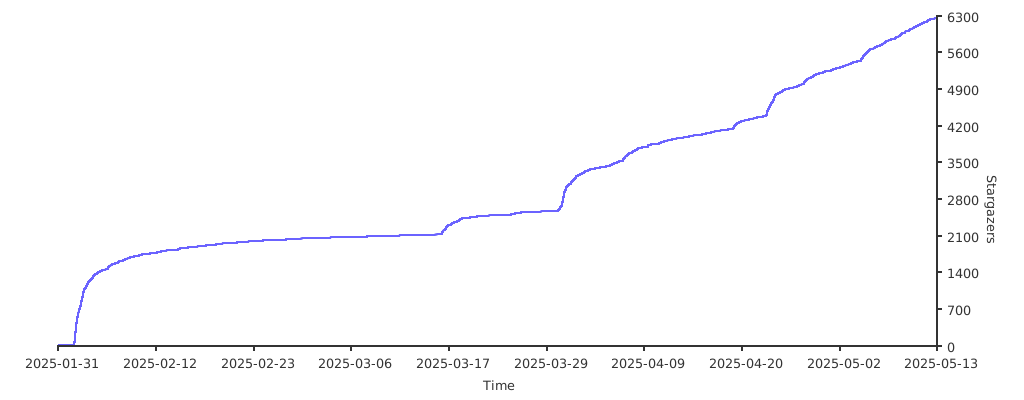](https://starchart.cc/trycua/cua)
# Sponsors
Thank you to all our [GitHub Sponsors](https://github.com/sponsors/trycua)!
<img width="300" alt="coderabbit-cli" src="https://github.com/user-attachments/assets/23a98e38-7897-4043-8ef7-eb990520dccc" />
```
--------------------------------------------------------------------------------
/LICENSE.md:
--------------------------------------------------------------------------------
```markdown
MIT License
Copyright (c) 2025 Cua AI, Inc.
Permission is hereby granted, free of charge, to any person obtaining a copy
of this software and associated documentation files (the "Software"), to deal
in the Software without restriction, including without limitation the rights
to use, copy, modify, merge, publish, distribute, sublicense, and/or sell
copies of the Software, and to permit persons to whom the Software is
furnished to do so, subject to the following conditions:
The above copyright notice and this permission notice shall be included in all
copies or substantial portions of the Software.
THE SOFTWARE IS PROVIDED "AS IS", WITHOUT WARRANTY OF ANY KIND, EXPRESS OR
IMPLIED, INCLUDING BUT NOT LIMITED TO THE WARRANTIES OF MERCHANTABILITY,
FITNESS FOR A PARTICULAR PURPOSE AND NONINFRINGEMENT. IN NO EVENT SHALL THE
AUTHORS OR COPYRIGHT HOLDERS BE LIABLE FOR ANY CLAIM, DAMAGES OR OTHER
LIABILITY, WHETHER IN AN ACTION OF CONTRACT, TORT OR OTHERWISE, ARISING FROM,
OUT OF OR IN CONNECTION WITH THE SOFTWARE OR THE USE OR OTHER DEALINGS IN THE
SOFTWARE.
```
--------------------------------------------------------------------------------
/libs/lume/CONTRIBUTING.md:
--------------------------------------------------------------------------------
```markdown
# Contributing to lume
We deeply appreciate your interest in contributing to lume! Whether you're reporting bugs, suggesting enhancements, improving docs, or submitting pull requests, your contributions help improve the project for everyone.
## Reporting Bugs
If you've encountered a bug in the project, we encourage you to report it. Please follow these steps:
1. **Check the Issue Tracker**: Before submitting a new bug report, please check our issue tracker to see if the bug has already been reported.
2. **Create a New Issue**: If the bug hasn't been reported, create a new issue with:
- A clear title and detailed description
- Steps to reproduce the issue
- Expected vs actual behavior
- Your environment (macOS version, lume version)
- Any relevant logs or error messages
3. **Label Your Issue**: Label your issue as a `bug` to help maintainers identify it quickly.
## Suggesting Enhancements
We're always looking for suggestions to make lume better. If you have an idea:
1. **Check Existing Issues**: See if someone else has already suggested something similar.
2. **Create a New Issue**: If your enhancement is new, create an issue describing:
- The problem your enhancement solves
- How your enhancement would work
- Any potential implementation details
- Why this enhancement would benefit lume users
## Documentation
Documentation improvements are always welcome. You can:
- Fix typos or unclear explanations
- Add examples and use cases
- Improve API documentation
- Add tutorials or guides
For detailed instructions on setting up your development environment and submitting code contributions, please see our [Development.md](docs/Development.md) guide.
Feel free to join our [Discord community](https://discord.com/invite/mVnXXpdE85) to discuss ideas or get help with your contributions.
```
--------------------------------------------------------------------------------
/libs/typescript/cua-cli/CLAUDE.md:
--------------------------------------------------------------------------------
```markdown
Default to using Bun instead of Node.js.
- Use `bun <file>` instead of `node <file>` or `ts-node <file>`
- Use `bun test` instead of `jest` or `vitest`
- Use `bun build <file.html|file.ts|file.css>` instead of `webpack` or `esbuild`
- Use `bun install` instead of `npm install` or `yarn install` or `pnpm install`
- Use `bun run <script>` instead of `npm run <script>` or `yarn run <script>` or `pnpm run <script>`
- Bun automatically loads .env, so don't use dotenv.
## APIs
- `Bun.serve()` supports WebSockets, HTTPS, and routes. Don't use `express`.
- `bun:sqlite` for SQLite. Don't use `better-sqlite3`.
- `Bun.redis` for Redis. Don't use `ioredis`.
- `Bun.sql` for Postgres. Don't use `pg` or `postgres.js`.
- `WebSocket` is built-in. Don't use `ws`.
- Prefer `Bun.file` over `node:fs`'s readFile/writeFile
- Bun.$`ls` instead of execa.
## Testing
Use `bun test` to run tests.
```ts#index.test.ts
import { test, expect } from "bun:test";
test("hello world", () => {
expect(1).toBe(1);
});
```
## Frontend
Use HTML imports with `Bun.serve()`. Don't use `vite`. HTML imports fully support React, CSS, Tailwind.
Server:
```ts#index.ts
import index from "./index.html"
Bun.serve({
routes: {
"/": index,
"/api/users/:id": {
GET: (req) => {
return new Response(JSON.stringify({ id: req.params.id }));
},
},
},
// optional websocket support
websocket: {
open: (ws) => {
ws.send("Hello, world!");
},
message: (ws, message) => {
ws.send(message);
},
close: (ws) => {
// handle close
}
},
development: {
hmr: true,
console: true,
}
})
```
HTML files can import .tsx, .jsx or .js files directly and Bun's bundler will transpile & bundle automatically. `<link>` tags can point to stylesheets and Bun's CSS bundler will bundle.
```html#index.html
<html>
<body>
<h1>Hello, world!</h1>
<script type="module" src="./frontend.tsx"></script>
</body>
</html>
```
With the following `frontend.tsx`:
```tsx#frontend.tsx
import React from "react";
// import .css files directly and it works
import './index.css';
import { createRoot } from "react-dom/client";
const root = createRoot(document.body);
export default function Frontend() {
return <h1>Hello, world!</h1>;
}
root.render(<Frontend />);
```
Then, run index.ts
```sh
bun --hot ./index.ts
```
For more information, read the Bun API docs in `node_modules/bun-types/docs/**.md`.
```
--------------------------------------------------------------------------------
/CONTRIBUTING.md:
--------------------------------------------------------------------------------
```markdown
# Contributing to Cua
We deeply appreciate your interest in contributing to Cua! Whether you're reporting bugs, suggesting enhancements, improving docs, or submitting pull requests, your contributions help improve the project for everyone.
## Reporting Bugs
If you've encountered a bug in the project, we encourage you to report it. Please follow these steps:
1. **Check the Issue Tracker**: Before submitting a new bug report, please check our issue tracker to see if the bug has already been reported.
2. **Create a New Issue**: If the bug hasn't been reported, create a new issue with:
- A clear title and detailed description
- Steps to reproduce the issue
- Expected vs actual behavior
- Your environment (macOS version, lume version)
- Any relevant logs or error messages
3. **Label Your Issue**: Label your issue as a `bug` to help maintainers identify it quickly.
## Suggesting Enhancements
We're always looking for suggestions to make lume better. If you have an idea:
1. **Check Existing Issues**: See if someone else has already suggested something similar.
2. **Create a New Issue**: If your enhancement is new, create an issue describing:
- The problem your enhancement solves
- How your enhancement would work
- Any potential implementation details
- Why this enhancement would benefit lume users
## Code Formatting
We follow strict code formatting guidelines to ensure consistency across the codebase. Before submitting any code:
1. **Review Our Format Guide**: Please review our [Code Formatting Standards](Development.md#code-formatting-standards) section in the Getting Started guide.
2. **Configure Your IDE**: We recommend using the workspace settings provided in `.vscode/` for automatic formatting.
3. **Run Formatting Tools**: Always run the formatting tools before submitting a PR:
```bash
# For Python code
uv run black .
uv run isort .
uv run ruff check --fix .
```
4. **Validate Your Code**: Ensure your code passes all checks:
```bash
uv run mypy .
```
5. Every time you try to commit code, a pre-commit hook will automatically run the formatting and validation tools. If any issues are found, the commit will be blocked until they are resolved. Please make sure to address any issues reported by the pre-commit hook before attempting to commit again. Once all issues are resolved, you can proceed with your commit.
## Documentation
Documentation improvements are always welcome. You can:
- Fix typos or unclear explanations
- Add examples and use cases
- Improve API documentation
- Add tutorials or guides
For detailed instructions on setting up your development environment and submitting code contributions, please see our [Developer-Guide](Development.md).
Feel free to join our [Discord community](https://discord.com/invite/mVnXXpdE85) to discuss ideas or get help with your contributions.
```
--------------------------------------------------------------------------------
/libs/python/computer-server/computer_server/diorama/__init__.py:
--------------------------------------------------------------------------------
```python
```
--------------------------------------------------------------------------------
/libs/typescript/core/src/telemetry/clients/index.ts:
--------------------------------------------------------------------------------
```typescript
export * from './posthog';
```
--------------------------------------------------------------------------------
/libs/python/computer/poetry.toml:
--------------------------------------------------------------------------------
```toml
[virtualenvs]
in-project = true
```
--------------------------------------------------------------------------------
/libs/python/core/poetry.toml:
--------------------------------------------------------------------------------
```toml
[virtualenvs]
in-project = true
```
--------------------------------------------------------------------------------
/libs/python/som/poetry.toml:
--------------------------------------------------------------------------------
```toml
[virtualenvs]
in-project = true
```
--------------------------------------------------------------------------------
/.github/scripts/tests/__init__.py:
--------------------------------------------------------------------------------
```python
"""Tests for .github/scripts."""
```
--------------------------------------------------------------------------------
/libs/python/computer/computer/ui/__init__.py:
--------------------------------------------------------------------------------
```python
"""UI modules for the Computer Interface."""
```
--------------------------------------------------------------------------------
/libs/python/computer-server/computer_server/utils/__init__.py:
--------------------------------------------------------------------------------
```python
from . import wallpaper
__all__ = ["wallpaper"]
```
--------------------------------------------------------------------------------
/libs/typescript/computer/src/computer/providers/index.ts:
--------------------------------------------------------------------------------
```typescript
export * from './base';
export * from './cloud';
```
--------------------------------------------------------------------------------
/libs/python/computer-server/examples/__init__.py:
--------------------------------------------------------------------------------
```python
"""
Examples package for the CUA Computer API.
"""
```
--------------------------------------------------------------------------------
/libs/typescript/computer/src/computer/index.ts:
--------------------------------------------------------------------------------
```typescript
export { BaseComputer, CloudComputer } from './providers';
```
--------------------------------------------------------------------------------
/libs/python/agent/benchmarks/models/__init__.py:
--------------------------------------------------------------------------------
```python
from .base import ModelProtocol
__all__ = ["ModelProtocol"]
```
--------------------------------------------------------------------------------
/tests/pytest.ini:
--------------------------------------------------------------------------------
```
[pytest]
asyncio_mode = auto
markers =
asyncio: asyncio mark
```
--------------------------------------------------------------------------------
/docs/content/docs/agent-sdk/integrations/meta.json:
--------------------------------------------------------------------------------
```json
{
"title": "Integrations",
"pages": ["hud", "observability"]
}
```
--------------------------------------------------------------------------------
/docs/postcss.config.mjs:
--------------------------------------------------------------------------------
```
export default {
plugins: {
'@tailwindcss/postcss': {},
},
};
```
--------------------------------------------------------------------------------
/libs/python/agent/agent/ui/__main__.py:
--------------------------------------------------------------------------------
```python
from .gradio import launch_ui
if __name__ == "__main__":
launch_ui()
```
--------------------------------------------------------------------------------
/libs/typescript/pnpm-workspace.yaml:
--------------------------------------------------------------------------------
```yaml
packages:
- "computer"
- "core"
- "agent"
minimumReleaseAge: 46080
```
--------------------------------------------------------------------------------
/libs/python/core/core/__init__.py:
--------------------------------------------------------------------------------
```python
"""Core functionality shared across Cua components."""
__version__ = "0.1.8"
```
--------------------------------------------------------------------------------
/docs/content/docs/macos-vm-cli-playbook/lumier/meta.json:
--------------------------------------------------------------------------------
```json
{
"pages": ["installation", "docker", "docker-compose", "building-lumier"]
}
```
--------------------------------------------------------------------------------
/libs/typescript/core/vitest.config.ts:
--------------------------------------------------------------------------------
```typescript
import { defineConfig } from 'vitest/config';
export default defineConfig({});
```
--------------------------------------------------------------------------------
/docs/content/docs/macos-vm-cli-playbook/lume/meta.json:
--------------------------------------------------------------------------------
```json
{
"pages": ["installation", "prebuilt-images", "cli-reference", "http-api", "faq"]
}
```
--------------------------------------------------------------------------------
/docs/content/docs/computer-sdk/computer-server/meta.json:
--------------------------------------------------------------------------------
```json
{
"title": "Computer Server",
"pages": ["index", "Commands", "REST-API", "WebSocket-API"]
}
```
--------------------------------------------------------------------------------
/docs/content/docs/agent-sdk/benchmarks/meta.json:
--------------------------------------------------------------------------------
```json
{
"pages": ["introduction", "screenspot-v2", "screenspot-pro", "interactive", "osworld-verified"]
}
```
--------------------------------------------------------------------------------
/libs/python/agent/agent/tools/__init__.py:
--------------------------------------------------------------------------------
```python
"""Tools for agent interactions."""
from .browser_tool import BrowserTool
__all__ = ["BrowserTool"]
```
--------------------------------------------------------------------------------
/libs/qemu-docker/windows/src/vm/setup/on-logon.ps1:
--------------------------------------------------------------------------------
```
Write-Host "Starting CUA Computer Server task..."
Start-ScheduledTask -TaskName "CUA-Computer-Server"
```
--------------------------------------------------------------------------------
/libs/lume/src/Commands/Options/FormatOption.swift:
--------------------------------------------------------------------------------
```swift
import ArgumentParser
enum FormatOption: String, ExpressibleByArgument {
case json
case text
}
```
--------------------------------------------------------------------------------
/libs/lume/src/ContainerRegistry/ImageList.swift:
--------------------------------------------------------------------------------
```swift
public struct ImageList: Codable {
public let local: [String]
public let remote: [String]
}
```
--------------------------------------------------------------------------------
/docs/content/docs/macos-vm-cli-playbook/meta.json:
--------------------------------------------------------------------------------
```json
{
"title": "macOS VM CLI",
"description": "CLI tools for macOS virtualization",
"pages": ["lume", "lumier"]
}
```
--------------------------------------------------------------------------------
/docs/content/docs/cli-playbook/meta.json:
--------------------------------------------------------------------------------
```json
{
"title": "Cloud CLI",
"description": "Command-line interface for CUA Cloud",
"pages": ["index", "commands"]
}
```
--------------------------------------------------------------------------------
/libs/python/computer/computer/ui/gradio/__init__.py:
--------------------------------------------------------------------------------
```python
"""Gradio UI for Computer UI."""
from typing import Optional
import gradio as gr
from .app import create_gradio_ui
```
--------------------------------------------------------------------------------
/libs/typescript/computer/tests/setup.ts:
--------------------------------------------------------------------------------
```typescript
import { afterAll, afterEach, beforeAll } from 'vitest';
beforeAll(() => {});
afterAll(() => {});
afterEach(() => {});
```
--------------------------------------------------------------------------------
/libs/python/agent/agent/ui/__init__.py:
--------------------------------------------------------------------------------
```python
"""
UI components for agent
"""
from .gradio import create_gradio_ui, launch_ui
__all__ = ["launch_ui", "create_gradio_ui"]
```
--------------------------------------------------------------------------------
/libs/typescript/agent/vitest.config.ts:
--------------------------------------------------------------------------------
```typescript
import { defineConfig } from 'vitest/config';
export default defineConfig({
test: {
environment: 'happy-dom',
},
});
```
--------------------------------------------------------------------------------
/libs/typescript/cua-cli/index.ts:
--------------------------------------------------------------------------------
```typescript
#! /usr/bin/env bun
import { runCli } from './src/cli';
runCli().catch((err) => {
console.error(err);
process.exit(1);
});
```
--------------------------------------------------------------------------------
/libs/python/mcp-server/mcp_server/__main__.py:
--------------------------------------------------------------------------------
```python
#!/usr/bin/env python
"""Entry point for the MCP server module."""
from .server import main
if __name__ == "__main__":
main()
```
--------------------------------------------------------------------------------
/docs/content/docs/agent-sdk/mcp-server/meta.json:
--------------------------------------------------------------------------------
```json
{
"pages": [
"installation",
"configuration",
"usage",
"tools",
"client-integrations",
"llm-integrations"
]
}
```
--------------------------------------------------------------------------------
/libs/python/bench-ui/bench_ui/__init__.py:
--------------------------------------------------------------------------------
```python
from .api import execute_javascript, get_element_rect, launch_window
__all__ = ["launch_window", "get_element_rect", "execute_javascript"]
```
--------------------------------------------------------------------------------
/libs/python/computer/computer/providers/cloud/__init__.py:
--------------------------------------------------------------------------------
```python
"""CloudProvider module for interacting with cloud-based virtual machines."""
from .provider import CloudProvider
__all__ = ["CloudProvider"]
```
--------------------------------------------------------------------------------
/libs/python/agent/agent/ui/gradio/__init__.py:
--------------------------------------------------------------------------------
```python
"""
Gradio UI for agent
"""
from .app import launch_ui
from .ui_components import create_gradio_ui
__all__ = ["launch_ui", "create_gradio_ui"]
```
--------------------------------------------------------------------------------
/libs/typescript/core/tsdown.config.ts:
--------------------------------------------------------------------------------
```typescript
import { defineConfig } from 'tsdown';
export default defineConfig([
{
entry: ['./src/index.ts'],
platform: 'node',
dts: true,
},
]);
```
--------------------------------------------------------------------------------
/docs/content/docs/get-started/meta.json:
--------------------------------------------------------------------------------
```json
{
"title": "Get Started",
"description": "Get started with Cua",
"defaultOpen": true,
"icon": "Rocket",
"pages": ["../index", "quickstart"]
}
```
--------------------------------------------------------------------------------
/libs/typescript/computer/src/types.ts:
--------------------------------------------------------------------------------
```typescript
export enum OSType {
MACOS = 'macos',
WINDOWS = 'windows',
LINUX = 'linux',
}
export interface ScreenSize {
width: number;
height: number;
}
```
--------------------------------------------------------------------------------
/docs/src/app/api/search/route.ts:
--------------------------------------------------------------------------------
```typescript
import { source } from '@/lib/source';
import { createFromSource } from 'fumadocs-core/search/server';
export const { GET } = createFromSource(source);
```
--------------------------------------------------------------------------------
/libs/lume/src/Utils/String.swift:
--------------------------------------------------------------------------------
```swift
import Foundation
extension String {
func padding(_ toLength: Int) -> String {
return self.padding(toLength: toLength, withPad: " ", startingAt: 0)
}
}
```
--------------------------------------------------------------------------------
/libs/typescript/computer/src/index.ts:
--------------------------------------------------------------------------------
```typescript
// Export classes
export { CloudComputer as Computer } from './computer';
//todo: figure out what types to export and how to do that
//
export { OSType } from './types';
```
--------------------------------------------------------------------------------
/libs/lume/src/Utils/CommandUtils.swift:
--------------------------------------------------------------------------------
```swift
import ArgumentParser
import Foundation
func completeVMName(_ arguments: [String]) -> [String] {
(try? Home().getAllVMDirectories().map { $0.directory.name }) ?? []
}
```
--------------------------------------------------------------------------------
/libs/typescript/computer/vitest.config.ts:
--------------------------------------------------------------------------------
```typescript
import { defineConfig } from 'vitest/config';
export default defineConfig({
test: {
setupFiles: ['./tests/setup.ts'],
environment: 'node',
globals: true,
},
});
```
--------------------------------------------------------------------------------
/libs/typescript/core/src/index.ts:
--------------------------------------------------------------------------------
```typescript
/**
* This module provides the core telemetry functionality for CUA libraries.
*
* It provides a low-overhead way to collect anonymous usage data.
*/
export * from './telemetry';
```
--------------------------------------------------------------------------------
/libs/python/mcp-server/desktop-extension/requirements.txt:
--------------------------------------------------------------------------------
```
# Core MCP dependencies
mcp>=1.6.0,<2.0.0
# CUA Agent dependencies
cua-agent[all]>=0.4.0,<0.5.0
cua-computer>=0.4.0,<0.5.0
# Additional dependencies for async operations
anyio>=4.0.0
```
--------------------------------------------------------------------------------
/libs/typescript/computer/tsdown.config.ts:
--------------------------------------------------------------------------------
```typescript
import { defineConfig } from 'tsdown';
export default defineConfig([
{
entry: ['./src/index.ts'],
platform: 'node',
dts: true,
external: ['child_process', 'util'],
},
]);
```
--------------------------------------------------------------------------------
/libs/python/computer/computer/providers/__init__.py:
--------------------------------------------------------------------------------
```python
"""Provider implementations for different VM backends."""
# Import specific providers only when needed to avoid circular imports
__all__ = [] # Let each provider module handle its own exports
```
--------------------------------------------------------------------------------
/libs/python/computer/computer/providers/lume/__init__.py:
--------------------------------------------------------------------------------
```python
"""Lume VM provider implementation."""
try:
from .provider import LumeProvider
HAS_LUME = True
__all__ = ["LumeProvider"]
except ImportError:
HAS_LUME = False
__all__ = []
```
--------------------------------------------------------------------------------
/docs/content/docs/agent-sdk/callbacks/meta.json:
--------------------------------------------------------------------------------
```json
{
"title": "Callbacks",
"description": "Extending agents with callback hooks and built-in handlers",
"pages": ["agent-lifecycle", "trajectories", "logging", "cost-saving", "pii-anonymization"]
}
```
--------------------------------------------------------------------------------
/docs/content/docs/agent-sdk/supported-agents/meta.json:
--------------------------------------------------------------------------------
```json
{
"title": "Supported Agents",
"description": "Models and configurations supported by the Agent SDK",
"pages": ["computer-use-agents", "grounding-models", "composed-agents", "human-in-the-loop"]
}
```
--------------------------------------------------------------------------------
/.vscode/extensions.json:
--------------------------------------------------------------------------------
```json
{
"recommendations": [
"esbenp.prettier-vscode",
"charliermarsh.ruff",
"ms-python.black-formatter",
"ms-python.mypy-type-checker",
"ms-python.vscode-pylance",
"ms-python.isort"
]
}
```
--------------------------------------------------------------------------------
/libs/python/computer/computer/providers/lumier/__init__.py:
--------------------------------------------------------------------------------
```python
"""Lumier VM provider implementation."""
try:
# Use the same import approach as in the Lume provider
from .provider import LumierProvider
HAS_LUMIER = True
except ImportError:
HAS_LUMIER = False
```
--------------------------------------------------------------------------------
/libs/typescript/core/src/telemetry/index.ts:
--------------------------------------------------------------------------------
```typescript
/**
* This module provides the core telemetry functionality for CUA libraries.
*
* It provides a low-overhead way to collect anonymous usage data.
*/
export { PostHogTelemetryClient as Telemetry } from './clients';
```
--------------------------------------------------------------------------------
/docs/content/docs/example-usecases/meta.json:
--------------------------------------------------------------------------------
```json
{
"title": "Cookbook",
"description": "Real-world examples of building with Cua",
"pages": [
"windows-app-behind-vpn",
"form-filling",
"post-event-contact-export",
"gemini-complex-ui-navigation"
]
}
```
--------------------------------------------------------------------------------
/libs/python/computer-server/computer_server/__main__.py:
--------------------------------------------------------------------------------
```python
"""
Main entry point for running the Computer Server as a module.
This allows the server to be started with `python -m computer_server`.
"""
import sys
from .cli import main
if __name__ == "__main__":
sys.exit(main())
```
--------------------------------------------------------------------------------
/libs/python/computer-server/computer_server/diorama/base.py:
--------------------------------------------------------------------------------
```python
class BaseDioramaHandler:
"""Base Diorama handler for unsupported OSes."""
async def diorama_cmd(self, action: str, arguments: dict = None) -> dict:
return {"success": False, "error": "Diorama is not supported on this OS yet."}
```
--------------------------------------------------------------------------------
/libs/python/computer/computer/providers/winsandbox/__init__.py:
--------------------------------------------------------------------------------
```python
"""Windows Sandbox provider for CUA Computer."""
try:
import winsandbox
HAS_WINSANDBOX = True
except ImportError:
HAS_WINSANDBOX = False
from .provider import WinSandboxProvider
__all__ = ["WinSandboxProvider", "HAS_WINSANDBOX"]
```
--------------------------------------------------------------------------------
/package.json:
--------------------------------------------------------------------------------
```json
{
"scripts": {
"prettier:check": "prettier --check '**/*.{ts,tsx,js,jsx,json,md,mdx,yaml,yml}'",
"prettier:format": "prettier --write '**/*.{ts,tsx,js,jsx,json,md,mdx,yaml,yml}'"
},
"devDependencies": {
"prettier": "^3.6.2"
}
}
```
--------------------------------------------------------------------------------
/libs/qemu-docker/linux/Dockerfile:
--------------------------------------------------------------------------------
```dockerfile
FROM trycua/qemu-local:latest
COPY src/vm/setup/. /oem/
COPY --chmod=755 src/entry.sh /entry.sh
ENV RAM_SIZE="8G"
ENV CPU_CORES="8"
ENV DISK_SIZE="64G"
ENV ARGUMENTS="-qmp tcp:0.0.0.0:7200,server,nowait"
EXPOSE 5000 8006
ENTRYPOINT ["/entry.sh"]
```
--------------------------------------------------------------------------------
/scripts/typescript-typecheck.js:
--------------------------------------------------------------------------------
```javascript
#!/usr/bin/env node
const { execSync } = require('child_process');
try {
execSync('pnpm -C libs/typescript install', { stdio: 'inherit' });
execSync('pnpm -C libs/typescript -r run typecheck', { stdio: 'inherit' });
} catch (err) {
process.exit(1);
}
```
--------------------------------------------------------------------------------
/libs/python/computer/computer/interface/__init__.py:
--------------------------------------------------------------------------------
```python
"""
Interface package for Computer SDK.
"""
from .base import BaseComputerInterface
from .factory import InterfaceFactory
from .macos import MacOSComputerInterface
__all__ = [
"InterfaceFactory",
"BaseComputerInterface",
"MacOSComputerInterface",
]
```
--------------------------------------------------------------------------------
/docs/content/docs/computer-sdk/meta.json:
--------------------------------------------------------------------------------
```json
{
"title": "Computer SDK",
"description": "Build computer-using agents with the Computer SDK",
"pages": [
"computers",
"commands",
"tracing-api",
"sandboxed-python",
"custom-computer-handlers",
"computer-ui",
"computer-server"
]
}
```
--------------------------------------------------------------------------------
/docs/content/docs/agent-sdk/benchmarks/osworld-verified.mdx:
--------------------------------------------------------------------------------
```markdown
---
title: OSWorld-Verified
description: Benchmark ComputerAgent on OSWorld tasks using HUD
---
OSWorld-Verified is a curated subset of OSWorld tasks that can be run using the HUD framework.
Use [ComputerAgent with HUD](../integrations/hud) to benchmark on these tasks.
```
--------------------------------------------------------------------------------
/libs/xfce/src/scripts/start-computer-server.sh:
--------------------------------------------------------------------------------
```bash
#!/bin/bash
set -e
# Wait for X server to be ready
echo "Waiting for X server to start..."
while ! xdpyinfo -display :1 >/dev/null 2>&1; do
sleep 1
done
echo "X server is ready"
# Start computer-server
export DISPLAY=:1
python3.12 -m computer_server --port ${API_PORT:-8000}
```
--------------------------------------------------------------------------------
/libs/python/computer/computer/ui/__main__.py:
--------------------------------------------------------------------------------
```python
"""
Main entry point for computer.ui module.
This allows running the computer UI with:
python -m computer.ui
Instead of:
python -m computer.ui.gradio.app
"""
from .gradio.app import create_gradio_ui
if __name__ == "__main__":
app = create_gradio_ui()
app.launch()
```
--------------------------------------------------------------------------------
/docs/src/app/robots.ts:
--------------------------------------------------------------------------------
```typescript
import { MetadataRoute } from 'next';
export default function robots(): MetadataRoute.Robots {
return {
rules: {
userAgent: '*',
allow: ['/', '/llms.txt'],
disallow: [],
},
sitemap: 'https://cua.ai/docs/sitemap.xml',
host: 'https://cua.ai',
};
}
```
--------------------------------------------------------------------------------
/libs/qemu-docker/windows/Dockerfile:
--------------------------------------------------------------------------------
```dockerfile
FROM trycua/windows-local:latest
COPY src/vm/setup/. /oem/
COPY --chmod=755 src/entry.sh /entry.sh
ENV RAM_SIZE="8G"
ENV CPU_CORES="8"
ENV VERSION="win11x64-enterprise-eval"
ENV DISK_SIZE="30G"
ENV ARGUMENTS="-qmp tcp:0.0.0.0:7200,server,nowait"
EXPOSE 5000 8006
ENTRYPOINT ["/entry.sh"]
```
--------------------------------------------------------------------------------
/libs/xfce/src/scripts/start-novnc.sh:
--------------------------------------------------------------------------------
```bash
#!/bin/bash
set -e
# Give VNC a moment to start (supervisor starts it with priority 10, this is priority 20)
echo "Waiting for VNC server to start..."
sleep 5
# Start noVNC
cd /opt/noVNC
/opt/noVNC/utils/novnc_proxy \
--vnc localhost:${VNC_PORT:-5901} \
--listen ${NOVNC_PORT:-6901}
```
--------------------------------------------------------------------------------
/docs/src/app/llms.txt/route.ts:
--------------------------------------------------------------------------------
```typescript
import { source } from '@/lib/source';
import { getLLMText } from '@/lib/llms';
// cached forever
export const revalidate = false;
export async function GET() {
const scan = source.getPages().map(getLLMText);
const scanned = await Promise.all(scan);
return new Response(scanned.join('\n\n'));
}
```
--------------------------------------------------------------------------------
/libs/xfce/src/scripts/xstartup.sh:
--------------------------------------------------------------------------------
```bash
#!/bin/bash
set -e
# Start D-Bus
if [ -z "$DBUS_SESSION_BUS_ADDRESS" ]; then
eval $(dbus-launch --sh-syntax --exit-with-session)
fi
# Start XFCE
startxfce4 &
# Wait for XFCE to start
sleep 2
# Disable screensaver and power management
xset s off
xset -dpms
xset s noblank
# Wait for the session
wait
```
--------------------------------------------------------------------------------
/libs/typescript/computer/src/interface/index.ts:
--------------------------------------------------------------------------------
```typescript
export { BaseComputerInterface } from './base';
export type { MouseButton, CursorPosition, AccessibilityNode } from './base';
export { InterfaceFactory } from './factory';
export { MacOSComputerInterface } from './macos';
export { LinuxComputerInterface } from './linux';
export { WindowsComputerInterface } from './windows';
```
--------------------------------------------------------------------------------
/libs/python/core/core/telemetry/__init__.py:
--------------------------------------------------------------------------------
```python
"""This module provides the core telemetry functionality for CUA libraries.
It provides a low-overhead way to collect anonymous usage data.
"""
from core.telemetry.posthog import (
destroy_telemetry_client,
is_telemetry_enabled,
record_event,
)
__all__ = [
"record_event",
"is_telemetry_enabled",
"destroy_telemetry_client",
]
```
--------------------------------------------------------------------------------
/libs/python/agent/agent/adapters/__init__.py:
--------------------------------------------------------------------------------
```python
"""
Adapters package for agent - Custom LLM adapters for LiteLLM
"""
from .cua_adapter import CUAAdapter
from .huggingfacelocal_adapter import HuggingFaceLocalAdapter
from .human_adapter import HumanAdapter
from .mlxvlm_adapter import MLXVLMAdapter
__all__ = [
"HuggingFaceLocalAdapter",
"HumanAdapter",
"MLXVLMAdapter",
"CUAAdapter",
]
```
--------------------------------------------------------------------------------
/libs/typescript/agent/tsdown.config.ts:
--------------------------------------------------------------------------------
```typescript
import { defineConfig } from 'tsdown';
export default defineConfig({
entry: ['src/index.ts'],
format: ['module'],
platform: 'browser',
dts: true,
clean: true,
// Remove if we don't need to support including the library via '<script/>' tags.
// noExternal bundles this list of libraries within the final 'dist'
noExternal: ['peerjs'],
});
```
--------------------------------------------------------------------------------
/docs/src/app/(home)/layout.tsx:
--------------------------------------------------------------------------------
```typescript
import { baseOptions } from '@/app/layout.config';
import { source } from '@/lib/source';
import { DocsLayout } from 'fumadocs-ui/layouts/docs';
import type { ReactNode } from 'react';
export default function Layout({ children }: { children: ReactNode }) {
return (
<DocsLayout tree={source.pageTree} {...baseOptions}>
{children}
</DocsLayout>
);
}
```
--------------------------------------------------------------------------------
/libs/python/computer-server/computer_server/__init__.py:
--------------------------------------------------------------------------------
```python
"""
Computer API package.
Provides a server interface for the Computer API.
"""
from __future__ import annotations
__version__: str = "0.1.0"
# Explicitly export Server for static type checkers
from .server import Server as Server # noqa: F401
__all__ = ["Server", "run_cli"]
def run_cli() -> None:
"""Entry point for CLI"""
from .cli import main
main()
```
--------------------------------------------------------------------------------
/libs/python/computer-server/run_server.py:
--------------------------------------------------------------------------------
```python
#!/usr/bin/env python
"""
Entrypoint script for the Computer Server.
This script provides a simple way to start the Computer Server from the command line
or using a launch configuration in an IDE.
Usage:
python run_server.py [--host HOST] [--port PORT] [--log-level LEVEL]
"""
import sys
from computer_server.cli import main
if __name__ == "__main__":
sys.exit(main())
```
--------------------------------------------------------------------------------
/libs/typescript/computer/tests/computer/cloud.test.ts:
--------------------------------------------------------------------------------
```typescript
import { describe, expect, it } from 'vitest';
import { Computer } from '../../src';
import { OSType } from '../../src/types';
describe('Computer Cloud', () => {
it('Should create computer instance', () => {
const cloud = new Computer({
apiKey: 'asdf',
name: 's-linux-1234',
osType: OSType.LINUX,
});
expect(cloud).toBeInstanceOf(Computer);
});
});
```
--------------------------------------------------------------------------------
/libs/python/computer/computer/providers/docker/__init__.py:
--------------------------------------------------------------------------------
```python
"""Docker provider for running containers with computer-server."""
from .provider import DockerProvider
# Check if Docker is available
try:
import subprocess
subprocess.run(["docker", "--version"], capture_output=True, check=True)
HAS_DOCKER = True
except (subprocess.SubprocessError, FileNotFoundError):
HAS_DOCKER = False
__all__ = ["DockerProvider", "HAS_DOCKER"]
```
--------------------------------------------------------------------------------
/libs/typescript/computer/src/interface/linux.ts:
--------------------------------------------------------------------------------
```typescript
/**
* Linux computer interface implementation.
*/
import { MacOSComputerInterface } from './macos';
/**
* Linux interface implementation.
* Since the cloud provider uses the same WebSocket protocol for all OS types,
* we can reuse the macOS implementation.
*/
export class LinuxComputerInterface extends MacOSComputerInterface {
// Linux uses the same WebSocket interface as macOS for cloud provider
}
```
--------------------------------------------------------------------------------
/libs/python/som/som/__init__.py:
--------------------------------------------------------------------------------
```python
"""SOM - Computer Vision and OCR library for detecting and analyzing UI elements."""
__version__ = "0.1.0"
from .detect import OmniParser
from .models import (
BoundingBox,
IconElement,
ParseResult,
ParserMetadata,
TextElement,
UIElement,
)
__all__ = [
"OmniParser",
"BoundingBox",
"UIElement",
"IconElement",
"TextElement",
"ParserMetadata",
"ParseResult",
]
```
--------------------------------------------------------------------------------
/docs/content/docs/agent-sdk/meta.json:
--------------------------------------------------------------------------------
```json
{
"title": "Agent SDK",
"description": "Build computer-using agents with the Agent SDK",
"pages": [
"agent-loops",
"supported-agents",
"supported-model-providers",
"chat-history",
"message-format",
"customizing-computeragent",
"callbacks",
"custom-tools",
"prompt-caching",
"usage-tracking",
"telemetry",
"benchmarks",
"integrations",
"mcp-server"
]
}
```
--------------------------------------------------------------------------------
/libs/lume/src/Utils/ProcessRunner.swift:
--------------------------------------------------------------------------------
```swift
import Foundation
/// Protocol for process execution
protocol ProcessRunner {
func run(executable: String, arguments: [String]) throws
}
class DefaultProcessRunner: ProcessRunner {
func run(executable: String, arguments: [String]) throws {
let process = Process()
process.executableURL = URL(fileURLWithPath: executable)
process.arguments = arguments
try process.run()
}
}
```
--------------------------------------------------------------------------------
/libs/typescript/computer/src/interface/windows.ts:
--------------------------------------------------------------------------------
```typescript
/**
* Windows computer interface implementation.
*/
import { MacOSComputerInterface } from './macos';
/**
* Windows interface implementation.
* Since the cloud provider uses the same WebSocket protocol for all OS types,
* we can reuse the macOS implementation.
*/
export class WindowsComputerInterface extends MacOSComputerInterface {
// Windows uses the same WebSocket interface as macOS for cloud provider
}
```
--------------------------------------------------------------------------------
/docs/content/docs/macos-vm-cli-playbook/lume/index.mdx:
--------------------------------------------------------------------------------
```markdown
---
title: Lume
description: Reference for the current version of the Lume CLI.
github:
- https://github.com/trycua/cua/tree/main/libs/lume
---
Lume is a lightweight Command Line Interface and local API server for creating, running and managing **macOS and Linux virtual machines** with near-native performance on Apple Silicon, using Apple's [Virtualization.Framework](https://developer.apple.com/documentation/virtualization).
```
--------------------------------------------------------------------------------
/pyrightconfig.json:
--------------------------------------------------------------------------------
```json
{
"include": ["**/*.py"],
"exclude": [
"**/node_modules/**",
"**/__pycache__/**",
"**/.*/**",
"**/venv/**",
"**/.venv/**",
"**/dist/**",
"**/build/**",
".pdm-build/**",
"**/.git/**",
"examples/**",
"notebooks/**",
"logs/**",
"screenshots/**"
],
"typeCheckingMode": "basic",
"useLibraryCodeForTypes": true,
"reportMissingImports": false,
"reportMissingModuleSource": false
}
```
--------------------------------------------------------------------------------
/libs/lume/src/Commands/Prune.swift:
--------------------------------------------------------------------------------
```swift
import ArgumentParser
import Foundation
struct Prune: AsyncParsableCommand {
static let configuration: CommandConfiguration = CommandConfiguration(
commandName: "prune",
abstract: "Remove cached images"
)
init() {
}
@MainActor
func run() async throws {
let manager = LumeController()
try await manager.pruneImages()
print("Successfully removed cached images")
}
}
```
--------------------------------------------------------------------------------
/libs/typescript/core/tsconfig.json:
--------------------------------------------------------------------------------
```json
{
"compilerOptions": {
"target": "esnext",
"lib": ["es2023"],
"moduleDetection": "force",
"module": "preserve",
"moduleResolution": "bundler",
"resolveJsonModule": true,
"types": ["node"],
"strict": true,
"noUnusedLocals": true,
"declaration": true,
"emitDeclarationOnly": true,
"esModuleInterop": true,
"isolatedModules": true,
"verbatimModuleSyntax": true,
"skipLibCheck": true
},
"include": ["src"]
}
```
--------------------------------------------------------------------------------
/docs/content/docs/meta.json:
--------------------------------------------------------------------------------
```json
{
"title": "Home",
"description": "Documentation Home",
"root": true,
"defaultOpen": true,
"pages": [
"---[Rocket]Get Started---",
"...get-started",
"---[ChefHat]Cookbook---",
"...example-usecases",
"---[BookCopy]Computer Playbook---",
"...computer-sdk",
"---[Bot]Agent Playbook---",
"...agent-sdk",
"---[Terminal]Cloud CLI Playbook---",
"...cli-playbook",
"---[Terminal]macOS VM CLI Playbook---",
"...macos-vm-cli-playbook"
]
}
```
--------------------------------------------------------------------------------
/libs/typescript/cua-cli/src/http.ts:
--------------------------------------------------------------------------------
```typescript
import { API_BASE } from './config';
export async function http(
path: string,
opts: { method?: string; token: string; body?: any }
): Promise<Response> {
const url = `${API_BASE}${path}`;
const headers: Record<string, string> = {
Authorization: `Bearer ${opts.token}`,
};
if (opts.body) headers['content-type'] = 'application/json';
return fetch(url, {
method: opts.method || 'GET',
headers,
body: opts.body ? JSON.stringify(opts.body) : undefined,
});
}
```
--------------------------------------------------------------------------------
/libs/lumier/src/config/constants.sh:
--------------------------------------------------------------------------------
```bash
#!/usr/bin/env bash
# Port configuration
TUNNEL_PORT=8080
VNC_PORT=8006
# Host configuration
TUNNEL_HOST="host.docker.internal"
# Default VM configuration
DEFAULT_RAM_SIZE="8192"
DEFAULT_CPU_CORES="4"
DEFAULT_DISK_SIZE="100"
DEFAULT_VM_NAME="lumier"
DEFAULT_VM_VERSION="ghcr.io/trycua/macos-sequoia-vanilla:latest"
# Paths
NOVNC_PATH="/opt/noVNC"
LIFECYCLE_HOOKS_DIR="/run/hooks"
# VM connection details
HOST_USER="lume"
HOST_PASSWORD="lume"
SSH_RETRY_ATTEMPTS=20
SSH_RETRY_INTERVAL=5
```
--------------------------------------------------------------------------------
/libs/lume/src/Utils/ProgressLogger.swift:
--------------------------------------------------------------------------------
```swift
import Foundation
struct ProgressLogger {
private var lastLoggedProgress: Double = 0.0
private let threshold: Double
init(threshold: Double = 0.05) {
self.threshold = threshold
}
mutating func logProgress(current: Double, context: String) {
if current - lastLoggedProgress >= threshold {
lastLoggedProgress = current
let percentage = Int(current * 100)
Logger.info("\(context) Progress: \(percentage)%")
}
}
}
```
--------------------------------------------------------------------------------
/libs/lume/src/Utils/CommandRegistry.swift:
--------------------------------------------------------------------------------
```swift
import ArgumentParser
enum CommandRegistry {
static var allCommands: [ParsableCommand.Type] {
[
Create.self,
Pull.self,
Push.self,
Images.self,
Clone.self,
Get.self,
Set.self,
List.self,
Run.self,
Stop.self,
IPSW.self,
Serve.self,
Delete.self,
Prune.self,
Config.self,
Logs.self,
]
}
}
```
--------------------------------------------------------------------------------
/libs/python/bench-ui/pyproject.toml:
--------------------------------------------------------------------------------
```toml
[build-system]
requires = ["pdm-backend"]
build-backend = "pdm.backend"
[project]
name = "cua-bench-ui"
version = "0.7.0"
description = "Lightweight webUI window controller for CUA bench using pywebview"
readme = "README.md"
authors = [
{ name = "TryCua", email = "[email protected]" }
]
dependencies = [
"pywebview>=5.3",
"aiohttp>=3.9.0",
"psutil>=5.9",
]
requires-python = ">=3.12"
[tool.pdm]
distribution = true
[tool.pdm.build]
includes = ["bench_ui/"]
source-includes = ["README.md"]
```
--------------------------------------------------------------------------------
/libs/lume/src/Commands/IPSW.swift:
--------------------------------------------------------------------------------
```swift
import ArgumentParser
import Foundation
struct IPSW: AsyncParsableCommand {
static let configuration = CommandConfiguration(
abstract: "Get macOS restore image IPSW URL",
discussion: "Download IPSW file manually, then use in create command with --ipsw"
)
init() {
}
@MainActor
func run() async throws {
let vmController = LumeController()
let url = try await vmController.getLatestIPSWURL()
print(url.absoluteString)
}
}
```
--------------------------------------------------------------------------------
/libs/lume/src/Commands/Images.swift:
--------------------------------------------------------------------------------
```swift
import ArgumentParser
import Foundation
struct Images: AsyncParsableCommand {
static let configuration = CommandConfiguration(
abstract: "List available macOS images from local cache"
)
@Option(help: "Organization to list from. Defaults to trycua")
var organization: String = "trycua"
init() {}
@MainActor
func run() async throws {
let vmController = LumeController()
_ = try await vmController.getImages(organization: organization)
}
}
```
--------------------------------------------------------------------------------
/libs/xfce/src/scripts/resize-display.sh:
--------------------------------------------------------------------------------
```bash
#!/bin/bash
# Dynamic display resolution script
# Can be called to change the VNC display resolution
RESOLUTION=${1:-1920x1080}
# Wait for display to be ready
for i in {1..10}; do
if DISPLAY=:1 xdpyinfo >/dev/null 2>&1; then
break
fi
sleep 1
done
# Change resolution using xrandr
DISPLAY=:1 xrandr --output VNC-0 --mode "$RESOLUTION" 2>/dev/null || \
DISPLAY=:1 xrandr --fb "$RESOLUTION" 2>/dev/null || \
echo "Failed to set resolution to $RESOLUTION"
echo "Display resolution set to: $RESOLUTION"
```
--------------------------------------------------------------------------------
/libs/python/agent/agent/__main__.py:
--------------------------------------------------------------------------------
```python
"""
Entry point for running agent CLI module.
Usage:
python -m agent.cli <model_string>
"""
import asyncio
import sys
from .cli import main
if __name__ == "__main__":
# Check if 'cli' is specified as the module
if len(sys.argv) > 1 and sys.argv[1] == "cli":
# Remove 'cli' from arguments and run CLI
sys.argv.pop(1)
asyncio.run(main())
else:
print("Usage: python -m agent.cli <model_string>")
print("Example: python -m agent.cli openai/computer-use-preview")
sys.exit(1)
```
--------------------------------------------------------------------------------
/libs/python/computer/computer/interface/linux.py:
--------------------------------------------------------------------------------
```python
from typing import Optional
from .generic import GenericComputerInterface
class LinuxComputerInterface(GenericComputerInterface):
"""Interface for Linux."""
def __init__(
self,
ip_address: str,
username: str = "lume",
password: str = "lume",
api_key: Optional[str] = None,
vm_name: Optional[str] = None,
api_port: Optional[int] = None,
):
super().__init__(
ip_address, username, password, api_key, vm_name, "computer.interface.linux", api_port
)
```
--------------------------------------------------------------------------------
/docs/src/app/llms.mdx/[[...slug]]/route.ts:
--------------------------------------------------------------------------------
```typescript
import { type NextRequest, NextResponse } from 'next/server';
import { getLLMText } from '@/lib/llms';
import { source } from '@/lib/source';
import { notFound } from 'next/navigation';
export const revalidate = false;
export async function GET(_req: NextRequest, { params }: { params: Promise<{ slug?: string[] }> }) {
const { slug } = await params;
const page = source.getPage(slug);
if (!page) notFound();
return new NextResponse(await getLLMText(page));
}
export function generateStaticParams() {
return source.generateParams();
}
```
--------------------------------------------------------------------------------
/libs/xfce/Development.md:
--------------------------------------------------------------------------------
```markdown
# Development
## Building the Development Docker Image
To build the XFCE container with local computer-server changes:
```bash
cd libs/xfce
docker build -f Dockerfile.dev -t cua-xfce:dev ..
```
The build context is set to the parent directory to allow copying the local `computer-server` source.
## Tagging the Image
To tag the dev image as latest:
```bash
docker tag cua-xfce:dev cua-xfce:latest
```
## Running the Development Container
```bash
docker run -p 6901:6901 -p 8000:8000 cua-xfce:dev
```
Access noVNC at: http://localhost:6901
```
--------------------------------------------------------------------------------
/libs/python/computer/computer/interface/windows.py:
--------------------------------------------------------------------------------
```python
from typing import Optional
from .generic import GenericComputerInterface
class WindowsComputerInterface(GenericComputerInterface):
"""Interface for Windows."""
def __init__(
self,
ip_address: str,
username: str = "lume",
password: str = "lume",
api_key: Optional[str] = None,
vm_name: Optional[str] = None,
api_port: Optional[int] = None,
):
super().__init__(
ip_address, username, password, api_key, vm_name, "computer.interface.windows", api_port
)
```
--------------------------------------------------------------------------------
/libs/typescript/agent/tsconfig.json:
--------------------------------------------------------------------------------
```json
{
"compilerOptions": {
"target": "esnext",
"lib": ["es2023"],
"moduleDetection": "force",
"module": "preserve",
"moduleResolution": "bundler",
"allowImportingTsExtensions": true,
"resolveJsonModule": true,
"types": ["node"],
"allowSyntheticDefaultImports": true,
"strict": true,
"noUnusedLocals": true,
"declaration": true,
"emitDeclarationOnly": true,
"esModuleInterop": true,
"isolatedModules": true,
"verbatimModuleSyntax": true,
"skipLibCheck": true
},
"include": ["src"]
}
```
--------------------------------------------------------------------------------
/libs/typescript/computer/tsconfig.json:
--------------------------------------------------------------------------------
```json
{
"compilerOptions": {
"target": "esnext",
"lib": ["es2023"],
"moduleDetection": "force",
"module": "preserve",
"moduleResolution": "bundler",
"allowImportingTsExtensions": true,
"resolveJsonModule": true,
"types": ["node"],
"allowSyntheticDefaultImports": true,
"strict": true,
"noUnusedLocals": true,
"declaration": true,
"emitDeclarationOnly": true,
"esModuleInterop": true,
"isolatedModules": true,
"verbatimModuleSyntax": true,
"skipLibCheck": true
},
"include": ["src"]
}
```
--------------------------------------------------------------------------------
/libs/xfce/src/scripts/start-vnc.sh:
--------------------------------------------------------------------------------
```bash
#!/bin/bash
set -e
# Clean up any existing VNC lock files
rm -rf /tmp/.X1-lock /tmp/.X11-unix/X1
# Start VNC server without password authentication
vncserver :1 \
-geometry ${VNC_RESOLUTION:-1920x1080} \
-depth ${VNC_COL_DEPTH:-24} \
-rfbport ${VNC_PORT:-5901} \
-localhost no \
-SecurityTypes None \
-AlwaysShared \
-AcceptPointerEvents \
-AcceptKeyEvents \
-AcceptCutText \
-SendCutText \
-xstartup /usr/local/bin/xstartup.sh \
--I-KNOW-THIS-IS-INSECURE
# Keep the process running
tail -f /home/cua/.vnc/*.log
```